
Plot coordinate pairs

You are encouraged to solve this task according to the task description, using any language you may know.
- Task
Plot a function represented as x, y numerical arrays.
Post the resulting image for the following input arrays (taken from Python's Example section on Time a function):
      x = {0,   1,    2,    3,    4,    5,     6,     7,     8,     9};
      y = {2.7, 2.8, 31.4, 38.1, 58.0, 76.2, 100.5, 130.0, 149.3, 180.0};
This task is intended as a subtask for Measure relative performance of sorting algorithms implementations.
AArch64 Assembly
/* ARM assembly AARCH64 Raspberry PI 3B */
/*  program areaPlot64.s   */

/*******************************************/
/* Constantes file                         */
/*******************************************/
/* for this file see task include a file in language AArch64 assembly*/
.include "../includeConstantesARM64.inc"
.equ HAUTEUR, 22
.equ LARGEUR, 50
.equ MARGEGAUCHE, 10

/*******************************************/
/* Structures                               */
/********************************************/
/* structure  for points  */
    .struct  0
point_posX:
    .struct  point_posX + 8
point_posY:
    .struct  point_posY + 8
point_end:
/*******************************************/
/* Initialized data                        */
/*******************************************/
.data
szMessError:        .asciz "Number of points too large !! \n"
szCarriageReturn:  .asciz "\n"
szMessMovePos:      .ascii "\033["          // cursor position
posY:                .byte '0'
                     .byte '6'
                    .ascii ";"
posX:                .byte '0'
                     .byte '3'
                    .asciz "H*"
szMessEchelleX:     .asciz  "Y^ X="
szClear1:                  .byte 0x1B
                           .byte 'c'        // other console clear
                           .byte 0
szMessPosEch:      .ascii "\033["           // scale cursor position
posY1:                .byte '0'
                     .byte '0'
                    .ascii ";"
posX1:                .byte '0'
                     .byte '0'
                    .asciz "H"

//x = {0, 1, 2, 3, 4, 5, 6, 7, 8, 9};
//y = {2.7, 2.8, 31.4, 38.1, 58.0, 76.2, 100.5, 130.0, 149.3, 180.0};

/* areas points  */
tbPoints:   .quad 0      // 1
            .quad 27     //    Data * 10 for integer operation
            .quad 1      // 2
            .quad 28
            .quad 2      // 3
            .quad 314
            .quad 3      // 4
            .quad 381
            .quad 4      // 5
            .quad 580
            .quad 5      // 6
            .quad 762
            .quad 6      // 7
            .quad 1005
            .quad 7      // 8
            .quad 1300
            .quad 8      // 9
            .quad 1493
            .quad 9      // 10
            .quad 1800
/*******************************************/
/* UnInitialized data                      */
/*******************************************/
.bss
sZoneConv:       .skip 30
/*******************************************/
/*  code section                           */
/*******************************************/
.text
.global main
main:                      // entry of program
    ldr x0,qAdrtbPoints    // area address
    mov x1,10              // size
    mov x2,LARGEUR
    mov x3,HAUTEUR
    bl plotArea
    b 100f

100:                       // standard end of the program
    mov x0,  0             // return code
    mov x8,EXIT            // request to exit program
    svc 0                  // perform the system call

qAdrsZoneConv:          .quad sZoneConv
qAdrszCarriageReturn:   .quad szCarriageReturn
qAdrtbPoints:           .quad tbPoints
/************************************/
/* create graph                     */
/************************************/
/* x0 contains area points address */
/* x1 contains number points */
/* x2 contains graphic weight  */
/* x3 contains graphic height  */
/* REMARK : no save x9-x20  registers */
plotArea:
    stp x2,lr,[sp,-16]!         // save  registers
    stp x3,x4,[sp,-16]!         // save  registers
    cmp x1,x2
    bge 99f
    mov x9,x0
    mov x4,x1
    ldr x10,qAdrposX
    ldr x11,qAdrposY
    mov x12,#0                   // indice
    mov x13,point_end            // element area size
    mov x17,0                    // Y maxi
    mov x19,-1                   // Y Mini
1:                               //search mini maxi
    madd x14,x12,x13,x0          // load coord Y
    ldr x15,[x14,point_posY]
    cmp x15,x17
    csel x17,x15,x17,hi          // maxi ?
    cmp x15,x19
    csel x19,x15,x19,lo          // mini ?
    add x12,x12,#1
    cmp x12,x1                   // end ?
    blt 1b                       // no -> loop
                                 // compute ratio
    udiv x15,x17,x3              // ratio = maxi / height
    add x15,x15,1                // for adjust
    ldr x0,qAdrszClear1          // clear screen
    bl affichageMess
    udiv x20,x2,x4               // compute interval X = weight / number points
    mov x12,0                    // indice
2:                               // loop begin for display point
    madd x14,x12,x13,x9          // charge X coord point
    ldr x16,[x14,point_posX]
    mul x16,x20,x12              // interval * indice
    add x0,x16,MARGEGAUCHE       // + left margin
    mov x1,x10                   // conversion ascii and store
    bl convPos

    ldr x18,[x14,point_posY]              // charge Y coord point
    udiv x18,x18,x15             // divide by ratio
    sub x0,x3,x18                // inversion position ligne
    mov x1,x11                   // conversion ascii and store
    bl convPos

    ldr x0,qAdrszMessMovePos     // display * at position X,Y
    bl affichageMess
    add x12,x12,1                // next point
    cmp x12,x4                   // end ?
    blt 2b                       // no -> loop
                                 // display left scale
                                 // display Y Mini
    mov x0,0
    ldr x1,qAdrposX1
    bl convPos
    mov x0,HAUTEUR
    ldr x1,qAdrposY1
    bl convPos
    ldr x0,qAdrszMessPosEch
    bl affichageMess
    mov x0,x19
    ldr x1,qAdrsZoneConv
    bl conversion10
    ldr x0,qAdrsZoneConv
    bl affichageMess
                                 // display Y Maxi
    mov x0,0
    ldr x1,qAdrposX1
    bl convPos
    mov x0,0
    ldr x1,qAdrposY1
    bl convPos
    ldr x0,qAdrszMessPosEch
    bl affichageMess
    mov x0,x17
    ldr x1,qAdrsZoneConv
    bl conversion10
    ldr x0,qAdrsZoneConv
    bl affichageMess
                                 // display average value
    mov x0,0
    ldr x1,qAdrposX1
    bl convPos
    mov x0,HAUTEUR/2
    add x0,x0,#1
    ldr x1,qAdrposY1
    bl convPos
    ldr x0,qAdrszMessPosEch
    bl affichageMess
    lsr x0,x17,#1
    ldr x1,qAdrsZoneConv
    bl conversion10
    ldr x0,qAdrsZoneConv
    bl affichageMess

                                // display X scale
    mov x0,0
    ldr x1,qAdrposX1
    bl convPos
    mov x0,HAUTEUR+1
    ldr x1,qAdrposY1
    bl convPos
    ldr x0,qAdrszMessPosEch
    bl affichageMess
    ldr x0,qAdrszMessEchelleX
    bl affichageMess


    mov x12,0                       // indice
    mov x19,MARGEGAUCHE
10:
    udiv x20,x2,x4
    madd x0,x20,x12,x19
    ldr x1,qAdrposX1
    bl convPos
    mov x0,HAUTEUR+1
    ldr x1,qAdrposY1
    bl convPos
    ldr x0,qAdrszMessPosEch
    bl affichageMess
    madd x14,x12,x13,x9             // load X coord point
    ldr x0,[x14,point_posX]
    ldr x1,qAdrsZoneConv
    bl conversion10
    ldr x0,qAdrsZoneConv
    bl affichageMess
    add x12,x12,1
    cmp x12,x4
    blt 10b

    ldr x0,qAdrszCarriageReturn
    bl affichageMess

    mov x0,0                    // return code
    b 100f
99:                             // error
    ldr x0,qAdrszMessError
    bl affichageMess
    mov x0,-1                   // return code
100:
    ldp x3,x4,[sp],16           // restaur  2 registers
    ldp x2,lr,[sp],16           // restaur  2 registers
    ret                         // return to address lr x30
qAdrszMessMovePos:         .quad szMessMovePos
qAdrszClear1:              .quad szClear1
qAdrposX:                  .quad posX
qAdrposY:                  .quad posY
qAdrposX1:                 .quad posX1
qAdrposY1:                 .quad posY1
qAdrszMessEchelleX:        .quad szMessEchelleX
qAdrszMessPosEch:          .quad szMessPosEch
qAdrszMessError:           .quad szMessError
/************************************/
/* conv position in ascii and store at address */
/************************************/
/* x0 contains position */
/* x1 contains string address */
convPos:
    stp x2,lr,[sp,-16]!      // save  registers
    stp x3,x4,[sp,-16]!      // save  registers
    mov x2,10
    udiv x3,x0,x2
    add x4,x3,48             // convert in ascii
    strb w4,[x1]             // store posX
    msub x4,x3,x2,x0
    add x4,x4,48
    strb w4,[x1,1]
100:
    ldp x3,x4,[sp],16        // restaur  2 registers
    ldp x2,lr,[sp],16        // restaur  2 registers
    ret                      // return to address lr x30
/********************************************************/
/*        File Include fonctions                        */
/********************************************************/
/* for this file see task include a file in language AArch64 assembly */
.include "../includeARM64.inc"- Output:
1800                                                  *


                                                 *


                                            *


                                       *

900
                                  *

                             *


                        *
                   *


27       *    *
Y^ X=    0    1    2    3    4    5    6    7    8    9
Action!
INCLUDE "D2:REAL.ACT" ;from the Action! Tool Kit

DEFINE PTR="CARD"
DEFINE BUF_SIZE="100"
DEFINE REAL_SIZE="3"

TYPE Settings=[
  INT xMin,xMax,xStep,yMin,yMax,yStep
  INT xLeft,xRight,yTop,yBottom
  INT tickLength]

BYTE ARRAY xs(BUF_SIZE),ys(BUF_SIZE)
BYTE count=[0]

PTR FUNC GetXPtr(BYTE i)
RETURN (xs+3*i)

PTR FUNC GetYPtr(BYTE i)
RETURN (ys+3*i)

PROC AddPoint(CHAR ARRAY xstr,ystr)
  REAL POINTER p

  p=GetXPtr(count) ValR(xstr,p)
  p=GetYPtr(count) ValR(ystr,p)
  count==+1
RETURN

PROC InitData()
  AddPoint("0.0","2.7")
  AddPoint("1.0","2.8")
  AddPoint("2.0","31.4")
  AddPoint("3.0","38.1")
  AddPoint("4.0","58.0")
  AddPoint("5.0","76.2")
  AddPoint("6.0","100.5")
  AddPoint("7.0","130.0")
  AddPoint("8.0","149.3")
  AddPoint("9.0","180.0")
RETURN

INT FUNC GetXPos(Settings POINTER s INT x)
  INT res

  res=x*(s.xRight-s.xLeft)/(s.xMax-s.xMin)+s.xLeft
RETURN (res)

INT FUNC GetYPos(Settings POINTER s INT y)
  INT res

  res=y*(s.yTop-s.yBottom)/(s.yMax-s.yMin)+s.yBottom
RETURN (res)

INT FUNC GetXPosR(Settings POINTER s REAL POINTER x)
  REAL nom,denom,div,tmp
  INT res

  IntToReal(s.xRight-s.xLeft,tmp)
  RealMult(tmp,x,nom)
  IntToReal(s.xMax-s.xMin,denom)
  RealDiv(nom,denom,div)
  res=RealToInt(div)+s.xLeft
RETURN (res)

INT FUNC GetYPosR(Settings POINTER s REAL POINTER y)
  REAL nom,denom,div,tmp
  INT res

  IntToReal(s.yBottom-s.yTop,tmp)
  RealMult(tmp,y,nom)
  IntToReal(s.yMax-s.yMin,denom)
  RealDiv(nom,denom,div)
  res=-RealToInt(div)+s.yBottom
RETURN (res)

BYTE FUNC AtasciiToInternal(CHAR c)
  BYTE c2

  c2=c&$7F
  IF c2<32 THEN
    RETURN (c+64)
  ELSEIF c2<96 THEN
    RETURN (c-32)
  FI
RETURN (c)

PROC CharOut(INT x,y CHAR c)
  BYTE i,j,v
  PTR addr

  addr=$E000+AtasciiToInternal(c)*8;
  FOR j=0 TO 7
  DO
    v=Peek(addr)
    i=8
    WHILE i>0
    DO
      IF v&1 THEN
        Plot(x+i,y+j)
      FI

      v=v RSH 1
      i==-1
    OD
    addr==+1
  OD
RETURN

PROC TextOut(INT x,y CHAR ARRAY text)
  BYTE i

  FOR i=1 TO text(0)
  DO
    CharOut(x,y,text(i))
    x==+8
  OD
RETURN

PROC DrawAxes(Settings POINTER s)
  INT i,x,y
  CHAR ARRAY t(10)

  Plot(s.xLeft,s.yTop)
  DrawTo(s.xLeft,s.yBottom)
  DrawTo(s.xRight,s.yBottom)

  FOR i=s.xMin TO s.xMax STEP s.xStep
  DO
    x=GetXPos(s,i)
    Plot(x,s.yBottom)
    DrawTo(x,s.yBottom+s.tickLength)
    StrI(i,t)
    TextOut(x-t(0)*4,s.yBottom+s.tickLength+1,t)
  OD

  FOR i=s.yMin TO s.yMax STEP s.yStep
  DO
    y=GetYPos(s,i)
    Plot(s.xLeft-s.tickLength,y)
    DrawTo(s.xLeft,y)
    StrI(i,t)
    TextOut(s.xLeft-s.tickLength-1-t(0)*8,y-4,t)
  OD
RETURN

PROC DrawPoint(INT x,y)
  Plot(x-1,y-1) DrawTo(x+1,y-1)
  DrawTo(x+1,y+1) DrawTo(x-1,y+1)
  DrawTo(x-1,y-1)
RETURN

PROC DrawSeries(Settings POINTER s)
  INT i,x,y,prevX,prevY
  REAL POINTER p

  FOR i=0 TO count-1
  DO
    p=GetXPtr(i) x=GetXPosR(s,p)
    p=GetYPtr(i) y=GetYPosR(s,p)
    DrawPoint(x,y)
    IF i>0 THEN
      Plot(prevX,prevY)
      DrawTo(x,y)
    FI
    prevX=x prevY=y
  OD
RETURN

PROC DrawPlot(Settings POINTER s)
  DrawAxes(s)
  DrawSeries(s)
RETURN

PROC Main()
  BYTE CH=$02FC,COLOR1=$02C5,COLOR2=$02C6
  Settings s

  Graphics(8+16)
  Color=1
  COLOR1=$0C
  COLOR2=$02

  InitData()
  s.xMin=0 s.xMax=9 s.xStep=1
  s.yMin=0 s.yMax=180 s.yStep=20
  s.xLeft=30 s.xRight=311 s.yTop=8 s.yBottom=177
  s.tickLength=3
  DrawPlot(s)

  DO UNTIL CH#$FF OD
  CH=$FF
RETURN- Output:
Screenshot from Atari 8-bit computer
Ada
Like C, this is often outsourced to another program like gnuplot, but is also possible with GtkAda.

with Gtk.Main;
with Gtk.Window;  use Gtk.Window;
with Gtk.Widget;  use Gtk.Widget;
with Gtk.Handlers;  use Gtk.Handlers;
with Glib;  use Glib;
with Gtk.Extra.Plot;  use Gtk.Extra.Plot;
with Gtk.Extra.Plot_Data;  use Gtk.Extra.Plot_Data;
with Gtk.Extra.Plot_Canvas;  use Gtk.Extra.Plot_Canvas;
with Gtk.Extra.Plot_Canvas.Plot;  use Gtk.Extra.Plot_Canvas.Plot;

procedure PlotCoords is
   package Handler is new Callback (Gtk_Widget_Record);

   Window : Gtk_Window;
   Plot : Gtk_Plot;
   PCP : Gtk_Plot_Canvas_Plot;
   Canvas : Gtk_Plot_Canvas;
   PlotData : Gtk_Plot_Data;
   x, y, dx, dy : Gdouble_Array_Access;

   procedure ExitMain (Object : access Gtk_Widget_Record'Class) is
   begin
      Destroy (Object);  Gtk.Main.Main_Quit;
   end ExitMain;

begin
   x := new Gdouble_Array'(0.0, 1.0, 2.0, 3.0, 4.0, 5.0, 6.0, 7.0, 8.0, 9.0);
   y := new Gdouble_Array'(2.7, 2.8, 31.4, 38.1, 58.0, 76.2, 100.5, 130.0, 149.3, 180.0);
   Gtk.Main.Init;
   Gtk_New (Window);
   Set_Title (Window, "Plot coordinate pairs with GtkAda");
   Gtk_New (PlotData);
   Set_Points (PlotData, x, y, dx, dy);
   Gtk_New (Plot);
   Add_Data (Plot, PlotData);
   Autoscale (Plot);  Show (PlotData);
   Hide_Legends (Plot);
   Gtk_New (PCP, Plot);  Show (Plot);
   Gtk_New (Canvas, 500, 500);  Show (Canvas);
   Put_Child (Canvas, PCP, 0.15, 0.15, 0.85, 0.85);
   Add (Window, Canvas);
   Show_All (Window);
   Handler.Connect (Window, "destroy",
      Handler.To_Marshaller (ExitMain'Access));
   Gtk.Main.Main;
end PlotCoords;
ALGOL 68

File: Plot_coordinate_pairs.a68
#!/usr/bin/algol68g-full --script #
# -*- coding: utf-8 -*- #

PR READ "prelude/errata.a68" PR;
PR READ "prelude/exception.a68" PR;
PR READ "prelude/math_lib.a68" PR;

CO REQUIRED BY "prelude/graph_2d.a68" CO
  MODE GREAL= REAL; # single precision #
  FORMAT greal repr = $g(-3,0)$;
PR READ "prelude/graph_2d.a68" PR;

[]REAL x = (0, 1, 2, 3, 4, 5, 6, 7, 8, 9);
[]REAL y = (2.7, 2.8, 31.4, 38.1, 58.0, 76.2, 100.5, 130.0, 149.3, 180.0);

test:(
  REF GRAPHDD test graph = INIT LOC GRAPHDD;
  type OF window OF test graph := "gif"; # or gif, ps, X, pnm etc #

  title OF test graph := "Plot coordinate pairs";
  sub title OF test graph := "Algol68";

  interval OF (axis OF test graph)[x axis] := (0, 8);
  label OF    (axis OF test graph)[x axis] := "X axis";

  interval OF (axis OF test graph)[y axis] := (0, 200);
  label OF    (axis OF test graph)[y axis] := "Y axis";

  PROC curve = (POINTYIELD yield)VOID:
    FOR i TO UPB x DO yield((x[i],y[i])) OD;

  (begin curve OF (METHODOF test graph))(~);
  (add curve OF   (METHODOF test graph))(curve, (red,solid));
  (end curve OF   (METHODOF test graph))(~)
);

PR READ "postlude/exception.a68" PR
AutoHotkey
Image - Link, since uploads seem to be disabled currently.
(AutoHotkey1.1+)
#SingleInstance, Force
#NoEnv
SetBatchLines, -1
OnExit, Exit
FileOut := A_Desktop "\MyNewFile.png"
Font := "Arial"
x := [0, 1, 2, 3, 4, 5, 6, 7, 8, 9]
y := [2.7, 2.8, 31.4, 38.1, 58.0, 76.2, 100.5, 130.0, 149.3, 180.0]
; Uncomment if Gdip.ahk is not in your standard library
; #Include, Gdip.ahk
if (!pToken := Gdip_Startup()) {
	MsgBox, 48, Gdiplus error!, Gdiplus failed to start. Please ensure you have Gdiplus on your system.
	ExitApp
}
If (!Gdip_FontFamilyCreate(Font)) {
   MsgBox, 48, Font error!, The font you have specified does not exist on your system.
   ExitApp
}

pBitmap := Gdip_CreateBitmap(900, 900)
, G := Gdip_GraphicsFromImage(pBitmap)
, Gdip_SetSmoothingMode(G, 4)
, pBrush := Gdip_BrushCreateSolid(0xff000000)
, Gdip_FillRectangle(G, pBrush, -3, -3, 906, 906)
, Gdip_DeleteBrush(pBrush)
, pPen1 := Gdip_CreatePen(0xffffcc00, 2)
, pPen2 := Gdip_CreatePen(0xffffffff, 2)
, pPen3 := Gdip_CreatePen(0xff447821, 1)
, pPen4 := Gdip_CreatePen(0xff0066ff, 2)
, Gdip_DrawLine(G, pPen2, 50, 50, 50, 850)
, Gdip_DrawLine(G, pPen2, 50, 850, 850, 850)
, FontOptions1 := "x0 y870 Right cbbffffff r4 s16 Bold"
, Gdip_TextToGraphics(G, 0, FontOptions1, Font, 40, 20)

Loop, % x.MaxIndex() - 1 {
	Offset1 := 50 + (x[A_Index] * 80)
	, Offset2 := Offset1 + 80
	, Gdip_DrawLine(G, pPen1, Offset1, 850 - (y[A_Index] * 4), Offset1 + 80, 850 - (y[A_Index + 1] * 4))
}

Loop, % x.MaxIndex() {
	Offset1 := 50 + ((A_Index - 1) * 80)
	, Offset2 := Offset1 + 80
	, Offset3 := 45 + (x[A_Index] * 80)
	, Offset4 := 845 - (y[A_Index] * 4)
	, Gdip_DrawLine(G, pPen2, 45, Offset1, 55, Offset1)
	, Gdip_DrawLine(G, pPen2, Offset2, 845, Offset2, 855)
	, Gdip_DrawLine(G, pPen3, 50, Offset1, 850, Offset1)
	, Gdip_DrawLine(G, pPen3, Offset2, 50, Offset2, 850)
	, Gdip_DrawLine(G, pPen4, Offset3, Offset4, Offset3 + 10, Offset4 + 10)
	, Gdip_DrawLine(G, pPen4, Offset3, Offset4 + 10, Offset3 + 10, Offset4)
	, FontOptions1 := "x0 y" (Offset1 - 7) " Right cbbffffff r4 s16 Bold"
	, FontOptions2 := "x" (Offset2 - 7) " y870 Left cbbffffff r4 s16 Bold"
	, Gdip_TextToGraphics(G, 220 - (A_Index * 20), FontOptions1, Font, 40, 20)
	, Gdip_TextToGraphics(G, A_Index, FontOptions2, Font, 40, 20)
}

Gdip_DeletePen(pPen1)
, Gdip_DeletePen(pPen2)
, Gdip_DeletePen(pPen3)
, Gdip_DeletePen(pPen4)
, Gdip_SaveBitmapToFile(pBitmap, FileOut)
, Gdip_DisposeImage(pBitmap)
, Gdip_DeleteGraphics(G)
Run, % FileOut

Exit:
Gdip_Shutdown(pToken)
ExitApp
BBC BASIC

      DIM x(9), y(9)
      x() = 0,   1,    2,    3,    4,    5,     6,     7,     8,     9
      y() = 2.7, 2.8, 31.4, 38.1, 58.0, 76.2, 100.5, 130.0, 149.3, 180.0

      ORIGIN 100,100
      VDU 23,23,2;0;0;0;
      VDU 5

      FOR x = 1 TO 9
        GCOL 7 : LINE 100*x,720,100*x,0
        GCOL 0 : PLOT 0,-10,-4 : PRINT ; x ;
      NEXT

      FOR y = 20 TO 180 STEP 20
        GCOL 7 : LINE 900,4*y,0,4*y
        GCOL 0 : PLOT 0,-212,20 : PRINT y ;
      NEXT

      LINE 0,0,0,720
      LINE 0,0,900,0

      GCOL 4
      FOR i% = 0 TO 9
        IF i%=0 THEN
          MOVE 100*x(i%),4*y(i%)
        ELSE
          DRAW 100*x(i%),4*y(i%)
        ENDIF
      NEXT
C
We could use the suite provided by Raster graphics operations, but those functions lack a facility to draw text.
#include <stdio.h>
#include <stdlib.h>
#include <math.h>
#include <plot.h>

#define NP 10
double x[NP] = {0, 1, 2, 3, 4, 5, 6, 7, 8, 9};
double y[NP] = {2.7, 2.8, 31.4, 38.1, 58.0, 76.2, 100.5, 130.0, 149.3, 180.0};

void minmax(double *x, double *y,
	    double *minx, double *maxx,
	    double *miny, double *maxy, int n)
{
  int i;

  *minx = *maxx = x[0];
  *miny = *maxy = y[0];
  for(i=1; i < n; i++) {
    if ( x[i] < *minx ) *minx = x[i];
    if ( x[i] > *maxx ) *maxx = x[i];
    if ( y[i] < *miny ) *miny = y[i];
    if ( y[i] > *maxy ) *maxy = y[i];
  }
}

/* likely we must play with this parameter to make the plot looks better
   when using different set of data */
#define YLAB_HEIGHT_F 0.1
#define XLAB_WIDTH_F 0.2
#define XDIV (NP*1.0)
#define YDIV (NP*1.0)
#define EXTRA_W 0.01
#define EXTRA_H 0.01
#define DOTSCALE (1.0/150.0)

#define MAXLABLEN 32

#define PUSHSCALE(X,Y) pl_fscale((X),(Y))
#define POPSCALE(X,Y)  pl_fscale(1.0/(X), 1.0/(Y))
#define FMOVESCALE(X,Y) pl_fmove((X)/sx, (Y)/sy)

int main()
{
  int plotter, i;
  double minx, miny, maxx, maxy;
  double lx, ly;
  double xticstep, yticstep, nx, ny;
  double sx, sy;

  char labs[MAXLABLEN+1];

  plotter = pl_newpl("png", NULL, stdout, NULL);
  if ( plotter < 0 ) exit(1);
  pl_selectpl(plotter);
  if ( pl_openpl() < 0 ) exit(1);

  /* determines minx, miny, maxx, maxy */
  minmax(x, y, &minx, &maxx, &miny, &maxy, NP);

  lx = maxx - minx;
  ly = maxy - miny;
  pl_fspace(floor(minx) - XLAB_WIDTH_F * lx, floor(miny) - YLAB_HEIGHT_F * ly,
	    ceil(maxx) + EXTRA_W * lx, ceil(maxy) + EXTRA_H * ly);

  /* compute x,y-ticstep */
  xticstep = (ceil(maxx) - floor(minx)) / XDIV;
  yticstep = (ceil(maxy) - floor(miny)) / YDIV;

  pl_flinewidth(0.25);

  /* compute scale factors to adjust aspect */
  if ( lx < ly ) {
    sx = lx/ly;
    sy = 1.0;
  } else {
    sx = 1.0;
    sy = ly/lx;
  }

  pl_erase();

  /* a frame... */
  pl_fbox(floor(minx), floor(miny),
	  ceil(maxx), ceil(maxy));

  /* labels and "tics" */
  pl_fontname("HersheySerif");
  for(ny=floor(miny); ny < ceil(maxy); ny += yticstep) {
    pl_fline(floor(minx), ny, ceil(maxx), ny);
    snprintf(labs, MAXLABLEN, "%6.2lf", ny);
    FMOVESCALE(floor(minx) - XLAB_WIDTH_F * lx, ny);
    PUSHSCALE(sx,sy);
    pl_label(labs);
    POPSCALE(sx,sy);
  }
  for(nx=floor(minx); nx < ceil(maxx); nx += xticstep) {
    pl_fline(nx, floor(miny), nx, ceil(maxy));
    snprintf(labs, MAXLABLEN, "%6.2lf", nx);
    FMOVESCALE(nx, floor(miny));
    PUSHSCALE(sx,sy);
    pl_ftextangle(-90);
    pl_alabel('l', 'b', labs);
    POPSCALE(sx,sy);
  }

  /* plot data "point" */
  pl_fillcolorname("red");
  pl_filltype(1);
  for(i=0; i < NP; i++)
  {
    pl_fbox(x[i] - lx * DOTSCALE, y[i] - ly * DOTSCALE,
            x[i] + lx * DOTSCALE, y[i] + ly * DOTSCALE);
  }

  pl_flushpl();
  pl_closepl();
}
No one would use the previous code to produce a plot (that looks this way; instead, normally we produce data through a program, then we plot the data using e.g. gnuplot or other powerful tools; the result (with gnuplot and without enhancement) could look like this instead.
Writing EPS

Following code creates a plot in EPS format, with auto scaling and line/symbol/color controls. Plotting function loosely follows Matlab command style. Not thorough by any means, just to give an idea on how this kind of things can be coded.
#include <stdio.h>
#include <math.h>
#include <string.h>

#define N 40
double x[N], y[N];

void minmax(double x[], int len, double *base, double *step, int *nstep)
{
	int i;
	double diff, minv, maxv;
	*step = 1;

	minv = maxv = x[0];
	for (i = 1; i < len; i++) {
		if (minv > x[i]) minv = x[i];
		if (maxv < x[i]) maxv = x[i];
	}
	if (minv == maxv) {
		minv = floor(minv);
		maxv =  ceil(maxv);
		if (minv == maxv) {
			minv--;
			maxv++;
		}
	} else {
		diff = maxv - minv;
		while (*step < diff) *step *= 10;
		while (*step > diff)	   *step /= 10;
		if (*step > diff / 2)	   *step /= 5;
		else if (*step > diff / 5) *step /= 2;
	}

	*base = floor(minv / *step) * *step;
	*nstep =  ceil(maxv / *step) - floor(minv / *step);
}

/* writes an eps with 400 x 300 dimention, using 12 pt font */
#define CHARH 12
#define CHARW 6
#define DIMX 398
#define DIMY (300 - CHARH)
#define BOTY 20.
int plot(double x[], double y[], int len, char *spec)
{
	int nx, ny, i;
	double sx, sy, x0, y0;
	char buf[100];
	int dx, dy, lx, ly;
	double ofs_x, ofs_y, grid_x;

	minmax(x, len, &x0, &sx, &nx);
	minmax(y, len, &y0, &sy, &ny);

	dx = -log10(sx);
	dy = -log10(sy);

	ly = 0;
	for (i = 0; i <= ny; i++) {
		sprintf(buf, "%g\n", y0 + i * sy);
		if (strlen(buf) > ly) ly = strlen(buf);
	}
	ofs_x = ly * CHARW;

	printf("%%!PS-Adobe-3.0\n%%%%BoundingBox: 0 0 400 300\n"
		"/TimesRoman findfont %d scalefont setfont\n"
		"/rl{rlineto}def /l{lineto}def /s{setrgbcolor}def "
		"/rm{rmoveto}def /m{moveto}def /st{stroke}def\n",
		CHARH);
	for (i = 0; i <= ny; i++) {
		ofs_y = BOTY + (DIMY - BOTY) / ny * i;
		printf("0 %g m (%*.*f) show\n",
			ofs_y - 4, ly, dy, y0 + i * sy);
		if (i) printf("%g %g m 7 0 rl st\n",
			ofs_x, ofs_y);
	}
	printf("%g %g m %g %g l st\n", ofs_x, BOTY, ofs_x, ofs_y);

	for (i = 0; i <= nx; i++) {
		sprintf(buf, "%g", x0 + i * sx);
		lx = strlen(buf);
		grid_x = ofs_x + (DIMX - ofs_x) / nx * i;

		printf("%g %g m (%s) show\n", grid_x - CHARW * lx / 2,
			BOTY - 12, buf);
		if (i) printf("%g %g m 0 7 rl st\n", grid_x, BOTY);
	}
	printf("%g %g m %g %g l st\n", ofs_x, BOTY, grid_x, BOTY);

	if (strchr(spec, 'r'))		printf("1 0 0 s\n");
	else if (strchr(spec, 'b'))	printf("0 0 1 s\n");
	else if (strchr(spec, 'g'))	printf("0 1 0 s\n");
	else if (strchr(spec, 'm'))	printf("1 0 1 s\n");

	if (strchr(spec, 'o'))
		printf("/o { m 0 3 rm 3 -3 rl -3 -3 rl -3 3 rl closepath st} def "
			".5 setlinewidth\n");

	if (strchr(spec, '-')) {
		for (i = 0; i < len; i++) {
			printf("%g %g %s ",
				(x[i] - x0) / (sx * nx) * (DIMX - ofs_x) + ofs_x,
				(y[i] - y0) / (sy * ny) * (DIMY - BOTY) + BOTY,
				i ? "l" : "m");
		}
		printf("st\n");
	}

	if (strchr(spec, 'o'))
		for (i = 0; i < len; i++) {
			printf("%g %g o ",
				(x[i] - x0) / (sx * nx) * (DIMX - ofs_x) + ofs_x,
				(y[i] - y0) / (sy * ny) * (DIMY - BOTY) + BOTY);
		}

	printf("showpage\n%%EOF");

	return 0;
}

int main()
{
	int i;
	for (i = 0; i < N; i++) {
		x[i] = (double)i / N * 3.14159 * 6;
		y[i] = -1337 + (exp(x[i] / 10) + cos(x[i])) / 100;
	}
	/* string parts: any of "rgbm": color; "-": draw line; "o": draw symbol */
	plot(x, y, N, "r-o");
	return 0;
}
C++

#include <windows.h>
#include <string>
#include <vector>

//--------------------------------------------------------------------------------------------------
using namespace std;

//--------------------------------------------------------------------------------------------------
const int HSTEP = 46, MWID = 40, MHEI = 471;
const float VSTEP = 2.3f;

//--------------------------------------------------------------------------------------------------
class vector2
{
public:
    vector2() { x = y = 0; }
    vector2( float a, float b )  { x = a; y = b; }
    void set( float a, float b ) { x = a; y = b; }
    float x, y;
};
//--------------------------------------------------------------------------------------------------
class myBitmap
{
public:
    myBitmap() : pen( NULL ), brush( NULL ), clr( 0 ), wid( 1 ) {}
    ~myBitmap()
    {
	DeleteObject( pen );
	DeleteObject( brush );
	DeleteDC( hdc );
	DeleteObject( bmp );
    }

    bool create( int w, int h )
    {
	BITMAPINFO    bi;
	ZeroMemory( &bi, sizeof( bi ) );
	bi.bmiHeader.biSize        = sizeof( bi.bmiHeader );
	bi.bmiHeader.biBitCount    = sizeof( DWORD ) * 8;
	bi.bmiHeader.biCompression = BI_RGB;
	bi.bmiHeader.biPlanes      = 1;
	bi.bmiHeader.biWidth       =  w;
	bi.bmiHeader.biHeight      = -h;

	HDC dc = GetDC( GetConsoleWindow() );
	bmp = CreateDIBSection( dc, &bi, DIB_RGB_COLORS, &pBits, NULL, 0 );
	if( !bmp ) return false;

	hdc = CreateCompatibleDC( dc );
	SelectObject( hdc, bmp );
	ReleaseDC( GetConsoleWindow(), dc );

	width = w; height = h;
	return true;
    }

    void clear( BYTE clr = 0 )
    {
	memset( pBits, clr, width * height * sizeof( DWORD ) );
    }

    void setBrushColor( DWORD bClr )
    {
	if( brush ) DeleteObject( brush );
	brush = CreateSolidBrush( bClr );
	SelectObject( hdc, brush );
    }

    void setPenColor( DWORD c ) { clr = c; createPen(); }

    void setPenWidth( int w )   { wid = w; createPen(); }

    void saveBitmap( string path )
    {
	BITMAPFILEHEADER fileheader;
	BITMAPINFO       infoheader;
	BITMAP           bitmap;
	DWORD            wb;

	GetObject( bmp, sizeof( bitmap ), &bitmap );
	DWORD* dwpBits = new DWORD[bitmap.bmWidth * bitmap.bmHeight];

	ZeroMemory( dwpBits, bitmap.bmWidth * bitmap.bmHeight * sizeof( DWORD ) );
	ZeroMemory( &infoheader, sizeof( BITMAPINFO ) );
	ZeroMemory( &fileheader, sizeof( BITMAPFILEHEADER ) );

	infoheader.bmiHeader.biBitCount = sizeof( DWORD ) * 8;
	infoheader.bmiHeader.biCompression = BI_RGB;
	infoheader.bmiHeader.biPlanes = 1;
	infoheader.bmiHeader.biSize = sizeof( infoheader.bmiHeader );
	infoheader.bmiHeader.biHeight = bitmap.bmHeight;
	infoheader.bmiHeader.biWidth = bitmap.bmWidth;
	infoheader.bmiHeader.biSizeImage = bitmap.bmWidth * bitmap.bmHeight * sizeof( DWORD );

	fileheader.bfType    = 0x4D42;
	fileheader.bfOffBits = sizeof( infoheader.bmiHeader ) + sizeof( BITMAPFILEHEADER );
	fileheader.bfSize    = fileheader.bfOffBits + infoheader.bmiHeader.biSizeImage;

	GetDIBits( hdc, bmp, 0, height, ( LPVOID )dwpBits, &infoheader, DIB_RGB_COLORS );

	HANDLE file = CreateFile( path.c_str(), GENERIC_WRITE, 0, NULL, CREATE_ALWAYS, FILE_ATTRIBUTE_NORMAL, NULL );
	WriteFile( file, &fileheader, sizeof( BITMAPFILEHEADER ), &wb, NULL );
	WriteFile( file, &infoheader.bmiHeader, sizeof( infoheader.bmiHeader ), &wb, NULL );
	WriteFile( file, dwpBits, bitmap.bmWidth * bitmap.bmHeight * 4, &wb, NULL );
	CloseHandle( file );

	delete [] dwpBits;
    }

    HDC getDC() const     { return hdc; }
    int getWidth() const  { return width; }
    int getHeight() const { return height; }

private:
    void createPen()
    {
	if( pen ) DeleteObject( pen );
	pen = CreatePen( PS_SOLID, wid, clr );
	SelectObject( hdc, pen );
    }

    HBITMAP bmp;
    HDC     hdc;
    HPEN    pen;
    HBRUSH  brush;
    void    *pBits;
    int     width, height, wid;
    DWORD   clr;
};
//--------------------------------------------------------------------------------------------------
class plot
{
public:
    plot() { bmp.create( 512, 512 ); }

    void draw( vector<vector2>* pairs )
    {
	bmp.clear( 0xff );
	drawGraph( pairs );
	plotIt( pairs );

	HDC dc = GetDC( GetConsoleWindow() );
	BitBlt( dc, 0, 30, 512, 512, bmp.getDC(), 0, 0, SRCCOPY );
	ReleaseDC( GetConsoleWindow(), dc );
	//bmp.saveBitmap( "f:\\rc\\plot.bmp" );
    }

private:
    void drawGraph( vector<vector2>* pairs )
    {
	HDC dc = bmp.getDC();
	bmp.setPenColor( RGB( 240, 240, 240 ) );
	DWORD b = 11, c = 40, x;
	RECT rc; char txt[8];

	for( x = 0; x < pairs->size(); x++ )
	{
	    MoveToEx( dc, 40, b, NULL ); LineTo( dc, 500, b );
	    MoveToEx( dc, c, 11, NULL ); LineTo( dc, c, 471 );

	    wsprintf( txt, "%d", ( pairs->size() - x ) * 20 );
	    SetRect( &rc, 0, b - 9, 36, b + 11 );
	    DrawText( dc, txt, lstrlen( txt ), &rc, DT_RIGHT | DT_VCENTER | DT_SINGLELINE );

	    wsprintf( txt, "%d", x );
	    SetRect( &rc, c - 8, 472, c + 8, 492 );
	    DrawText( dc, txt, lstrlen( txt ), &rc, DT_CENTER | DT_VCENTER | DT_SINGLELINE );

	    c += 46; b += 46;
	}

	SetRect( &rc, 0, b - 9, 36, b + 11 );
	DrawText( dc, "0", 1, &rc, DT_RIGHT | DT_VCENTER | DT_SINGLELINE );

	bmp.setPenColor( 0 ); bmp.setPenWidth( 3 );
	MoveToEx( dc, 40, 11, NULL ); LineTo( dc, 40, 471 );
	MoveToEx( dc, 40, 471, NULL ); LineTo( dc, 500, 471 );
    }

    void plotIt( vector<vector2>* pairs )
    {
	HDC dc = bmp.getDC();
	HBRUSH br = CreateSolidBrush( 255 );
	RECT rc;

	bmp.setPenColor( 255 ); bmp.setPenWidth( 2 );
	vector<vector2>::iterator it = pairs->begin();
	int a = MWID + HSTEP * static_cast<int>( ( *it ).x ), b = MHEI - static_cast<int>( VSTEP * ( *it ).y );
	MoveToEx( dc, a, b, NULL );
	SetRect( &rc, a - 3, b - 3, a + 3, b + 3 ); FillRect( dc, &rc, br );

	it++;
	for( ; it < pairs->end(); it++ )
	{
	    a = MWID + HSTEP * static_cast<int>( ( *it ).x );
	    b = MHEI - static_cast<int>( VSTEP * ( *it ).y );
	    SetRect( &rc, a - 3, b - 3, a + 3, b + 3 );
	    FillRect( dc, &rc, br ); LineTo( dc, a, b );
	}

	DeleteObject( br );
    }

    myBitmap bmp;
};
//--------------------------------------------------------------------------------------------------
int main( int argc, char* argv[] )
{
    ShowWindow( GetConsoleWindow(), SW_MAXIMIZE );
    plot pt;
    vector<vector2> pairs;
    pairs.push_back( vector2( 0, 2.7f ) ); pairs.push_back( vector2( 1, 2.8f ) );
    pairs.push_back( vector2( 2.0f, 31.4f ) ); pairs.push_back( vector2( 3.0f, 38.1f ) );
    pairs.push_back( vector2( 4.0f, 58.0f ) ); pairs.push_back( vector2( 5.0f, 76.2f ) );
    pairs.push_back( vector2( 6.0f, 100.5f ) ); pairs.push_back( vector2( 7.0f, 130.0f ) );
    pairs.push_back( vector2( 8.0f, 149.3f ) ); pairs.push_back( vector2( 9.0f, 180.0f ) );

    pt.draw( &pairs );
    system( "pause" );

    return 0;
}
//--------------------------------------------------------------------------------------------------
Clojure
(use '(incanter core stats charts))
(def x (range 0 10))
(def y '(2.7 2.8 31.4 38.1 58.0 76.2 100.5 130.0 149.3 180.0))
(view (xy-plot x y))
- Output:
Delphi
Boost.Process is part of DelphiBoostLib.
program Plot_coordinate_pairs;

{$APPTYPE CONSOLE}

uses
  System.SysUtils,
  Boost.Process;

var
  x: TArray<Integer>;
  y: TArray<Double>;

begin
  x := [0, 1, 2, 3, 4, 5, 6, 7, 8, 9];
  y := [2.7, 2.8, 31.4, 38.1, 58.0, 76.2, 100.5, 130.0, 149.3, 180.0];

  var plot := TPipe.Create('gnuplot -p', True);
  plot.WriteA('unset key; plot ''-'''#10);
  for var i := 0 to High(x) do
    plot.WriteA(format('%d %f'#10, [x[i], y[i]]));
  plot.writeA('e'#10);

  writeln('Press enter to close');
  Readln;
  plot.Kill;
  plot.Free;
  readln;
end.
EasyLang
x[] = [ 0 1 2 3 4 5 6 7 8 9 ]
y[] = [ 2.7 2.8 31.4 38.1 58.0 76.2 100.5 130.0 149.3 180.0 ]
#
clear
linewidth 0.5
move 10 97
line 10 5
line 95 5
textsize 3
n = len x[]
m = 0
for i = 1 to n
   if y[i] > m
      m = y[i]
   .
.
linewidth 0.1
sty = m div 9
for i range0 10
   move 10 5 + i * 10
   line 95 5 + i * 10
   move 2 4 + i * 10
   text i * sty
.
stx = x[n] div 9
for i range0 10
   move i * 9 + 10 5
   line i * 9 + 10 97
   move i * 9 + 10 1
   text i * stx
.
color 900
linewidth 0.5
for i = 1 to n
   x = x[i] * 9 / stx + 10
   y = y[i] / sty * 10 + 5
   line x y
.
EchoLisp
Resulting image here.
(lib 'plot)

(define ys #(2.7 2.8 31.4 38.1 58.0 76.2 100.5 130.0 149.3 180.0) )
(define (f n) [ys n])

(plot-sequence f 9)
    → (("x:auto" 0 9) ("y:auto" 2 198))
(plot-grid 1 20)
(plot-text " Rosetta plot coordinate pairs" 0 10 "white")
Erlang
Using Eplot to produce PNG.
-module( plot_coordinate_pairs ).

-export( [task/0, to_png_file/3] ).

task() ->
	Xs = [0, 1, 2, 3, 4, 5, 6, 7, 8, 9],
	Ys = [2.7, 2.8, 31.4, 38.1, 58.0, 76.2, 100.5, 130.0, 149.3, 180.0],
	File = "plot_coordinate_pairs",
	to_png_file( File, Xs, Ys ).

to_png_file( File, Xs, Ys ) ->
	PNG = egd_chart:graph( [{File, lists:zip(Xs, Ys)}] ),
	file:write_file( File ++ ".png", PNG ).
The result looks like this.
F#
Using the F# for Visualization library:

#r @"C:\Program Files\FlyingFrog\FSharpForVisualization.dll"

let x = Seq.map float [|0; 1; 2; 3; 4; 5; 6; 7; 8; 9|]
let y = [|2.7; 2.8; 31.4; 38.1; 58.0; 76.2; 100.5; 130.0; 149.3; 180.0|]

open FlyingFrog.Graphics

Plot([Data(Seq.zip x y)], (0.0, 9.0))
Factor
USING: accessors assocs colors.constants kernel sequences ui
ui.gadgets ui.gadgets.charts ui.gadgets.charts.lines ;

chart new { { 0 9 } { 0 180 } } >>axes
line new COLOR: blue >>color
9 <iota> { 2.7 2.8 31.4 38.1 58 76.2 100.5 130 149.3 180 } zip
>>data add-gadget "Coordinate pairs" open-window
Fōrmulæ
Fōrmulæ programs are not textual, visualization/edition of programs is done showing/manipulating structures but not text. Moreover, there can be multiple visual representations of the same program. Even though it is possible to have textual representation —i.e. XML, JSON— they are intended for storage and transfer purposes more than visualization and edition.
Programs in Fōrmulæ are created/edited online in its website.
In this page you can see and run the program(s) related to this task and their results. You can also change either the programs or the parameters they are called with, for experimentation, but remember that these programs were created with the main purpose of showing a clear solution of the task, and they generally lack any kind of validation.
Solution


FreeBASIC
Text mode
Dim As Integer i, x(9), y(9)
For i = 0 To 9
    x(i) = i
Next i

y(0) = 2.7
y(1) = 2.8
y(2) = 31.4
y(3) = 38.1
y(4) = 58.0
y(5) = 76.2
y(6) = 100.5
y(7) = 130.0
y(8) = 149.3
y(9) = 180.0

Locate 22, 4
For i = 0 To 9
    Locate 22, ((i * 4) + 2) : Print i
Next i

For i = 0 To 20 Step 2
    Locate (21 - i), 0 : Print (i * 10)
Next i

Color 14
For i = 0 To 9
    Locate (21 - (y(i)/ 10)), (x(i) * 4) + 2 : Print "."
Next i
Sleep
gnuplot

unset key  # Only one data set, so the key is uninformative

plot '-'   # '-' can be replaced with a filename, to read data from that file.
  0   2.7
  1   2.8
  2  31.4
  3  38.1
  4  68.0
  5  76.2
  6 100.5
  7 130.0
  8 149.3
  9 180.0
e
Go
gnuplot
Output is the same as for the gnuplot example on this page.
A program can of course supply commands and data to gnuplot as prepared files. For the spirit of controlling plotting with the native language however, this example shows how commands and data can be prepared programatically and supplied to gnuplot through stdin.
package main

import (
  "fmt"
  "log"
  "os/exec"
)

var (
  x = []int{0, 1, 2, 3, 4, 5, 6, 7, 8, 9}
  y = []float64{2.7, 2.8, 31.4, 38.1, 58.0, 76.2, 100.5, 130.0, 149.3, 180.0}
)

func main() {
  g := exec.Command("gnuplot", "-persist")
  w, err := g.StdinPipe()
  if err != nil {
    log.Fatal(err)
  }
  if err = g.Start(); err != nil {
    log.Fatal(err)
  }
  fmt.Fprintln(w, "unset key; plot '-'")
  for i, xi := range x {
    fmt.Fprintf(w, "%d %f\n", xi, y[i])
  }
  fmt.Fprintln(w, "e")
  w.Close()
  g.Wait()
}
gonum/plot

package main

import (
    "log"

    "github.com/gonum/plot"
    "github.com/gonum/plot/plotter"
    "github.com/gonum/plot/plotutil"
    "github.com/gonum/plot/vg"
)

var (
    x = []int{0, 1, 2, 3, 4, 5, 6, 7, 8, 9}
    y = []float64{2.7, 2.8, 31.4, 38.1, 58.0, 76.2, 100.5, 130.0, 149.3, 180.0}
)

func main() {
    pts := make(plotter.XYs, len(x))
    for i, xi := range x {
        pts[i] = struct{ X, Y float64 }{float64(xi), y[i]}
    }
    p, err := plot.New()
    if err != nil {
        log.Fatal(err)
    }
    if err = plotutil.AddScatters(p, pts); err != nil {
        log.Fatal(err)
    }
    if err := p.Save(3*vg.Inch, 3*vg.Inch, "points.svg"); err != nil {
        log.Fatal(err)
    }
}
Groovy
Using JFreeChart and Groovy Swing Builder

import groovy.swing.SwingBuilder
import javax.swing.JFrame
import org.jfree.chart.ChartFactory
import org.jfree.chart.ChartPanel
import org.jfree.data.xy.XYSeries
import org.jfree.data.xy.XYSeriesCollection
import org.jfree.chart.plot.PlotOrientation

def chart = {
    x = [0, 1, 2, 3, 4, 5, 6, 7, 8, 9]
    y = [2.7, 2.8, 31.4, 38.1, 58.0, 76.2, 100.5, 130.0, 149.3, 180.0]

    def series = new XYSeries('plots')
    [x, y].transpose().each { x, y -> series.add x, y }

    def labels = ["Plot Demo", "X", "Y"]
    def data = new XYSeriesCollection(series)
    def options = [false, true, false]

    def chart = ChartFactory.createXYLineChart(*labels, data, PlotOrientation.VERTICAL, *options)
    new ChartPanel(chart)
}

new SwingBuilder().edt {
    frame(title:'Plot coordinate pairs', defaultCloseOperation:JFrame.EXIT_ON_CLOSE, pack:true, show:true) {
        widget(chart())
    }
}
Haskell
gnuplot is a package from HackageDB.
import Graphics.Gnuplot.Simple

pnts = [2.7, 2.8, 31.4, 38.1, 58.0, 76.2, 100.5, 130.0, 149.3, 180.0]

doPlot = plotPathStyle [ ( Title "plotting dots" )]
            (PlotStyle Points (CustomStyle []))  (zip [0..] pnts)
HicEst
REAL :: n=10, x(n), y(n)

x = (0, 1, 2, 3, 4, 5, 6, 7, 8, 9)
y = (2.7, 2.8, 31.4, 38.1, 58.0, 76.2, 100.5, 130.0, 149.3, 180.0)

WINDOW(WINdowhandle=wh, Width=-300, Height=-300, X=1, TItle='Rosetta')
AXIS(WINdowhandle=wh, Title='x values', Yaxis, Title='y values')
LINE(X=x, Y=y, SymbolDiameter=2)
Icon and Unicon

printf.icn provides formatting numbers.icn provides floor,ceil
J
require 'plot'
X=: i.10
Y=: 2.7 2.8 31.4 38.1 58.0 76.2 100.5 130.0 149.3 180.0
'dot; pensize 2.4' plot X;Y
If you eliminate the left argument to plot, the dots will be connected instead of being isolated.
Java
  import java.awt.*;
  import java.awt.event.*;
  import java.awt.geom.*;
  import javax.swing.JApplet;
  import javax.swing.JFrame;
  public class Plot2d extends JApplet {
    double[] xi;
    double[] yi;
    public Plot2d(double[] x, double[] y) {
        this.xi = x;
        this.yi = y;
    }
    public static double max(double[] t) {
        double maximum = t[0];
        for (int i = 1; i < t.length; i++) {
            if (t[i] > maximum) {
                maximum = t[i];
            }
        }
        return maximum;
    }
    public static double min(double[] t) {
        double minimum = t[0];
        for (int i = 1; i < t.length; i++) {
            if (t[i] < minimum) {
                minimum = t[i];
            }
        }
        return minimum;
    }
    public void init() {
        setBackground(Color.white);
        setForeground(Color.white);
    }
    public void paint(Graphics g) {
        Graphics2D g2 = (Graphics2D) g;
        g2.setRenderingHint(RenderingHints.KEY_ANTIALIASING,
                RenderingHints.VALUE_ANTIALIAS_ON);
        g2.setPaint(Color.black);
        int x0 = 70;
        int y0 = 10;
        int xm = 670;
        int ym = 410;
        int xspan = xm - x0;
        int yspan = ym - y0;
        double xmax = max(xi);
        double xmin = min(xi);
        double ymax = max(yi);
        double ymin = min(yi);
        g2.draw(new Line2D.Double(x0, ym, xm, ym));
        g2.draw(new Line2D.Double(x0, ym, x0, y0));
        for (int j = 0; j < 5; j++) {
            int interv = 4;
            g2.drawString("" + (j * (xmax - xmin) / interv + xmin), j * xspan / interv + x0 - 10, ym + 20);
            g2.drawString("" + (j * (ymax - ymin) / interv + ymin), x0 - 20 - (int) (9 * Math.log10(ymax)),
 ym - j * yspan / interv + y0 - 5);
            g2.draw(new Line2D.Double(j * xspan / interv + x0, ym, j * xspan / interv + x0, ym + 5));
            g2.draw(new Line2D.Double(x0 - 5, j * yspan / interv + y0, x0, j * yspan / interv + y0));
        }
        for (int i = 0; i < xi.length; i++) {
            int f = (int) ((xi[i] - xmin) * xspan / (xmax - xmin));
            int h = (int) (((ymax - ymin) - (yi[i] - ymin)) * yspan / (ymax - ymin));
            g2.drawString("o", x0 + f - 3, h + 14);
        }
        for (int i = 0; i < xi.length - 1; i++) {
            int f = (int) ((xi[i] - xmin) * xspan / (xmax - xmin));
            int f2 = (int) ((xi[i + 1] - xmin) * xspan / (xmax - xmin));
            int h = (int) (((ymax - ymin) - (yi[i] - ymin)) * yspan / (ymax - ymin));
            int h2 = (int) (((ymax - ymin) - (yi[i + 1] - ymin)) * yspan / (ymax - ymin));
            g2.draw(new Line2D.Double(f + x0, h + y0, f2 + x0, h2 + y0));
        }
    }
    public static void main(String args[]) {
        JFrame f = new JFrame("ShapesDemo2D");
        f.addWindowListener(new WindowAdapter() {
            public void windowClosing(WindowEvent e) {
                System.exit(0);
            }
        });
        double[] r = {0, 1, 2, 3, 4, 5, 6, 7, 8, 9};
        double[] t = {2.7, 2.8, 31.4, 38.1, 58.0, 76.2, 100.5, 130.0, 149.3, 180.09};
        JApplet applet = new Plot2d(r, t);
        f.getContentPane().add("Center", applet);
        applet.init();
        f.pack();
        f.setSize(new Dimension(720, 480));
        f.show();
    }
  }
jq
Using R (non-interactive mode)
jq is designed to interoperate with other tools, and in this section we illustrate how jq can be used with R in a simple pipeline: jq will produce a stream of CSV data that will be piped into R operating in non-interactive mode. Assuming the jq and R programs are respectively in plot.jq and plot.R, the pipeline would look like this:
jq -n -M -r -f plot.jq | R CMD BATCH plot.R
The above would produce the plot as a .pdf file.
plot.jq
# NOTE: This definition of transpose can be omitted
# if your version of jq includes transpose as a builtin.
#
# transpose a possibly jagged matrix, quickly;
# rows are padded with nulls so the result is always rectangular.
def transpose:
  if . == [] then []
  else . as $in
  | (map(length) | max) as $max
  | length as $length
  | reduce range(0; $max) as $j
      ([]; . + [reduce range(0;$length) as $i ([]; . + [ $in[$i][$j] ] )] )
  end;

def x: [0, 1, 2, 3, 4, 5, 6, 7, 8, 9];
def y: [2.7, 2.8, 31.4, 38.1, 58.0, 76.2, 100.5, 130.0, 149.3, 180.0];

def plot(x;y): "A,B", ( [x,y] | transpose | map( @csv ) | .[]);

plot(x;y)
plot.R
mydata <- read.table( file("stdin"), header=TRUE, sep=",")

x = mydata$A                        # x-axis
y = mydata$B                        # y-axis
plot(x, y,                          # plot the variables
   main="Scatterplot Example",
   xlab="x-axis label",             # x-axis label
   ylab="y-axis label" )            # y-axis label
Julia
Using Plots library with PlotlyJS as backend:
using Plots
plotlyjs()

x = [0, 1, 2, 3, 4, 5, 6, 7, 8, 9]
y = [2.7, 2.8, 31.4, 38.1, 58.0, 76.2, 100.5, 130.0, 149.3, 180.0]

p = scatter(x, y)
savefig(p, "/tmp/testplot.png")
Kotlin
// Version 1.2.31

import org.jfree.chart.ChartFactory
import org.jfree.chart.ChartPanel
import org.jfree.data.xy.XYSeries
import org.jfree.data.xy.XYSeriesCollection
import org.jfree.chart.plot.PlotOrientation
import javax.swing.JFrame
import javax.swing.SwingUtilities
import java.awt.BorderLayout

fun main(args: Array<String>) {
    val x = intArrayOf(0, 1, 2, 3, 4, 5, 6, 7, 8, 9)
    val y = doubleArrayOf(
        2.7, 2.8, 31.4, 38.1, 58.0, 76.2, 100.5, 130.0, 149.3, 180.0
    )
    val series = XYSeries("plots")
    (0 until x.size).forEach { series.add(x[it], y[it]) }
    val labels = arrayOf("Plot Demo", "X", "Y")
    val data = XYSeriesCollection(series)
    val options = booleanArrayOf(false, true, false)
    val orient = PlotOrientation.VERTICAL
    val chart = ChartFactory.createXYLineChart(
        labels[0], labels[1], labels[2], data, orient, options[0], options[1], options[2]
    )
    val chartPanel = ChartPanel(chart)
    SwingUtilities.invokeLater {
        val f = JFrame()
        with(f) {
            defaultCloseOperation = JFrame.EXIT_ON_CLOSE
            add(chartPanel, BorderLayout.CENTER)
            title = "Plot coordinate pairs"
            isResizable = false
            pack()
            setLocationRelativeTo(null)
            isVisible = true
        }
    }
}
- Output:
Similar to Groovy entry.
Lambdatalk
1) define X & Y:

{def X 0 1 2 3 4 5 7 8 9}
-> X
{def Y 2.7 2.8 31.4 38.1 58.0 76.2 100.5 130.0 149.3 180.0}
-> Y

2) define a function returning a sequence of SVG points

{def curve
 {lambda {:curve :kx :ky}
  {S.map {{lambda {:curve :kx :ky :i}
                  {* :kx {S.get :i {{car :curve}}}}
                  {* :ky {S.get :i {{cdr :curve}}}} } :curve :kx :ky}
         {S.serie 0 {- {S.length {X}} 1}} }}}

3) draw a polyline in a SVG context

{svg {@ width="580" height="300" style="background:#eee"}
 {g {AXES 580 300}
  {polyline {@ points="{curve {cons X Y} 30 0.9}"
               stroke="#000" fill="transparent" stroke-width="1"}} }}

where

{def AXES
 {lambda {:w :h}
  {@ transform="translate({/ :w 2},{/ :h 2}) scale(1,-1)"}
  {line {@ x1="-{/ :w 2}:w" y1="0"
           x2="{/ :w 2}" y2="0"
           stroke="red" fill="transparent"}}
  {line {@ x1="0" y1="-{/ :h 2}"
           x2="0" y2="{/ :h 2}"
           stroke="green" fill="transparent"}} }}

4) the result can be seen in http://lambdaway.free.fr/lambdawalks/?view=plot4
Liberty BASIC
First version writes directly to LB's console window.
 'Plotting coordinate pairs MainWin - Style
For i = 0 To 9
    x(i) = i
Next i

y(0) = 2.7
y(1) = 2.8
y(2) = 31.4
y(3) = 38.1
y(4) = 58.0
y(5) = 76.2
y(6) = 100.5
y(7) = 130.0
y(8) = 149.3
y(9) = 180.0

Locate 4, 22
For i = 0 To 9
    Locate ((i * 4) + 2), 22
    Print i
Next i

For i = 0 To 20 Step 2
    Locate 0, (21 - i)
    Print (i * 10)
Next i


For i = 0 To 9
    Locate (x(i) * 4) + 2, (21 - (y(i)/ 10))
    Print "."
Next i

End
The second version uses the more typical graphic window approach, and is written to enable easy adaptation to other data sets.
nomainwin

DATA 0, 1, 2, 3, 4, 5, 6, 7, 8, 9
DATA 2.7, 2.8, 31.4, 38.1, 58.0, 76.2, 100.5, 130.0, 149.3, 180.0

For i = 0 To 9
    READ tmp: x( i) = tmp
Next i

For i = 0 To 9
    READ tmp: y( i) = tmp
Next i

'Plotting coordinate pairs
WindowHeight = 500
WindowWidth = 430
Open "Plot coordinate pairs" For Graphics_nsb_nf As #gwin
#gwin "trapclose [quit.gwin]"
#gwin "Color Black; Down"

'25, 418 is 0,0
global offsetX, offsetY, scaleX, scaleY
offsetX = 25: offsetY = 418
scaleX  = 40: scaleY  =   2
maxX    =  9: maxY    = 200

#gwin "line "; sx( maxX);" "; sy( 0);" "; sx( 0); " "; sy( 0)
#gwin "goto "; sx( 0); " "; sy( maxY)

For x = 0 To 9
    #gwin "place ";sx(x);" ";sy(0)
    #gwin "Go -18"
    #gwin "|"; x
Next

#gwin "turn 90"
For y = 0 To 200 Step 20
    #gwin "place ";sx(0);" ";sy(y)
    #gwin "Go -5"
    #gwin "place ";0;" ";sy(y)
    #gwin "|"; y
Next

#gwin "size 3"
For i = 0 To 9
    #gwin "set ";sx(x(i));" ";sy(y(i))
Next i

#gwin "Flush"
Wait

[quit.gwin]
    Close #gwin
    End

'x, y to screen x, y
function sx(x)
    sx = offsetX +x*scaleX
end function

function sy(y)
    sy = offsetY-y*scaleY 'y is inverted
end functionLiveCode
Displaying the plot with vector graphics
on plotGraphic
    local tCoordinates
    local x = "0,   1,    2,    3,    4,    5,     6,     7,     8,     9"
    local y = "2.7, 2.8, 31.4, 38.1, 58.0, 76.2, 100.5, 130.0, 149.3, 180.0"
    if there is a graphic "graph" then delete graphic "graph"
    repeat with i = 1 to the  number of items of x
        put item i of x into item 1 of line i of tCoordinates
        put item i of y into item 2 of line i of tCoordinates
    end repeat
    create graphic "graph"
    set the style of graphic "graph" to "polygon"
    set the points of graphic "graph" to tCoordinates

    repeat with i = 1 to the number of lines of tCoordinates
        put the top of grc "graph" + the height of grc "graph" - item 2 of line i of tCoordinates into item 2 of line i of tCoordinates
    end repeat
    set the points of graphic "graph" to tCoordinates

    set the height of graphic "graph" to 200
    set the width of graphic "graph" to 300
    set the loc of grc "graph" to the loc of this card
end plotGraphicDisplaying the plot with the Line Graph widget
on plotLineGraph
    local tCoordinates
    local x = "0,   1,    2,    3,    4,    5,     6,     7,     8,     9"
    local y = "2.7, 2.8, 31.4, 38.1, 58.0, 76.2, 100.5, 130.0, 149.3, 180.0"
    if there is a  widget "graph" then delete widget "graph"
    repeat with i = 1 to the  number of items of x
        put item i of x into item 1 of line i of tCoordinates
        put item i of y into item 2 of line i of tCoordinates
    end repeat
    create widget "graph" as "com.livecode.widget.linegraph"
    set the graphData of widget "graph" to tCoordinates
    set the height of widget "graph" to 250
    set the width of widget "graph" to 350
    set the loc of widget "graph" to the loc of this card
end plotLineGraphLua
w_width = love.graphics.getWidth()
w_height = love.graphics.getHeight()

x = {0,1,2,3,4,5,6,7,8,9}
y = {2.7, 2.8, 31.4, 38.1, 58.0, 76.2, 100.5, 130.0, 149.3, 180.0}
origin = {24,24}
points = {}
x_unit = w_width/x[10]/2
y_unit = w_height/10

--add points to an array properly formatted for the line function
for i=1,10,1 do
  table.insert(points, (x[i]*x_unit) + origin[1])
  table.insert(points, (w_height-(y[i]*2)) - origin[2])
end


function love.draw()

  --draw axes and grid
  love.graphics.setColor(0, 0.8, 0)
  --draw x axis
  love.graphics.line(origin[1], w_height-origin[2], w_width, w_height-origin[2])
  --draw y axis
  love.graphics.line(origin[1], w_height-origin[2], origin[1], origin[2])
  --draw grid
  for i=1,20,1 do
    love.graphics.line(origin[1], (w_height-origin[2])-(i*y_unit), w_width, (w_height-origin[2])-(i*y_unit))
    love.graphics.line(origin[1]+(i*x_unit), origin[2], origin[1]+(i*x_unit), w_height-origin[2])
  end

  --draw line plot
  love.graphics.setColor(0.8, 0, 0)
  love.graphics.line(points)

  --draw labels
  love.graphics.setColor(0.8, 0.8, 0.8)
  for i=0,9,1 do
    --draw x axis labels
    love.graphics.print(i, (x_unit*i) + origin[1], love.graphics.getHeight()-origin[2])
    --draw y axis labels
    love.graphics.print(i*y_unit/2, origin[1], ((love.graphics.getHeight()-i*y_unit)-origin[2]))
  end

end
M2000 Interpreter
Last statements used for copy the console screen to clipboard
Result image here
Module Pairs {
      \\ written in version 9.5 rev. 13
      \\ use Gdi+ antialiasing (not work with Wine in Linux, but we get no error)
      smooth on
      Const center=2, right=3, left=1, blue=1, angle=0, dotline=3
      Const size9pt=9, size11pt=11
      Cls ,0    ' use current background color, set split screen from line 0
      Cursor 0,3
      Report center, "Coordinate pairs"
      x = (0, 1, 2, 3, 4, 5, 6, 7, 8, 9)
      y = (2.7, 2.8, 31.4, 38.1, 58.0, 76.2, 100.5, 130.0, 149.3, 180.0)
      dx=scale.x/2/len(x)
      dy=dx 'ratio 1:1
      graH=dy*len(x)
      Basex=scale.x/4
      Basey=(scale.y+graH)/2
      Move Basex, Basey
      \\ draw use relative coordinates
      Draw 0,-graH
      \\ Step just move graphic cursor
      Step 0, graH
      Draw scale.x/2
      Step -scale.x/2
      \\ scX is 1, not used
      max=Y#max()
      \\ Auto scale for Y, using 0 for start of axis Y
      scY=-graH/((max+5^log(max) ) div 100)/100
      \\ make vertical axis using dots with numbers center per dx
      j=1
      For i=basex+dx to basex+dx*x#max() Step dx
            Move i, basey
            Step 0, twipsy*10
            Legend format$("{0}",array(x,j)), "courier", size9pt, angle, center
            Width 1, dotline { draw 0, -graH-twipsy*10,7}
            j++
      Next i
      \\ the same for horizontal axis
      HalfTextHeight=Size.y("1","courier", size9pt)/2
      For i=basey-dy to basey-dy*x#max() Step dy
            Move  basex, i
            Step -twipsx*10
            Width 1, dotline { draw scale.x/2+twipsx*10,,7}
            Move basex-100, i+HalfTextHeight
            Legend format$("{0}",(i-basey)/scY), "courier", size9pt, angle, left
      Next i
      ex=each(x) : ey=each(y)
     \\ start from first point. We use Draw to for absolute coordinates
      Move array(x,0)*dx+Basex, array(y,0)*scy+Basey
      While ex, ey {
            Width 2 {
                  Draw to array(ex)*dx+Basex, array(ey)*scy+Basey, blue
            }
      }
      \\ second pass for marks and labels
      ex=each(x) : ey=each(y)
      While ex, ey {
            Move array(ex)*dx+Basex, array(ey)*scy+Basey
            Step -75, -75
            Pen 12 {draw 150: draw 0,150 : draw -150 : draw 0,-150}
            Pen 13 {
                  Step 200, -200
                  Legend format$("({0}-{1})",array(ex),array(ey) ), "courier bold", size11pt, angle, right
            }
      }
      \\ screenshot to clipboard
      Screenshot$=""
      Move 0,0
      Copy scale.x, scale.y to Screenshot$
      Clipboard Screenshot$
      a$=key$
}
Pairs
Maple
x := Vector([0, 1, 2, 3, 4, 5, 6, 7, 8, 9]):
y := Vector([2.7, 2.8, 31.4, 38.1, 58.0, 76.2, 100.5, 130.0, 149.3, 180.0]):
plot(x,y,style="point");Mathematica/Wolfram Language
x={0,1,2,3,4,5,6,7,8,9};
y={2.7,2.8,31.4,38.1,58.0,76.2,100.5,130.0,149.3,180.0};
ListPlot[{x, y} // Transpose]
- Output:
MATLAB
>> x = [0, 1, 2, 3, 4, 5, 6, 7, 8, 9];
>> y = [2.7, 2.8, 31.4, 38.1, 58.0, 76.2, 100.5, 130.0, 149.3, 180.0];
>> plot(x,y,'.-')
Maxima
".." (m, n) := makelist (i, i, m, n); infix ("..")$
x: 0 .. 9$
y:[2.7, 2.8, 31.4, 38.1, 58.0, 76.2, 100.5, 130.0, 149.3, 180.0]$
wxplot2d(['discrete, x, y], [style, [points,5,1,1]], [gnuplot_term, png], [gnuplot_out_file, "qsort-range-10-9.png"])$
Nim
Using gnuplot
There exists two libraries providing a Nim interface to “gnuplot” (the GNU plotting program), which are named “gnuplot” and “gnuplotlib”. We have chosen the second one as it is be more complete and more convenient to use.
The library launches “gnuplot” which does the plotting. From “gnuplot”, it is possible to save the drawing into a PDF, a SVG or an image (BMP, PNG) file.
import gnuplot

let
  x = [0, 1, 2, 3, 4, 5, 6, 7, 8, 9]
  y = [2.7, 2.8, 31.4, 38.1, 58.0, 76.2, 100.5, 130.0, 149.3, 180.0]

withGnuPlot:
  plot(x, y, "Coordinate pairs")
Using ggplotnim
This library doesn’t use an external process to does the plotting. It uses a syntax mostly compliant with “ggplot2” syntax.
import ggplotnim

let
  x = [0, 1, 2, 3, 4, 5, 6, 7, 8, 9]
  y = [2.7, 2.8, 31.4, 38.1, 58.0, 76.2, 100.5, 130.0, 149.3, 180.0]

let df = seqsToDf(x, y)   # Build a dataframe.

df.ggplot(aes("x", "y")) +
  ggtitle("Coordinate pairs") +
  geomLine() +
  themeOpaque() +
  ggsave("coordinate_pairs.png")
OCaml
#load "graphics.cma"
open Graphics

let round x = int_of_float (floor(x +. 0.5))

let x = [0; 1; 2; 3; 4; 5; 6; 7; 8; 9]
and y = [2.7; 2.8; 31.4; 38.1; 58.0; 76.2; 100.5; 130.0; 149.3; 180.0]

let () =
  open_graph "";
  List.iter2
    (fun x y ->
      (* scale to fit in the window *)
      let _x = x * 30
      and _y = round(y *. 2.0) in
      plot _x _y)
    x y;
  ignore(wait_next_event [Key_pressed]);
  close_graph();
;;
Using the Archimedes library, one can write:

module A = Archimedes

let y = [|2.7; 2.8; 31.4; 38.1; 58.0; 76.2; 100.5; 130.0; 149.3; 180.0|]

let () =
  let vp = A.init [] in
  A.Axes.box vp;
  A.set_color vp A.Color.red;
  A.Array.y vp y;
  A.close vp
Octave
x = [0, 1, 2, 3, 4, 5, 6, 7, 8, 9];
y = [2.7, 2.8, 31.4, 38.1, 58.0, 76.2, 100.5, 130.0, 149.3, 180.0];
plot(x,y,"o");
pause;
Ol
; define input arrays
(define x '(0 1 2 3 4 5 6 7 8 9))
(define y '(2.7 2.8 31.4 38.1 58.0 76.2 100.5 130.0 149.3 180.0))

; render
(import (lib gl2))
(glOrtho 0 10 0 200 0 1)

(gl:set-renderer (lambda (mouse)
   (glClear GL_COLOR_BUFFER_BIT)
   (glColor3f 0 1 0)
   (glBegin GL_LINE_STRIP)
      (map glVertex2f x y)
   (glEnd)))
PARI/GP
plothraw(vx, vy)Perl
GD::Graph library
use GD::Graph::points;

@data = (
  [0, 1, 2, 3, 4, 5, 6, 7, 8, 9],
  [2.7, 2.8, 31.4, 38.1, 58.0, 76.2, 100.5, 130.0, 149.3, 180.0],
);

$graph = GD::Graph::points->new(400, 300);
open my $fh, '>', "qsort-range-10-9.png";
binmode $fh;
print $fh $graph->plot(\@data)->png;
close $fh;
Imager::Plot library
use Imager;
use Imager::Plot;

@x = (0, 1, 2, 3, 4, 5, 6, 7, 8, 9);
@y = (2.7, 2.8, 31.4, 38.1, 58.0, 76.2, 100.5, 130.0, 149.3, 180.0);
$plot = Imager::Plot->new(
  Width => 400,
  Height => 300,
  GlobalFont => 'PATH_TO_TTF_FONT',
);
$plot->AddDataSet(
  X => \@x,
  Y => \@y,
  style => {
    marker => {
      size => 2,
      symbol => 'circle',
      color => Imager::Color->new('red'),
    },
  },
);
$img = Imager->new(
  xsize => 500,
  ysize => 400,
);
$img->box(filled => 1, color => 'white');
$plot->Render(Image => $img, Xoff => 50, Yoff => 350);
$img->write(file => 'qsort-range-10-9.png');
Processing
//Aamrun, 26th June 2022

int x[] = {0,   1,    2,    3,    4,    5,     6,     7,     8,     9};
float y[] = {2.7, 2.8, 31.4, 38.1, 58.0, 76.2, 100.5, 130.0, 149.3, 180.0};

size(300,300);
surface.setTitle("Rosetta Plot");

stroke(#ff0000);

for(int i=0;i<x.length;i++){
  ellipse(x[i],y[i],3,3);
}
Phix
Output same as BBC BASIC, you can run this online here.
--
-- demo\rosetta\Plot_coordinate_pairs.exw
-- ======================================
--
with javascript_semantics
include pGUI.e
include IupGraph.e

constant x = {0, 1, 2, 3, 4, 5, 6, 7, 8, 9},
         y = {2.7, 2.8, 31.4, 38.1, 58.0, 76.2, 100.5, 130.0, 149.3, 180.0}

function get_data(Ihandle graph) return {{x,y,CD_BLUE}} end function

IupOpen()
Ihandle graph = IupGraph(get_data),
        dlg = IupDialog(graph,`TITLE="Plot coordinate pairs"`)
IupSetAttributes(dlg,"RASTERSIZE=320x240,MINSIZE=320x200")
IupSetAttributes(graph,"XTICK=1,XMIN=0,XMAX=9")
IupSetAttributes(graph,"YTICK=20,YMIN=0,YMAX=180")
IupShow(dlg)
if platform()!=JS then
    IupMainLoop()
    IupClose()
end if
PicoLisp

(load "@lib/ps.l")

(scl 1)

(de plot (PsFile DX DY Lst)
   (let (SX (length Lst)  SY (apply max Lst)  N 0 Val)
      (out PsFile
         (psHead (+ DX 20) (+ DY 40))
         (font (9 . "Helvetica"))
         (if (or (=0 SX) (=0 SY))
            (window 60 12 DX DY
               (font 24 ,"Not enough Data") )
            (setq Lst  # Build coordinates
               (let X -1
                  (mapcar
                     '((Y)
                        (cons
                           (*/ (inc 'X) DX SX)
                           (- DY (*/ Y DY SY)) ) )
                     Lst ) ) )
            (color 55 95 55  # Background color
               (let (X (+ DX 40) Y (+ DY 40))
                  (poly T  0 0  X 0  X Y  0 Y  0 0) ) )
            (window 20 20 DX DY  # Plot coordinates
               (poly NIL 0 0  0 DY  (- DX 20) DY)
               (color 76 24 24
                  (poly NIL (caar Lst) (cdar Lst) (cdr Lst)) ) )
            (window 4 4 60 12 (ps (format SY *Scl)))
            (for X SX
               (window (+ 6 (*/ (dec X) DX SX)) (+ 24 DY) 30 12
                  (ps (format (dec X)) 0) ) ) )
         (page) ) ) )

(plot "plot.ps" 300 200 (2.7 2.8 31.4 38.1 58.0 76.2 100.5 130.0 149.3 180.0))
(call 'display "plot.ps")
PostScript
/x [0 1 2 3 4 5 6 7 8 9] def
/y [2.7 2.8 31.4 38.1 58.0 76.2 100.5 130.0 149.3 180.0] def
/i 1 def

newpath
x 0 get y 0 get moveto
x length 1 sub{
x i get y i get lineto
/i i 1 add def
}repeat
stroke
PureBasic
Structure PlotData
  x.i
  y.f
EndStructure

Global i, x, y.f, max_x, max_y, min_x = #MAXLONG, min_y = Infinity()
Define count = (?serie_y - ?serie_x) / SizeOf(Integer) - 1
Global Dim MyData.PlotData(count)

Restore serie_x
For i = 0 To count
  Read.i x
  MyData(i)\x = x
  If x > max_x: max_x = x:  EndIf
  If x < min_x: min_x = x:  EndIf
Next
Restore serie_y
For i = 0 To count
  Read.f  y
  MyData(i)\y = y
  If y > max_y: max_y = y:  EndIf
  If y < min_y: min_y = y:  EndIf
Next

Procedure UpdatePlot(Win, w, h)
  Static gblm = 20, gtrm = 5 ;graph's bottom-left and top-right margin

  Protected count = ArraySize(MyData())
  If w > gblm And h > gblm And count > 0
    SetWindowTitle(Win, "PureBasic Plot " + Str(w) + "x" + Str(h))
    Protected gw = w - gblm, gh = h - gblm ;graph's width and height
    Protected i, yf.f, xf.f
    yf = (gh - gtrm) / max_y
    xf = (gw - gtrm) / max_x

    CreateImage(0, w, h)
    Protected OutputID = ImageOutput(0)
    StartDrawing(OutputID)
      DrawingMode(#PB_2DDrawing_Transparent)
      ;- Draw grid
      For i = 0 To count
        y = gh - max_y * i / count * yf
        LineXY(gblm, y, w - gtrm, y, $467E3E)
        ; Y-scale
        DrawText(1, y - 5, RSet(StrD(i / count * max_y, 1), 5))
        x = gblm + max_x * i / count * xf
        y = gh
        ; X-Scale
        LineXY(x, y, x, gtrm, $467E3E)
        If i: DrawText(x - 5, y + 2, Str(i)): EndIf
      Next

      ;- Draw curve
      Protected ox = gblm, oy = gh, x, y
      For i = 0 To count
        x = gblm + MyData(i)\x * xf
        y = gh - MyData(i)\y * yf
        LineXY(ox, oy, x, y, $0133EE)
        ox = x: oy = y
      Next
    StopDrawing()
    ImageGadget(0, 0, 0, w, h, ImageID(0))
  EndIf
EndProcedure

Define Win = OpenWindow(#PB_Any, 0, 0, 600, 400,"", #PB_Window_SystemMenu | #PB_Window_SizeGadget)
If Win
  SmartWindowRefresh(Win, 1)
  UpdatePlot(Win, WindowWidth(Win), WindowHeight(Win))
  Repeat
    Define event = WaitWindowEvent()
    Select event
      Case #PB_Event_SizeWindow
        UpdatePlot(Win, WindowWidth(Win), WindowHeight(Win))
    EndSelect
  Until event = #PB_Event_CloseWindow

  ; Save the plot if the user wants to
  If MessageRequester("Question", "Save it?", #PB_MessageRequester_YesNo) = #PB_MessageRequester_Yes
    Define File$=SaveFileRequester("Save as", "PB.png", "PNG (*.png)|*.png", 0)
    UsePNGImageEncoder()
    SaveImage(0, File$, #PB_ImagePlugin_PNG)
  EndIf
EndIf

DataSection
  serie_x:
  Data.i 0, 1, 2, 3, 4, 5, 6, 7, 8, 9
  serie_y:
  Data.f 2.7, 2.8, 31.4, 38.1, 58.0, 76.2, 100.5, 130.0, 149.3, 180.0
EndDataSection
Python

Interactive session:
>>> x = [0, 1, 2, 3, 4, 5, 6, 7, 8, 9]
>>> y = [2.7, 2.8, 31.4, 38.1, 58.0, 76.2, 100.5, 130.0, 149.3, 180.0]

>>> import pylab
>>> pylab.plot(x, y, 'bo')
>>> pylab.savefig('qsort-range-10-9.png')
See some other examples:
from visual import *
from visual.graph import *

plot1 = gdisplay( title='VPython Plot-Demo',
                  xtitle='x',
                  ytitle='y    (click and drag mouse to see coordinates)',
                  foreground=color.black,
                  background=color.white,
                  x=0, y=0,
                  width=400, height=400,
                  xmin=0, xmax=10,
                  ymin=0, ymax=200 )

f1 = gdots(color=color.red)                 # create plot-object

f1.plot(pos= (0,   2.7), color=color.blue ) # add a single point
f1.plot(pos=[(1,   2.8),                    # add a list of points
             (2,  31.4),
             (3,  38.1),
             (4,  58.0),
             (5,  76.2),
             (6, 100.5),
             (7, 130.0),
             (8, 149.3),
             (9, 180.0) ]
        )
label(display=plot1.display, text="Look here",
      pos=(6,100.5), xoffset=30,yoffset=-20 )
R
R has several different plotting paradigms. First we define the data.
x <- c(0, 1, 2, 3, 4, 5, 6, 7, 8, 9)
y <- c(2.7, 2.8, 31.4, 38.1, 58.0, 76.2, 100.5, 130.0, 149.3, 180.0)
Base graphics
plot(x,y)
Lattice/grid graphics
library(lattice)
xyplot(y~x)
Grammar of graphics
library(ggplot2)
qplot(x,y)
Racket
Racket has a built-in plotting library
#lang racket
(require plot)

(define x (build-list 10 values))
(define y (list 2.7 2.8 31.4 38.1 58.0 76.2 100.5 130.0 149.3 180.0))

(plot-new-window? #t)
(plot (points (map vector x y)))
This opens a new window with this image (with interactive zooming)

And this
#lang racket
(require plot)

(define x (build-list 10 values))
(define y (list 2.7 2.8 31.4 38.1 58.0 76.2 100.5 130.0 149.3 180.0))

(plot-new-window? #t)
(plot (lines (map vector x y)))
opens a new window with this image

Raku
(formerly Perl 6)
Generate an SVG image file.
use SVG;
use SVG::Plot;

my @x = 0..9;
my @y = (2.7, 2.8, 31.4, 38.1, 58.0, 76.2, 100.5, 130.0, 149.3, 180.0);

say SVG.serialize: SVG::Plot.new(
    width       => 512,
    height      => 512,
    x           => @x,
    x-tick-step => { 1 },
    min-y-axis  => 0,
    values      => [@y,],
    title  => 'Coordinate Pairs',
).plot(:lines);

REXX
See Plot coordinate pairs/REXX for the $PLOT program.
without point labels
Example usage:
/*REXX program plots X,Y   coördinate pairs  of  numbers  with plain (ASCII) characters.*/
x = 0      1       2       3       4       5        6        7        8        9
y = 2.7    2.8    31.4    38.1    58.0    76.2    100.5    130.0    149.3    180.0
$=
                  do j=1  for words(x)           /*build a list suitable for $PLOT subr.*/
                  $=$   word(x, j)','word(y, j)  /*add this X,Y coördinate to the $ list*/
                  end   /*j*/                    /*$≡ 0,2.7  1,2.8  2,31.4 3,38.1  ···  */
call '$PLOT'  $                                  /*invoke the REXX program:  $PLOT      */
exit rc                                          /*stick a fork in it,  we're all done. */
- output when using the default input:
│180                                                                          ∙
│
│
│
│
│
│
│
│                                                                    ∙
│
│
│
│
│                                                            ∙
│
│
│
│
│
│
│                                                   ∙
│
│
│
│
│
│
│                                          ∙
│
│
│
│                                  ∙
│
│
│
│
│                         ∙
│
│                ∙
│
│
│
│
│
│
∙0       ∙                                                                    9
└──────────────────────────────────────────────────────────────────────────────
with point labels
/*REXX program plots X,Y   coördinate pairs  of  numbers  with plain (ASCII) characters.*/
x = 0      1       2       3       4       5        6        7        8        9
y = 2.7    2.8    31.4    38.1    58.0    76.2    100.5    130.0    149.3    180.0
$=
                  do j=1  for words(x)           /*build a list suitable for $PLOT subr.*/
                  $=$   word(x, j)','word(y, j)  /*add this X,Y coördinate to the $ list*/
                  end   /*j*/                    /*$≡ 0,2.7  1,2.8  2,31.4 3,38.1  ···  */
call '$PLOT'  $   '(LABELDatapoints'             /*invoke the REXX program:  $PLOT      */
exit rc                                          /*stick a fork in it,  we're all done. */
- output when using the default input:
│180                                                                                   (9,180)∙
│
│
│
│
│
│
│
│
│
│                                                                                   ∙(8,149.3)
│
│
│
│
│
│                                                                        ∙(7,130)
│
│
│
│
│
│
│
│
│
│                                                              ∙(6,100.5)
│
│
│
│
│
│
│                                                   ∙(5,76.2)
│
│
│
│
│
│                                         ∙(4,58)
│
│
│
│
│
│
│                              ∙(3,38.1)
│
│                    ∙(2,31.4)
│
│
│
│
│
│
│
│
∙(0,2.7)  ∙(1,2.8)
└──────────────────────────────────────────────────────────────────────────────────────────────
Ring
# Project : Plot coordinate pairs

load "guilib.ring"

paint = null

new qapp
        {
        win1 = new qwidget() {
                  setwindowtitle("Plot coordinate pairs")
                  setgeometry(100,100,1024,900)
                  label1 = new qlabel(win1) {
                              setgeometry(10,10,1024,900)
                              settext("")
                  }
                  new qpushbutton(win1) {
                          setgeometry(50,50,100,30)
                          settext("draw")
                          setclickevent("draw()")
                  }
                  show()
        }
        exec()
        }

func draw
        p1 = new qpicture()
               color = new qcolor() {
               setrgb(0,0,255,255)
        }
        pen = new qpen() {
                 setcolor(color)
                 setwidth(1)
        }
        paint = new qpainter() {
                  begin(p1)
                  setpen(pen)

        old = 0
        yold = 0
        xnew = 0
        ynew = 0
        x2 = [0, 1, 2, 3, 4, 5, 6, 7, 8, 9]
        y2 = [2.7, 2.8, 31.4, 38.1, 58.0, 76.2, 100.5, 130.0, 149.3, 180.0]

        for x = 1 to 9
              drawline(100*x,720,100*x,0)
              drawtext(100*x,750,string(x))
        next

        for y = 20 to 180 step 20
             drawline(900,4*y,0,4*y)
             drawtext(0,720-4*y,string(y))
        next

        drawline(0,0,0,720)
        drawline(0,0,900,0)

        for i = 1 to 10
             if i=1
                xold = 100*x2[i]
                yold = 720-4*y2[i]
             else
                xnew = 100*x2[i]
                ynew = 720-4*y2[i]
                drawline(xold,yold,xnew,ynew)
                xold = xnew
                yold = ynew
             ok
        next

        endpaint()
        }
        label1 { setpicture(p1) show() }
        return
Output:
https://www.dropbox.com/s/q6tra0cqoty4pya/Plot.jpg?dl=0
RPL
≪ → x y
  ≪ ERASE  @ clear graphics display
     x 0 + ≪ MIN ≫ STREAM x ≪ MAX ≫ STREAM XRNG    @ set x range
     y 0 + ≪ MIN ≫ STREAM y ≪ MAX ≫ STREAM YRNG    @ set y range
     1 x SIZE FOR j
        x j GET y j GET R→C   @ generate coordinates pair
        IF j 1 > THEN SWAP OVER LINE END @ draw a line from previous pair
     NEXT DROP
     { (0,0) 10 "x" "y" } AXES DRAX LABEL   @ draw axes and labels
     { } PVIEW                              @ display graphics
≫ ≫ 'PLOTXY' STO
{0 1 2 3 4 5 6 7 8 9}
{2.7 2.8 31.4 38.1 58.0 76.2 100.5 130.0 149.3 180.0}
PLOTXY
Ruby

require 'gnuplot'

x = [0, 1, 2, 3, 4, 5, 6, 7, 8, 9]
y = [2.7, 2.8, 31.4, 38.1, 58.0, 76.2, 100.5, 130.0, 149.3, 180.0]
Gnuplot.open do |gp|
  Gnuplot::Plot.new( gp ) do |plot|
    plot.data << Gnuplot::DataSet.new( [x, y] ) do |ds|
      ds.with = "linespoints"
      ds.notitle
    end
  end
end
Scala
import scala.swing.Swing.pair2Dimension
import scala.swing.{ MainFrame, Panel, Rectangle }
import java.awt.{ Color, Graphics2D, geom }

object PlotCoordPairs extends scala.swing.SimpleSwingApplication {

  //min/max of display-x resp. y
  val (dx0, dy0) = (70, 30)
  val (dxm, dym) = (670, 430)

  val (prefSizeX, prefSizeY) = (720, 480)

  private def ui = new Panel {

    import math._
    val xmax = {
      val f1 = pow(10, log10(xs.max).toInt)
      val f2 = if (f1 < 10) 10 else round(xs.max / f1) * f1
      if (f2 >= xs.max) f2 else (round(xs.max / f1) + 1) * f1
    }
    val ymax = {
      val f1 = pow(10, log10(ys.max).toInt)
      val f2 = if (f1 < 10) 10 else round(ys.max / f1) * f1
      if (f2 >= ys.max) f2 else (round(ys.max / f1) + 1) * f1
    }

    val (xinterv, yinterv) = (xmax / xs.size, ymax / xs.size)

    case class Coord(x: Double, y: Double) {
      val (dx, dy) = ((x / xmax * (dxm - dx0) + dx0).toInt, (dym - y / ymax * (dym - dy0)).toInt)
    }

    val pcentre = Coord(0, 0)
    val pxmax = Coord(xmax, 0)
    val pymax = Coord(0, ymax)

    background = Color.white
    preferredSize = (prefSizeX, prefSizeY)

    //axes:
    val a_path = new geom.GeneralPath
    a_path.moveTo(pxmax.dx, pxmax.dy)
    a_path.lineTo(pcentre.dx, pcentre.dy) //x-axis
    a_path.lineTo(pymax.dx, pymax.dy) //y-axis
    // interval ticks:
    xs.map(i => Coord(i * xinterv, 0)).map(p => {
      a_path.moveTo(p.dx, p.dy)
      a_path.lineTo(p.dx, p.dy + 5)
    })
    xs.map(i => Coord(0, i * yinterv)).map(p => {
      a_path.moveTo(p.dx, p.dy)
      a_path.lineTo(p.dx - 5, p.dy)
    })

    //grid:
    val g_path = new geom.GeneralPath
    (1 to xs.size).
      map(i => Coord(i * xinterv, 0)).map(p => {
        g_path.moveTo(p.dx, p.dy);
        g_path.lineTo(Coord(p.x, ymax).dx, Coord(p.x, ymax).dy)
      })
    (1 to xs.size).map(i => Coord(0, i * yinterv)).map(p => {
      g_path.moveTo(p.dx, p.dy);
      g_path.lineTo(Coord(xmax, p.y).dx, Coord(xmax, p.y).dy)
    })

    //labeling:
    val xlabels = (0 to xs.size).map(i => {
      val p = Coord(i * xinterv, 0)
      Triple(p.x.toInt.toString, p.dx - 3, p.dy + 20)
    })
    val ylabels = (0 to xs.size).map(i => {
      val p = Coord(0, i * yinterv)
      Triple(p.y.toInt.toString, p.dx - 30, p.dy + 5)
    })

    //curve:
    val path = new geom.GeneralPath
    val curve = xs.map(i => Coord(xs(i), ys(i)))
    path.moveTo(curve.head.dx, curve.head.dy)
    curve.map(p => path.lineTo(p.dx, p.dy))
    //...flag all function values:
    val rects = curve.map(p => new Rectangle(p.dx - 3, p.dy - 3, 6, 6))

    override def paintComponent(g: Graphics2D) = {
      super.paintComponent(g)

      g.setColor(Color.lightGray)
      g.draw(g_path)
      g.setColor(Color.black)
      g.draw(a_path)
      xlabels.map(t => g.drawString(t._1, t._2, t._3))
      ylabels.map(t => g.drawString(t._1, t._2, t._3))
      g.draw(path)
      rects.map(g.draw(_))
    }
  }

  val xs = 0 to 9
  val ys: List[Double] = List(2.7, 2.8, 31.4, 38.1, 58.0, 76.2, 100.5, 130.0, 149.3, 180.0)

  def top = new MainFrame {
    title = "Rosetta Code >>> Task: Plot coordinate pairs | Language: Scala"
    contents = ui
  }
}
Scilab
--> x = [0, 1, 2, 3, 4, 5, 6, 7, 8, 9];
--> y = [2.7, 2.8, 31.4, 38.1, 58.0, 76.2, 100.5, 130.0, 149.3, 180.0];
--> plot2d(x,y)
Sidef
require('GD::Graph::points')

var data = [
    [0, 1, 2, 3, 4, 5, 6, 7, 8, 9],
    [2.7, 2.8, 31.4, 38.1, 58.0, 76.2, 100.5, 130.0, 149.3, 180.0],
]

var graph = %s'GD::Graph::points'.new(400, 300)
var gd = graph.plot(data)

var format = 'png'
File("qsort-range.#{format}").write(gd.(format), :raw)
Stata
clear
input x y
0 2.7
1 2.8
2 31.4
3 38.1
4 58.0
5 76.2
6 100.5
7 130.0
8 149.3
9 180.0
end

lines y x
graph export image.png
Tcl

This solution does not use existing plotting packages, but constructs the graphics from bare-metal Tk code.
package require Tk

# The actual plotting engine
proc plotxy {canvas xs ys} {
    global xfac yfac
    set maxx [tcl::mathfunc::max {*}$xs]
    set maxy [tcl::mathfunc::max {*}$ys]
    set xfac [expr {[winfo width $canvas] * 0.8/$maxx}]
    set yfac [expr {[winfo height $canvas] * 0.8/$maxy}]
    scale $canvas x 0 $maxx $xfac
    scale $canvas y 0 $maxy $yfac
    foreach x $xs y $ys {
        dot $canvas [expr {$x*$xfac}] [expr {$y*$yfac}] -fill red
    }
}
# Rescales the contents of the given canvas
proc scale {canvas direction from to fac} {
    set f [expr {$from*$fac}]
    set t [expr {$to*$fac}]
    switch -- $direction {
        x {
            set f [expr {$from * $fac}]
            set t [expr {$to * $fac}]
            $canvas create line $f 0 $t 0
            $canvas create text $f 0 -anchor nw -text $from
            $canvas create text $t 0 -anchor n -text $to

        }
        y {
            set f [expr {$from * -$fac}]
            set t [expr {$to * -$fac}]
            $canvas create line 0 $f 0 $t
            $canvas create text 0 $f -anchor se -text $from
            $canvas create text 0 $t -anchor e -text $to
        }
    }
}
# Helper to make points, which are otherwise not a native item type
proc dot {canvas x y args} {
    set id [$canvas create oval [expr {$x-3}] [expr {-$y-3}] \
                [expr {$x+3}] [expr {-$y+3}]]
    $canvas itemconfigure $id {*}$args
}

pack [canvas .c -background white]
update
set xs {0   1    2    3    4    5     6     7     8     9}
set ys {2.7 2.8 31.4 38.1 58.0 76.2 100.5 130.0 149.3 180.0}
plotxy .c $xs $ys
.c config -scrollregion [.c bbox all]
.c move all 20 20

# Save image (this is the only part that requires an external library)
package require Img
set im [image create photo -data .c]
$im write plotxy.png -format PNG
Of course, if we were generating an encapsulated postscript version, we would be able to do that directly.
Note also that in Tk 8.6, there is no need for an external library to write PNG images; the capability is directly supported.
TI-89 BASIC

FnOff
PlotsOff
NewPlot 1, 1, x, y
ZoomData
Ursala
Ursala doesn't plot anything directly, but has libraries to generate LaTeX code for 2D and 3D graphics. The output file has to be run through LaTeX or included into a LaTeX document. Here's the way to do it just as a quick check (all default settings and dots connected with straight lines).
#import std
#import flo
#import fit
#import plo

x = <0., 1., 2., 3., 4., 5., 6., 7., 8., 9.>
y = <2.7, 2.8, 31.4, 38.1, 58.0, 76.2, 100.5, 130.0, 149.3, 180.0>

#output dot'tex' latex_document+ plot

main = visualization[curves: <curve[points: ~&p/x y]>](output)
Here's one way you might do it if you were interested in publication quality graphics. The dots are connected with a cubic spline interpolating function sampled at 200 points, and the axes are nicely labeled.
main =

visualization[
   abscissa: axis[
      variable: 'problem size',
      hats: printf/*'%0.0f' ari10/0. 9.],
   ordinates: ~&iNC axis[
      variable: 'execution time ($\mu$s)',
      hats: printf/*'%0.1f' ari6/0. 180.],
   curves: <
      curve[
         points: ^(~&,chord_fit0@p/x y)* ari200/0. 9.,
         attributes: {'linecolor': 'lightgray'}],
      curve[
         scattered: true,
         points: ~&p/x y,
attributes: {'linecolor': 'black'}]>](output)
VBA
Using Excel
Private Sub plot_coordinate_pairs(x As Variant, y As Variant)
    Dim chrt As Chart
    Set chrt = ActiveSheet.Shapes.AddChart.Chart
    With chrt
        .ChartType = xlLine
        .HasLegend = False
        .HasTitle = True
        .ChartTitle.Text = "Time"
        .SeriesCollection.NewSeries
        .SeriesCollection.Item(1).XValues = x
        .SeriesCollection.Item(1).Values = y
        .Axes(xlValue, xlPrimary).HasTitle = True
        .Axes(xlValue, xlPrimary).AxisTitle.Characters.Text = "microseconds"
    End With
End Sub
Public Sub main()
    x = [{0, 1, 2, 3, 4, 5, 6, 7, 8, 9}]
    y = [{2.7, 2.8, 31.4, 38.1, 58.0, 76.2, 100.5, 130.0, 149.3, 180.0}]
    plot_coordinate_pairs x, y
End Sub
Wren
import "graphics" for Canvas, ImageData, Color
import "dome" for Window
import "math" for Point

class PlotCoordinates {
    construct new(width, height) {
        Window.title = "Plot coordinates"
        Window.resize(width, height)
        Canvas.resize(width, height)
        _width = width
        _height = height
    }

    init() {
        var x = [0, 1, 2, 3, 4, 5, 6, 7, 8, 9]
        var y = [2.7, 2.8, 31.4, 38.1, 58.0, 76.2, 100.5, 130.0, 149.3, 180.0]
        plotCoordinates(x, y)
    }

    plotCoordinates(x, y) {
        var n = x.count
        // draw axes
        Canvas.line(40, _height - 40, _width - 40, _height - 40, Color.blue, 2)
        Canvas.line(40, _height - 40, 40, 40, Color.blue, 2)
        var length = 40 * n
        var div = length / 10
        var j = 0
        for (i in 0..9) {
            var p = Point.new(40 + j, _height - 40)
            Canvas.print(i.toString, p.x - 4, p.y + 4, Color.white)
            j = j + div
        }
        j = div
        for (i in 1..9) {
            var p = Point.new(10, _height - 40 - j)
            var s = (i * 20).toString
            if (s.count == 2) s = " " + s
            Canvas.print(s, p.x, p.y, Color.white)
            j = j + div
        }
        Canvas.print("X", _width - 44, _height - 36, Color.green)
        Canvas.print("Y", 20, 40, Color.green)

        // plot points
        var xStart = 40
        var xScale = 40
        var yStart = 40
        var yScale = 2
        var points = List.filled(n, null)
        for (i in 0...n) {
            points[i] = Point.new(xStart + x[i]*xScale, _height - yStart - y[i]*yScale)
        }
        Canvas.circlefill(points[0].x, points[0].y, 3, Color.red)
        for (i in 1...n) {
            Canvas.line(points[i-1].x, points[i-1].y, points[i].x, points[i].y, Color.red)
            Canvas.circlefill(points[i].x, points[i].y, 3, Color.red)
        }
    }

    update() {}

    draw(alpha) {}
}

var Game = PlotCoordinates.new(500, 500)
XPL0
XPL0 does not provide a library routine for plotting graphs. An issue with this particular task is how general to make the code. This is pretty specific.

include c:\cxpl\codes;          \intrinsic 'code' declarations

def     ScrW=640, ScrH=480, VidMode=$101;
def     Sx = ScrW/10,           \pixels per horz grid line
        Sy = ScrH/10,           \pixels per vert grid line
        Ox = (3+1+1)*8+2,       \offset for horz grid: allow room for "180.0"
        Oy = ScrH-20;           \offset for vert grid: allow room for labels
int     X, DataX;
real    Y, DataY, Gain;
def     Brown=6, LCyan=11;

[DataX:= [0,   1,    2,    3,    4,    5,     6,     7,     8,     9];
 DataY:= [2.7, 2.8, 31.4, 38.1, 58.0, 76.2, 100.5, 130.0, 149.3, 180.0];

SetVid(VidMode);
for X:= 0 to 9 do                                               \draw grid
        [Move(X*Sx+Ox, Oy);  Line(X*Sx+Ox, Oy-9*Sy, Brown);     \vert lines
         Move(Ox, Oy-X*Sy);  Line(9*Sx+Ox, Oy-X*Sy, Brown);     \horz lines
        ];
Format(3,1);  Attrib(LCyan);                                    \label grid
Y:= 0.0;
for X:= 0 to 9 do
        [Move(X*Sx+Ox-3, Oy+6); IntOut(6, X);                   \X axis
         Move(0, Oy-X*Sy-7);     RlOut(6, Y);                   \Y axis
        Y:= Y + 20.0;
        ];
Gain:= float(Sy)/20.0;
Move(DataX(0)*Sx+Ox, Oy-Fix(DataY(0)*Gain));                    \plot points
for X:= 1 to 9 do
        Line(DataX(X)*Sx+Ox, Oy-Fix(DataY(X)*Gain), LCyan);

if ChIn(1) then [];                                             \wait for key
SetVid(3);                                                      \restore text
]
Yorick
x = [0, 1, 2, 3, 4, 5, 6, 7, 8, 9];
y = [2.7, 2.8, 31.4, 38.1, 58.0, 76.2, 100.5, 130.0, 149.3, 180.0];
window, 0;
plmk, y, x;
window, 1;
plg, y, x, marks=0;-

Output with plmk
-

Output with plg


![[1]](http://i.imgur.com/0RQaxNl.png)
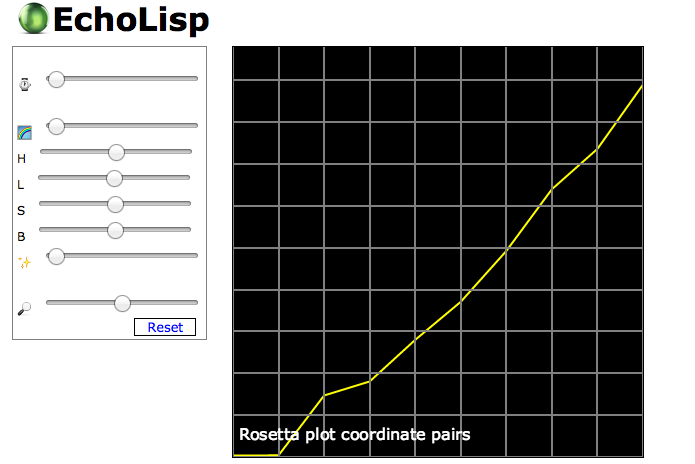

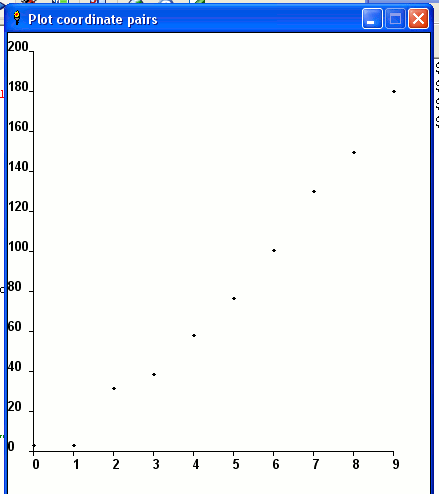


![[2]](http://i43.tinypic.com/2a689yw.png)


zkl
Solution using gnuplot. Output is the same as for the gnuplot example on this page.
A program can of course supply commands and data to gnuplot as prepared files. For the spirit of controlling plotting with the native language however, this example shows how commands and data can be prepared programmatically and supplied to gnuplot through stdin.
#<<<
cmd:=0'|
#set term wxt  # X11
unset key  # Only one data set, so the key is uninformative

plot '-'   # '-' can be replaced with a filename, to read data from that file.
  0   2.7
  1   2.8
  2  31.4
  3  38.1
  4  68.0
  5  76.2
  6 100.5
  7 130.0
  8 149.3
  9 180.0
e
|;
#<<<

gnuplot:=System.popen("gnuplot","w");
gnuplot.write(cmd); gnuplot.flush();
ask("Hit return to finish"); gnuplot.close();- Programming Tasks
- Solutions by Programming Task
- AArch64 Assembly
- Action!
- Action! Tool Kit
- Ada
- GtkAda
- ALGOL 68
- AutoHotkey
- GDIP
- BBC BASIC
- C
- Libplot
- C++
- Clojure
- Incanter
- Delphi
- System.SysUtils
- Boost.Process
- EasyLang
- EchoLisp
- Erlang
- F Sharp
- Factor
- Fōrmulæ
- FreeBASIC
- Gnuplot
- Go
- Gonum/plot
- Groovy
- Haskell
- HicEst
- Icon
- Unicon
- Icon Programming Library
- J
- Plot
- Java
- Jq
- Julia
- Kotlin
- JFreeChart
- Lambdatalk
- Liberty BASIC
- LiveCode
- Lua
- LÖVE
- M2000 Interpreter
- Maple
- Mathematica
- Wolfram Language
- MATLAB
- Maxima
- Nim
- Gnuplotlib.nim
- Ggplotnim
- OCaml
- Octave
- Ol
- PARI/GP
- Perl
- Processing
- Phix
- Phix/pGUI
- PicoLisp
- PostScript
- PureBasic
- Python
- Matplotlib
- VPython
- R
- Lattice
- Ggplot2
- Racket
- Raku
- REXX
- Ring
- RPL
- Pages with broken file links
- Ruby
- Rgplot
- Scala
- Scilab
- Sidef
- Stata
- Tcl
- Tk
- Img
- TI-89 BASIC
- Ursala
- VBA
- Wren
- DOME
- XPL0
- Yorick
- Zkl