
Hello world/Graphical

You are encouraged to solve this task according to the task description, using any language you may know.
- Task
Display the string Goodbye, World! on a GUI object (alert box, plain window, text area, etc.).
- Related task
AArch64 Assembly
/* ARM assembly AARCH64 Raspberry PI 3B */
/*  program disMessGraph64.s   */
/* link with gcc options  -lX11 -L/usr/lpp/X11/lib */

/*******************************************/
/* Constantes file                         */
/*******************************************/
/* for this file see task include a file in language AArch64 assembly*/
.include "../includeConstantesARM64.inc"
.equ ClientMessage, 33

/*******************************************/
/* Initialized data                        */
/*******************************************/
.data
szRetourligne: .asciz  "\n"
szMessErreur:  .asciz "Server X11 not found.\n"
szMessErrfen:  .asciz "Error create X11 window.\n"
szMessErrGC:   .asciz "Error create Graphic Context.\n"
szMessGoodBye: .asciz "Goodbye World!"

szLibDW:       .asciz "WM_DELETE_WINDOW"      // message close window

/*******************************************/
/* UnInitialized data                      */
/*******************************************/
.bss
.align 4
qDisplay:        .skip 8           // Display address
qDefScreen:      .skip 8           // Default screen address
identWin:        .skip 8           // window ident
wmDeleteMessage: .skip 16          // ident close message
stEvent:         .skip 400         // provisional size

buffer:          .skip 500

/**********************************************/
/* -- Code section                            */
/**********************************************/
.text
.global main                   // program entry
main:
    mov x0,#0                  // open server X
    bl XOpenDisplay
    cmp x0,#0
    beq erreur
                               //  Ok return Display address
    ldr x1,qAdrqDisplay
    str x0,[x1]                // store Display address for future use
    mov x28,x0                 // and in register 28
                               // load default screen
    ldr x2,[x0,#264]           // at location 264
    ldr x1,qAdrqDefScreen
    str x2,[x1]                //store default_screen
    mov x2,x0
    ldr x0,[x2,#232]           // screen list

                               //screen areas
    ldr x5,[x0,#+88]           // white pixel
    ldr x3,[x0,#+96]           // black pixel
    ldr x4,[x0,#+56]           // bits par pixel
    ldr x1,[x0,#+16]           // root windows
                               // create window x11
    mov x0,x28                 //display
    mov x2,#0                  // position X
    mov x3,#0                  // position Y
    mov x4,600                 // weight
    mov x5,400                 // height
    mov x6,0                   // bordure ???
    ldr x7,0                   // ?
    ldr x8,qBlanc              // background
    str x8,[sp,-16]!           // argument fot stack
    bl XCreateSimpleWindow
    add sp,sp,16               // for stack alignement
    cmp x0,#0                  // error ?
    beq erreurF
    ldr x1,qAdridentWin
    str x0,[x1]                // store window ident for future use
    mov x27,x0                 // and in register 27

                               // Correction of window closing error
    mov x0,x28                 // Display address
    ldr x1,qAdrszLibDW         // atom name address
    mov x2,#1                  // False  create atom if not exist
    bl XInternAtom
    cmp x0,#0
    ble erreurF
    ldr x1,qAdrwmDeleteMessage // address message
    str x0,[x1]
    mov x2,x1                  // address atom create
    mov x0,x28                 // display address
    mov x1,x27                 // window ident
    mov x3,#1                  // number of protocoles
    bl XSetWMProtocols
    cmp x0,#0
    ble erreurF
                               // create Graphic Context
    mov x0,x28                 // display address
    mov x1,x27                 // window ident
    bl createGC                // GC address -> x26
    cbz x0,erreurF
                               // Display window
    mov x1,x27                 // ident window
    mov x0,x28                 // Display address
    bl XMapWindow

    ldr x0,qAdrszMessGoodBye   // display text
    bl displayText

1:                             // events loop
    mov x0,x28                 // Display address
    ldr x1,qAdrstEvent         // events structure address
    bl XNextEvent
    ldr x0,qAdrstEvent         // events structure address
    ldr w0,[x0]                // type in 4 fist bytes
    cmp w0,#ClientMessage      // message for close window
    bne 1b                     // no -> loop

    ldr x0,qAdrstEvent         // events structure address
    ldr x1,[x0,56]             // location message code
    ldr x2,qAdrwmDeleteMessage // equal ?
    ldr x2,[x2]
    cmp x1,x2
    bne 1b                     // no loop

    mov x0,0                   // end Ok
    b 100f
erreurF:                       // error create window
    ldr x0,qAdrszMessErrfen
    bl affichageMess
    mov x0,1
    b 100f
erreur:                        // error no server x11 active
    ldr x0,qAdrszMessErreur
    bl affichageMess
    mov x0,1
100:                           // program standard end
    mov x8,EXIT
    svc 0
qBlanc:              .quad 0xF0F0F0F0
qAdrqDisplay:        .quad qDisplay
qAdrqDefScreen:      .quad qDefScreen
qAdridentWin:        .quad identWin
qAdrstEvent:         .quad stEvent
qAdrszMessErrfen:    .quad szMessErrfen
qAdrszMessErreur:    .quad szMessErreur
qAdrwmDeleteMessage: .quad wmDeleteMessage
qAdrszLibDW:         .quad szLibDW
qAdrszMessGoodBye:   .quad szMessGoodBye
/******************************************************************/
/*     create Graphic Context                                     */
/******************************************************************/
/* x0 contains the Display address */
/* x1 contains the ident Window */
createGC:
    stp x20,lr,[sp,-16]!       // save  registers
    mov x20,x0                 // save display address
    mov x2,#0
    mov x3,#0
    bl XCreateGC
    cbz x0,99f
    mov x26,x0                 // save GC
    mov x0,x20                 // display address
    mov x1,x26
    ldr x2,qRed                // code RGB color
    bl XSetForeground
    cbz x0,99f
    mov x0,x26                 // return GC
    b 100f
99:
    ldr x0,qAdrszMessErrGC
    bl affichageMess
    mov x0,0
100:
    ldp x20,lr,[sp],16         // restaur  2 registers
    ret                        // return to address lr x30
qAdrszMessErrGC:             .quad szMessErrGC
qRed:                        .quad 0xFF0000
qGreen:                      .quad 0xFF00
qBlue:                       .quad 0xFF
qBlack:                      .quad 0x0
/******************************************************************/
/*     display text on screen                                     */
/******************************************************************/
/* x0 contains the address of text */
displayText:
    stp x1,lr,[sp,-16]!    // save  registers
    mov x5,x0              // text address
    mov x6,0               // text size
1:                         // loop compute text size
    ldrb w10,[x5,x6]       // load text byte
    cbz x10,2f             // zero -> end
    add x6,x6,1            // increment size
    b 1b                   // and loop
2:
    mov x0,x28             // display address
    mov x1,x27             // ident window
    mov x2,x26             // GC address
    mov x3,#50             // position x
    mov x4,#100            // position y
    bl XDrawString
100:
    ldp x1,lr,[sp],16      // restaur  2 registers
    ret                    // return to address lr x30
/********************************************************/
/*        File Include fonctions                        */
/********************************************************/
/* for this file see task include a file in language AArch64 assembly */
.include "../includeARM64.inc"
Action!
DEFINE PTR="CARD"

BYTE FUNC AtasciiToInternal(CHAR c)
  BYTE c2

  c2=c&$7F
  IF c2<32 THEN
    RETURN (c+64)
  ELSEIF c2<96 THEN
    RETURN (c-32)
  FI
RETURN (c)

PROC CharOut(CARD x BYTE y CHAR c)
  BYTE i,j,v
  PTR addr

  addr=$E000+AtasciiToInternal(c)*8;
  FOR j=0 TO 7
  DO
    v=Peek(addr)
    i=8
    WHILE i>0
    DO
      IF (v&1)=0 THEN
        Color=0
      ELSE
        Color=1
      FI
      Plot(x+i-1,y+j)

      v=v RSH 1
      i==-1
    OD
    addr==+1
  OD
RETURN

PROC TextOut(CARD x BYTE y CHAR ARRAY text)
  BYTE i

  FOR i=1 TO text(0)
  DO
    CharOut(x,y,text(i))
    x==+8
  OD
RETURN

PROC Frame(CARD x BYTE y,width,height)
  Color=1
  Plot(x,y)
  DrawTo(x+width-1,y)
  DrawTo(x+width-1,y+height-1)
  DrawTo(x,y+height-1)
  DrawTo(x,y)
RETURN

PROC Main()
  BYTE CH=$02FC,COLOR1=$02C5,COLOR2=$02C6
  BYTE i,x,y,width=[122],height=[10]

  Graphics(8+16)
  COLOR1=$0C
  COLOR2=$02

  FOR i=1 TO 10
  DO
    x=Rand(320-width)
    y=Rand(192-height)
    Frame(x,y,width,height)
    TextOut(x+1,y+1,"Goodbye, World!")
  OD

  DO UNTIL CH#$FF OD
  CH=$FF
RETURN- Output:
Screenshot from Atari 8-bit computer

ActionScript
var textField:TextField = new TextField();
stage.addChild(textField);
textField.text =  "Goodbye, World!"
Ada
with Gdk.Event;   use Gdk.Event;
with Gtk.Label;   use Gtk.Label;
with Gtk.Window;  use Gtk.Window;
with Gtk.Widget;  use Gtk.Widget;

with Gtk.Handlers;
with Gtk.Main;

procedure Windowed_Goodbye_World is
   Window : Gtk_Window;
   Label  : Gtk_Label;

   package Handlers is new Gtk.Handlers.Callback (Gtk_Widget_Record);
   package Return_Handlers is
      new Gtk.Handlers.Return_Callback (Gtk_Widget_Record, Boolean);

   function Delete_Event (Widget : access Gtk_Widget_Record'Class)
      return Boolean is
   begin
      return False;
   end Delete_Event;

   procedure Destroy (Widget : access Gtk_Widget_Record'Class) is
   begin
     Gtk.Main.Main_Quit;
   end Destroy;

begin
   Gtk.Main.Init;
   Gtk.Window.Gtk_New (Window);
   Gtk_New (Label, "Goodbye, World!");
   Add (Window, Label);
   Return_Handlers.Connect
   (  Window,
      "delete_event",
      Return_Handlers.To_Marshaller (Delete_Event'Access)
   );
   Handlers.Connect
   (  Window,
      "destroy",
      Handlers.To_Marshaller (Destroy'Access)
   );
   Show_All (Label);
   Show (Window);

   Gtk.Main.Main;
end Windowed_Goodbye_World;
ALGOL 68
The code below is a gentle re-write (including a bug fix) of that in the Algol 68 Genie documentation.
BEGIN
   FILE window;
   open (window, "Hello!", stand draw channel);
   draw device (window, "X", "600x400");
   draw erase (window);
   draw move (window, 0.25, 0.5);
   draw colour (window, 1, 0, 0);
   draw text (window, "c", "c", "Goodbye, world!");
   draw show (window);
   close (window)
END
App Inventor
No Blocks solution
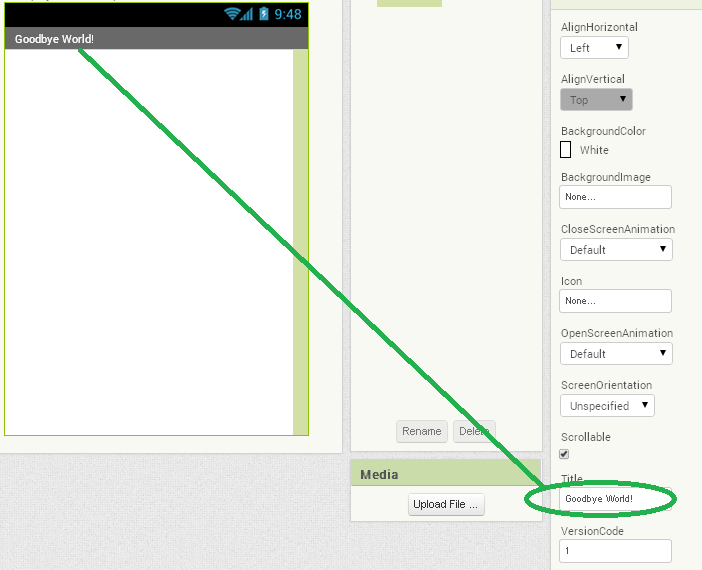
This solution requires no code blocks as the text is entered directly into the Title properties TextBox of the Designer.
VIEW THE DESIGNER
Three blocks solution
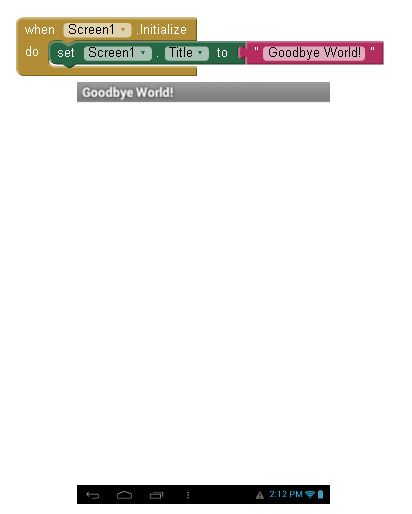
This solution uses three blocks to assign the text to the Title bar:
Screen1.Initialize and
set Screen1.Title to "Goodbye World!"
VIEW THE BLOCKS AND ANDROID APP SCREEN
APL
See Simple Windowed Application
AppleScript
display dialog "Goodbye, World!" buttons {"Bye"}
Applesoft BASIC
  1 LET T$ = "GOODBYE, WORLD!"
  2 LET R = 5:GX = 3:GY = 2:O = 3:XC = R + GX:YC = R * 2 + GY
  3 TEXT : HOME : TEXT : HGR : HCOLOR= 7: HPLOT 0,0: CALL 62454: HCOLOR= 6
  4 LET L =  LEN (T$): FOR I = 1 TO L:K =  ASC ( MID$ (T$,I,1)):XO = XC:YO = YC: GOSUB 5:XC = XO + 1:YC = YO: GOSUB 7: NEXT : END
  5 IF K > 64 THEN K = K + LC: GOSUB 20:LC = 32: RETURN
  6 LET LC = 0: ON K >  = 32 GOTO 20: RETURN
  7 GOSUB 20:XC = XC + R * 2 + GX: IF XC > 279 - R THEN XC = R + GX:YC = YC + GY + R * 5
  8 RETURN
  9 LET XC = XC - R * 2: RETURN
 10 LET Y = R:D = 1 - R:X = 0
 11 IF D >  = 0 THEN Y = Y - 1:D = D - Y * 2
 12 LET D = D + X * 2 + 3
 13 IF O = 1 OR O = 3 THEN  GOSUB 17
 14 IF O = 2 OR O = 3 THEN  GOSUB 19
 15 LET X = X + 1: IF X < Y THEN 11
 16 LET O = 3:E = 0: RETURN
 17 HPLOT XC - X,YC + Y: HPLOT XC + X,YC + Y: HPLOT XC - Y,YC + X: IF  NOT E THEN  HPLOT XC + Y,YC + X
 18 RETURN
 19 HPLOT XC - X,YC - Y: HPLOT XC + X,YC - Y: HPLOT XC - Y,YC - X: HPLOT XC + Y,YC - X: RETURN
 20 LET M = K - 31
 21 ON M GOTO 32,33,34,35,36,37,38,39,40,41,42,43,44
 22 LET M = M - 32
 23 ON M GOTO 64,65,66,67,68,69,70,71,72,73,74,75,76,77,78,79,80,81,82,83,84,85,86,87
 24 LET M = M - 32
 25 ON M GOTO 96,97,98,99,100,101,102,103,104,105,106,107,108,109,110,10,112,113,114,115,116,117,118,119,120,121
 32 RETURN
 33 HPLOT XC - R,YC - R * 2 TO XC - R,YC + R - GY: HPLOT XC - R,YC + R: GOTO 9: REM !
 44 HPLOT XC - R,YC + R + R / 2 TO XC - R,YC + R: GOTO 9: REM ,
 71 LET O = 2:YC = YC - R: GOSUB 10:YC = YC + R: HPLOT XC - R,YC TO XC - R,YC - R: HPLOT XC + R / 2,YC TO XC + R,YC TO XC + R,YC + R:O = 1: GOTO 10: REM G
 87 HPLOT XC - R,YC - R * 2 TO XC - R,YC + R TO XC,YC TO XC + R,YC + R TO XC + R,YC - R * 2: RETURN : REM W
 98 HPLOT XC - R,YC - R * 2 TO XC - R,YC + R: GOTO 10: RETURN : REM B
100 HPLOT XC + R,YC - R * 2 TO XC + R,YC + R: GOTO 10: REM D
101 HPLOT XC - R,YC TO XC + R,YC:E = 1: GOTO 10: REM E
108 HPLOT XC - R,YC - R * 2 TO XC - R,YC + R: GOTO 9: REM L
114 HPLOT XC - R,YC - R TO XC - R,YC + R:O = 2: GOTO 10: REM R
121 HPLOT XC - R,YC - R TO XC,YC + R: HPLOT XC + R,YC - R TO XC - R,YC + R * 3: RETURN : REM Y
Arendelle
// title

   "Hello, World!"

// first spacings

   [ 5 , rd ]

// body

   /* H */ [7,pd][4,u][3,pr][3,d][7,pu]drr
   /* E */ [6,pd][4,pr]l[3,u][2,lp][3,u][3,pr]r
   /* L */ [7,pd]u[3,rp][6,u]rr
   /* L */ [7,pd]u[3,rp][6,u]rr
   /* O */ [7,pd]u[2,rp]r[6,pu][3,pl][5,r]
   /* , */ [5,d]prpd[3,pld][9,u][5,r]
   /*   */ rrr
   /* W */ [4,pd][2,prd][2,pru][5,pu][5,d][2,prd][2,pru][5,pu]rrd
   /* O */ [7,pd]u[2,rp]r[6,pu][3,pl][5,r]
   /* R */ [7,pd][7,u][3,rp][3,pd][3,pl]rrdpr[2,dp][6,u]rr
   /* L */ [7,pd]u[3,rp][6,u]rr
   /* D */ [6,pd][3,pr][5,up]u[2,lp]p[4,r]
   /* ! */ r[5,pd]dp[6,u]rr

// done
Arturo
popup "" "Goodbye, World!"
- Output:
Here, you can see what the popup box with our message looks like (on macOS).

ATS
//
#include
"share/atspre_define.hats"
#include
"share/atspre_staload.hats"
//
(* ****** ****** *)

staload UN = $UNSAFE

(* ****** ****** *)

staload "{$GLIB}/SATS/glib.sats"

(* ****** ****** *)

staload "{$GTK}/SATS/gdk.sats"
staload "{$GTK}/SATS/gtk.sats"
staload "{$GLIB}/SATS/glib-object.sats"

(* ****** ****** *)

%{^
typedef char **charpp ;
%} ;
abstype charpp = $extype"charpp"

(* ****** ****** *)

fun hello
(
  widget: !GtkWidget1, _: gpointer
) : void = print ("Goodbye, world!\n")

fun on_delete_event
(
  widget: !GtkWidget1
, event: &GdkEvent, udata: gpointer
) : gboolean = let
  val () = print ("delete event occurred\n")
in
  GTRUE // handling of delete-event is finished
end // end of [on_delete_event]

fun on_destroy
  (widget: !GtkWidget1, _: gpointer): void = gtk_main_quit ()
// end of [on_destroy]

(* ****** ****** *)

macdef nullp = the_null_ptr

(* ****** ****** *)

implement
main0 (argc, argv) =
{
//
var argc: int = argc
var argv: charpp = $UN.castvwtp1{charpp}(argv)
//
val () = $extfcall (void, "gtk_init", addr@(argc), addr@(argv))
//
val window =
  gtk_window_new (GTK_WINDOW_TOPLEVEL)
val () = assertloc (ptrcast(window) > 0)
//
val _(*id*) =
g_signal_connect (
  window, (gsignal)"destroy", (G_CALLBACK)on_destroy, (gpointer)nullp
) (* end of [val] *)
val _(*id*) =
g_signal_connect (
  window, (gsignal)"delete_event", (G_CALLBACK)on_delete_event, (gpointer)nullp
) (* end of [val] *)
//
val () = gtk_container_set_border_width (window, (guint)10)
val button = gtk_button_new_with_label (gstring("Goodbye, world!"))
val () = assertloc (ptrcast(button) > 0)
//
val () = gtk_widget_show (button)
val () = gtk_container_add (window, button)
val () = gtk_widget_show (window)
//
val _(*id*) =
g_signal_connect
(
  button, (gsignal)"clicked", (G_CALLBACK)hello, (gpointer)nullp
)
val _(*id*) =
g_signal_connect_swapped
(
  button, (gsignal)"clicked", (G_CALLBACK)gtk_widget_destroy, window
)
//
val () = g_object_unref (button)
val () = g_object_unref (window) // ref-count becomes 1!
//
val ((*void*)) = gtk_main ()
//
} (* end of [main0] *)
AutoHotkey
MsgBox, Goodbye`, World!
ToolTip, Goodbye`, World!
Gui, Add, Text,   x4    y4,   To be announced:
Gui, Add, Edit,   xp+90 yp-3, Goodbye, World!
Gui, Add, Button, xp+98 yp-1, OK
Gui, Show, w226 h22     , Rosetta Code
Return
SplashTextOn, 100, 100, Rosetta Code, Goodbye, World!
AutoHotKey V2
MsgBox("Goodbye, World!")
AutoIt
#include <GUIConstantsEx.au3>

$hGUI = GUICreate("Hello World") ; Create the main GUI
GUICtrlCreateLabel("Goodbye, World!", -1, -1) ; Create a label dispalying "Goodbye, World!"

GUISetState() ; Make the GUI visible

While 1 ; Infinite GUI loop
	$nMsg = GUIGetMsg() ; Get any messages from the GUI
	Switch $nMsg ; Switch for a certain event
		Case $GUI_EVENT_CLOSE ; When an user closes the windows
			Exit ; Exit

	EndSwitch
WEnd
MsgBox(0, "Goodbye", "Goodbye, World!")
ToolTip("Goodbye, World!")
AWK
Awk has no GUI, but can execute system-commands.
E.g. the Windows-commandline provides a command for a messagebox,
see below
at Batch_File
and UNIX_Shell.
# Usage:  awk -f hi_win.awk
BEGIN { system("msg * Goodbye, Msgbox !") }
Axe
This example is almost identical to the TI-83 BASIC version.
ClrHome
Text(0,0,"Goodbye, world!")
Pause 5000
BaCon
Using Xaw backend:
OPTION GUI TRUE

gui = GUIDEFINE("{ type=window name=window XtNtitle=\"Graphical\" } \
    { type=labelWidgetClass name=label parent=window XtNlabel=\"Goodbye, World!\" } ")

CALL GUIEVENT$(gui)
Using GTK3 backend:
OPTION GUI TRUE
PRAGMA GUI gtk3

gui = GUIDEFINE("{ type=WINDOW name=window callback=delete-event title=\"Graphical\" } \
    { type=LABEL name=label parent=window margin=5 label=\"Goodbye, World!\" } ")

CALL GUIEVENT$(gui)
BASIC
' Demonstrate a simple Windows application using FreeBasic

#include once "windows.bi"

Declare Function WinMain(ByVal hInst As HINSTANCE, _
      ByVal hPrev As HINSTANCE, _
      ByVal szCmdLine as String, _
      ByVal iCmdShow As Integer) As Integer
End WinMain( GetModuleHandle( null ), null, Command( ), SW_NORMAL )

Function WinMain (ByVal hInst As HINSTANCE, _
                  ByVal hPrev As HINSTANCE, _
                  ByVal szCmdLine As String, _
                  ByVal iCmdShow As Integer) As Integer
    MessageBox(NULL, "Goodbye World", "Goodbye World", MB_ICONINFORMATION)
    function = 0
End Function
' Demonstrate a simple Windows/Linux application using GTK/FreeBasic
#INCLUDE "gtk/gtk.bi"
gtk_init(@__FB_ARGC__, @__FB_ARGV__)
VAR win = gtk_window_new (GTK_WINDOW_TOPLEVEL)
gtk_window_set_title (gtk_window (win), "Goodbye, World")
g_signal_connect(G_OBJECT (win), "delete-event", @gtk_main_quit, 0)
gtk_widget_show_all (win)
gtk_main()
END 0BASIC256
clg
font "times new roman", 20,100
color orange
rect 10,10, 140,30
color red
text 10,10, "Goodbye, World!"
batari Basic
 playfield:
................................
................................
................................
.XX..XXX.XXX.XX..XX..X.X.XXX....
.X.X.X.X.X.X.X.X.XXX..X..XX...X.
.XXX.XXX.XXX.XX..XXX..X..XXX.X..
................................
.....X.X.XXX.XX..X...XX...X.....
.....XXX.X.X.XXX.X...X.X..X.....
.....XXX.XXX.X.X.XXX.XX..X......
................................
end
 COLUPF = 15
 COLUBK = 1
mainloop
 drawscreen
 goto mainloop
Batch File
From Window 7 and later, pure Batch File does not completely provide GUI. However, MSHTA.EXE provides command-line JavaScript/VBScript access.
@echo off

::Output to message box [Does not work in Window 7 and later]
msg * "Goodbye, World!" 2>nul

::Using MSHTA.EXE Hack::
@mshta javascript:alert("Goodbye, World!");code(close());
@mshta vbscript:Execute("msgbox(""Goodbye, World!""):code close")
pause
BBC BASIC
SYS "MessageBox", @hwnd%, "Goodbye, World!", "", 0
Beads
Beads specializes in graphical design and can use draw_str for html in the browser or alerts for popup boxes.
beads 1 program 'Goodbye World'
calc main_init
	alert('Goodbye, World!')

draw main_draw
	draw_str('Goodbye, World!')
BML
msgbox Goodbye, World!C
GTK
#include <gtk/gtk.h>

int main (int argc, char **argv) {
  GtkWidget *window;
  gtk_init(&argc, &argv);

  window = gtk_window_new (GTK_WINDOW_TOPLEVEL);
  gtk_window_set_title (GTK_WINDOW (window), "Goodbye, World");
  g_signal_connect (G_OBJECT (window), "delete-event", gtk_main_quit, NULL);
  gtk_widget_show_all (window);

  gtk_main();
  return 0;
}
Win32
To compile with Visual C++: cl /nologo hello.c user32.lib, or with Open Watcom: wcl386 /q hello.c user32.lib.
#include <windows.h>

int main(void) {
    MessageBox(NULL, TEXT("Goodbye, World!"), TEXT("Rosetta Code"), MB_OK | MB_ICONINFORMATION);
    return 0;
}
OS/2 Presentation Manager
The following program shows a message box in OS/2 PM. Tested in ArcaOS.
To compile with Open Watcom:
wcc386 hello.c
wlink system os2v2_pm name hello file hello.obj
#include <os2.h>

int main(void) {
    HAB hab;
    HMQ hmq;

    hab = WinInitialize(0);
    hmq = WinCreateMsgQueue(hab, 0);

    WinMessageBox(HWND_DESKTOP,
                  HWND_DESKTOP,
                  "Hello, Presentation Manager!",
                  "My Program",
                  0L,
                  0L);

    WinDestroyMsgQueue(hmq);
    WinTerminate(hab);
    return 0;
}
Turbo C for DOS
Using the graphics library included with Turbo C. The BGI driver and the font must be in the same directory as the program (EGAVGA.BGI and SANS.CHR). Compile with tcc hellobgi.c graphics.lib.
#include <conio.h>
#include <graphics.h>

int main(void) {
    int Driver = DETECT, Mode;
    int MaxX, MaxY, X, Y;
    char Message[] = "Hello, World!";

    initgraph(&Driver, &Mode, "");

    MaxX = getmaxx();
    MaxY = getmaxy();

    settextstyle(SANS_SERIF_FONT, HORIZ_DIR, 7);

    X = (MaxX - textwidth(Message)) >> 1;
    Y = (MaxY - textheight(Message)) >> 1;
    outtextxy(X, Y, Message);

    getch();
    closegraph();
    return 0;
}
C#
using System;
using System.Windows.Forms;

class Program {
    static void Main(string[] args) {
        Application.EnableVisualStyles(); //Optional.
        MessageBox.Show("Goodbye, World!");
    }
}
using Gtk;
using GtkSharp;

public class GoodbyeWorld {
  public static void Main(string[] args) {
    Gtk.Window window = new Gtk.Window();
    window.Title = "Goodbye, World";
    window.DeleteEvent += delegate { Application.Quit(); };
    window.ShowAll();
    Application.Run();
  }
}
C++
#include <gtkmm.h>
int main(int argc, char *argv[])
{
   Gtk::Main app(argc, argv);
   Gtk::MessageDialog msg("Goodbye, World!");
   msg.run();
}
All Win32 APIs work in C++ the same way as they do in C. See the C example.
Where pWnd is a pointer to a CWnd object corresponding to a valid window in the application.
#include "afx.h"
void ShowGoodbyeWorld(CWnd* pWnd)
{
    pWnd->SetWindowText(_T("Goodbye, World!"));
}
#include <FL/Fl.H>
#include <FL/Fl_Window.H>
#include <FL/Fl_Box.H>

int main(int argc, char **argv) {
  Fl_Window *window = new Fl_Window(300,180);
  Fl_Box *box = new Fl_Box(20,40,260,100,"Goodbye, World!");
  box->box(FL_UP_BOX);
  box->labelsize(36);
  box->labelfont(FL_BOLD+FL_ITALIC);
  box->labeltype(FL_SHADOW_LABEL);
  window->end();
  window->show(argc, argv);
  return Fl::run();
}
C++/CLI
using namespace System::Windows::Forms;

int main(array<System::String^> ^args)
{
  MessageBox::Show("Goodbye, World!", "Rosetta Code");
  return 0;
}
Casio BASIC
To configure the "Graphical screen"
ViewWindow 1,127,1,1,63,1
AxesOff
CoordOff
GridOff
LabelOff
ViewWindow parameters depend on the calculator resolution (These are the most common).
To print text on the "Graphical screen" of the calculator:
Text 1,1,"Goodbye, World!"
ClrGraph
Clean
import StdEnv, StdIO

Start :: *World -> *World
Start world = startIO NDI Void (snd o openDialog undef hello) [] world
where
    hello = Dialog "" (TextControl "Goodbye, World!" [])
                                     [WindowClose (noLS closeProcess)]
Clojure
(ns experimentation.core
  (:import (javax.swing JOptionPane JFrame JTextArea JButton)
     (java.awt FlowLayout)))

(JOptionPane/showMessageDialog nil "Goodbye, World!")
(let [button (JButton. "Goodbye, World!")
      window (JFrame. "Goodbye, World!")
      text (JTextArea. "Goodbye, World!")]
  (doto window
    (.setLayout (FlowLayout.))
    (.add button)
    (.add text)
    (.pack)
    (.setDefaultCloseOperation (JFrame/EXIT_ON_CLOSE))
    (.setVisible true)))
With cljfx
(ns example
  (:require [cljfx.api :as fx]))

(fx/on-fx-thread
  (fx/create-component
    {:fx/type :stage
     :showing true
     :title "Cljfx example"
     :width 300
     :height 100
     :scene {:fx/type :scene
             :root {:fx/type :v-box
                    :alignment :center
                    :children [{:fx/type :label
                                :text "Goodbye, world"}]}}}))
COBOL
GUI
The following are in the Managed COBOL dialect.
       CLASS-ID ProgramClass.
       METHOD-ID Main STATIC.
       PROCEDURE DIVISION.
           INVOKE TYPE Application::EnableVisualStyles() *> Optional
           INVOKE TYPE MessageBox::Show("Goodbye, World!")
       END METHOD.
       END CLASS.
gui.xaml.cbl:
       CLASS-ID GoodbyeWorldWPF.Window IS PARTIAL
                 INHERITS TYPE System.Windows.Window.
       METHOD-ID NEW.
       PROCEDURE DIVISION.
           INVOKE self::InitializeComponent()
       END METHOD.
       END CLASS.
gui.xaml:
<Window x:Class="COBOL_WPF.Window1"
    xmlns="http://schemas.microsoft.com/winfx/2006/xaml/presentation"
    xmlns:x="http://schemas.microsoft.com/winfx/2006/xaml"
    Title="Hello world/Graphical">
    <TextBox>Goodbye, World!</TextBox>
</Window>
GTK
      *>
      *> cobweb-gui-hello, using gtk-label
      *> Tectonics:
      *>   cobc -w -xj cobweb-gui-hello.cob cobweb-gtk.cob \
      *>        `pkg-config --libs gtk+-3.0`
      *>
       identification division.
       program-id. cobweb-gui-hello.

       environment division.
       configuration section.
       repository.
           function new-window
           function new-box
           function new-label
           function gtk-go
           function all intrinsic.

       data division.
       working-storage section.

       01 TOPLEVEL                     usage binary-long value 0.
       01 HORIZONTAL                   usage binary-long value 0.
       01 VERTICAL                     usage binary-long value 1.

       01 width-hint                   usage binary-long value 160.
       01 height-hint                  usage binary-long value 16.

       01 spacing                      usage binary-long value 8.
       01 homogeneous                  usage binary-long value 0.

       01 extraneous                   usage binary-long.

       01 gtk-window-data.
          05 gtk-window                usage pointer.
       01 gtk-container-data.
          05 gtk-container             usage pointer.

       01 gtk-box-data.
          05 gtk-box                   usage pointer.
       01 gtk-label-data.
          05 gtk-label                 usage pointer.

       procedure division.
       cobweb-hello-main.

      *> Main window and top level container
       move new-window("Hello", TOPLEVEL, width-hint, height-hint)
         to gtk-window-data
       move new-box(gtk-window, VERTICAL, spacing, homogeneous)
         to gtk-container-data

      *> Box, across, with simple label
       move new-box(gtk-container, HORIZONTAL, spacing, homogeneous)
         to gtk-box-data
       move new-label(gtk-box, "Goodbye, World!") to gtk-label-data

      *> GTK+ event loop now takes over
       move gtk-go(gtk-window) to extraneous

       goback.
       end program cobweb-gui-hello.
TUI
The program gets the lines and columns of the screen and positions the text in the middle. Program waits for a return key.
  program-id. ghello.
  data division.
  working-storage section.
  01  var pic x(1).
  01  lynz  pic 9(3).
  01  colz  pic 9(3).
  01  msg pic x(15) value "Goodbye, world!".
  procedure division.
    accept lynz from lines end-accept
    divide lynz by 2 giving lynz.
    accept colz from columns end-accept
    divide colz by 2 giving colz.
    subtract 7 from colz giving colz.
    display msg
      at line number lynz
      column number colz
    end-display
    accept var end-accept
    stop run.
Cobra
Requires
GUI library.
@args -pkg:gtk-sharp-2.0

use Gtk

class MainProgram
  def main
    Application.init
    dialog = MessageDialog(nil,
      DialogFlags.DestroyWithParent,
      MessageType.Info,
      ButtonsType.Ok,
      "Goodbye, World!")
    dialog.run
    dialog.destroy
CoffeeScript
alert "Goodbye, World!"
Commodore BASIC
Commodore 64
There are no text drawing routines in BASIC that apply to the high resolution bitmap mode on the Commodore 64. Therefore, it is necessary to either draw letterforms from designs stored in RAM, or copy the font contained in ROM. It should be noted that using BASIC to handle high resolution graphics is a slow process, and the same tasks are much more efficiently accomplished in assembly language/machine code.
This example will iterate through the string and copy the appropriate bitmap information from the Character ROM. In line 425 a conversion must take place since strings are stored in memory as bytes of ASCII (PETSCII) codes, however, the Character ROM is stored in order of the screen codes as found in Appendix B of the Commodore 64 Programmer's Reference Guide... And even then the conversion given will work only for a limited set of the Character ROM. This could be remedied if the Character ROM (or some other font definition) was copied to RAM and indexed in ASCII/PETSCII order.
The POKE statements encapsulating the text drawing routine (lines 410-415 and 450-455) are necessary to make the Character ROM visible to BASIC without crashing the operating system. As such, keyboard scanning must be suspended during this time, preventing the routine from any user interruption until it is finished.
1 rem hello world on graphics screen
2 rem commodore 64 version

10 print chr$(147): print " press c to clear bitmap area,"
15 print " any other key to continue"
20 get k$:if k$="" then 20
25 if k$<>"c" then goto 40

30 poke 53280,0:print chr$(147):print " clearing bitmap area... please wait..."
35 base=8192:for i=base to base+7999:poke i,0:next

40 print chr$(147);
45 poke 53272,peek(53272) or 8:rem set bitmap memory at 8192 ($2000)
50 poke 53265,peek(53265) or 32:rem enter bitmap mode

55 rem write text to graphics at tx,ty
60 t$="goodbye, world!":tx=10:ty=10
65 gosub 400

70 rem draw sine wave - prove we are in hi-res mode
75 for x=0 to 319:y=int(50*sin(x/10))+100:gosub 500:next

80 rem wait for keypress
85 get k$:if k$="" then 85

90 rem back to text mode, restore colors, end program
95 poke 53265,peek(53265) and 223:poke 53272,peek(53272) and 247
100 poke 53280,14:poke 53281,6:poke 646,14
200 end

400 rem write text to graphics routine
405 tx=tx+(40*ty):m=base+(tx*8)
410 poke 56334,peek(56334) and 254 : rem turn off keyscan
415 poke 1,peek(1) and 251 : rem switch in chargen rom
420 for i=1 to len(t$)
425 l=asc(mid$(t$,i,1))-64:if l<0 then l=l+64
430 for b=0 to 7
435 poke m,peek(53248+(l*8)+b)
440 m=m+1
445 next b, i
450 poke 1,peek(1) or 4 : rem switch in io
455 poke 56334,peek(56334) or 1 : rem restart keyscan
460 return

500 rem plot a single pixel at x,y
510 mem=base+int(y/8)*320+int(x/8)*8+(y and 7)
520 px=7-(x and 7)
530 poke mem,peek(mem) or 2^px
540 return
Common Lisp
This can be done using the extension package ltk that provides an interface to the Tk library.
(use-package :ltk)

(defun show-message (text)
  "Show message in a label on a Tk window"
  (with-ltk ()
      (let* ((label (make-instance 'label :text text))
             (button (make-instance 'button :text "Done"
                                    :command (lambda ()
                                               (ltk::break-mainloop)
                                               (ltk::update)))))
              (pack label :side :top :expand t :fill :both)
              (pack button :side :right)
              (mainloop))))

(show-message "Goodbye World")
This can also be done using the CLIM 2.0 specification. The following code runs on both SBCL and the LispWorks IDE:
(in-package :clim-user)

(defclass hello-world-pane
    (clim-stream-pane) ())

(define-application-frame hello-world ()
  ((greeting :initform "Goodbye World"
             :accessor greeting))
  (:pane (make-pane 'hello-world-pane)))

;;; Behaviour defined by the Handle Repaint Protocol
(defmethod handle-repaint ((pane hello-world-pane) region)
  (let ((w (bounding-rectangle-width pane))
        (h (bounding-rectangle-height pane)))
    ;; Blank the pane out
    (draw-rectangle* pane 0 0 w h
                     :filled t
                     :ink (pane-background pane))
    ;; Draw greeting in center of pane
    (draw-text* pane
                (greeting *application-frame*)
                (floor w 2) (floor h 2)
                :align-x :center
                :align-y :center)))

(run-frame-top-level
 (make-application-frame 'hello-world
   :width 200 :height 200))
Creative Basic
DEF Win:WINDOW
DEF Close:CHAR
DEF ScreenSizeX,ScreenSizeY:INT

GETSCREENSIZE(ScreenSizeX,ScreenSizeY)

WINDOW Win,0,0,ScreenSizeX,ScreenSizeY,0,0,"Goodbye program",MainHandler

PRINT Win,"Goodbye, World!"
'Prints in the upper left corner of the window (position 0,0).

WAITUNTIL Close=1

CLOSEWINDOW Win

END

SUB MainHandler

    IF @CLASS=@IDCLOSEWINDOW THEN Close=1

RETURN
Crystal
require "crsfml"

window = SF::RenderWindow.new(SF::VideoMode.new(800, 600), "Hello world/Graphical")

# A font file(s) MUST be in the directory of the Crystal file itself.
# CrSFML does NOT load font files from the filesystem root!
font = SF::Font.from_file("DejaVuSerif-Bold.ttf")

text = SF::Text.new
text.font = font

text.string = "Goodbye, world!"
text.character_size = 24

text.color = SF::Color::Black

while window.open?
  while event = window.poll_event
    if event.is_a? SF::Event::Closed
      window.close
    end
  end

  window.clear(SF::Color::White)

  window.draw(text)

  window.display
end
D
import gtk.MainWindow, gtk.Label, gtk.Main;

class GoodbyeWorld : MainWindow {
    this() {
        super("GtkD");
        add(new Label("Goodbye World"));
        showAll();
    }
}

void main(string[] args) {
    Main.init(args);
    new GoodbyeWorld();
    Main.run();
}
Dart
Flutter
Because Flutter works on the Web in addition to Mobiles and Desktop, you can view these examples on Dartpad! - https://dartpad.github.io
Simplest (and ugliest) solution
import 'package:flutter/material.dart';

main() => runApp( MaterialApp( home: Text( "Goodbye, World!" ) ) );
A still bare bones but much better looking example that displays a white screen with the text centered
import 'package:flutter/material.dart';

void main() {
  runApp(
    MaterialApp(
      debugShowCheckedModeBanner: false,
      home: Scaffold (
        body: Center (
          child: Text( "Goodbye, World!")
        )
      )
    )
  );
}
Html dom manipulation, Dart has first class support for compilation to JavaScript. This simply sets the innerHtml of the body to 'Goodbye, World!'
Web/Javascript
import 'dart:html';

main() => document.body.innerHtml = '<p>Goodbye, World!</p>';
import 'dart:html';

main() => window.alert("Goodbye, World!");
Delphi
program HelloWorldGraphical;

uses
  Dialogs;

begin
  ShowMessage('Goodbye, World!');
end.
Diego
To differentiate only a GUI message use the display_ verb.
display_me()_msg(Goodbye, World!);However, using the _msg (short for 'message') action will send a string message to the callee who may decide to display the string graphically...
me_msg(Goodbye, World!);Dylan
(This works entered into the interactive shell):
notify-user("Goodbye, World!", frame: make(<frame>));
E
This is a complete application. If it were part of a larger application, the portions related to interp would be removed.
def <widget> := <swt:widgets.*>
def SWT := <swt:makeSWT>

def frame := <widget:makeShell>(currentDisplay)
  frame.setText("Rosetta Code")
  frame.setBounds(30, 30, 230, 60)
  frame.addDisposeListener(def _ { to widgetDisposed(event) {
    interp.continueAtTop()
  }})

def label := <widget:makeLabel>(frame, SWT.getLEFT())
  label.setText("Goodbye, World!")
  swtGrid`$frame: $label`

frame.open()

interp.blockAtTop()
EasyLang
move 10 20
text "Goodbye, World!"
eC
MessageBox:
import "ecere"
MessageBox goodBye { contents = "Goodbye, World!" };
Label:
import "ecere"
Label label { text = "Goodbye, World!", hasClose = true, opacity = 1, size = { 320, 200 } };
Titled Form + Surface Output:
import "ecere"

class GoodByeForm : Window
{
   text = "Goodbye, World!";
   size = { 320, 200 };
   hasClose = true;

   void OnRedraw(Surface surface)
   {
      surface.WriteTextf(10, 10, "Goodbye, World!");
   }
}

GoodByeForm form {};
EchoLisp
(alert "Goodbye, World!")
EGL
Allows entry of any name into a text field (using "World" as the default entry). Then, when the "Say Goodbye" button is pressed, sets a text label to the value "Goodbye, <name>!".
import org.eclipse.edt.rui.widgets.*;
import dojo.widgets.*;

handler HelloWorld type RUIhandler{initialUI =[ui]}

    ui Box {columns=1, children=[nameField, helloLabel, goButton]};

    nameField DojoTextField {placeHolder = "What's your name?", text = "World"};
    helloLabel TextLabel {};
    goButton DojoButton {text = "Say Goodbye", onClick ::= onClick_goButton};

    function onClick_goButton(e Event in)
        helloLabel.text = "Goodbye, " + nameField.text + "!";
    end

end
Elena
ELENA 6.x :
import forms;

public class MainWindow : SDIDialog
{
    Label goodByeWorldLabel;
    Button closeButton;

    constructor new()
       <= super new()
    {
        self.Caption := "ELENA";

        goodByeWorldLabel := Label.new();
        closeButton       := Button.new();

        self
            .appendControl(goodByeWorldLabel)
            .appendControl(closeButton);

        self.setRegion(250, 200, 200, 110);

        goodByeWorldLabel.Caption := "Goodbye, World!";
        goodByeWorldLabel.setRegion(40, 10, 150, 30);

        closeButton.Caption := "Close";
        closeButton.setRegion(20, 40, 150, 30);
        closeButton.onClick := (args){ forward program.stop() };
    }
}
Alternative version using xforms script
import xforms;

const layout = "
<Form X=""250"" Y=""200"" Height=""110"" Width=""200"" Caption=""ELENA"">
   <Label X=""40"" Y=""10"" Width=""150"" Height=""30"" Caption=""Goodbye, World!"">
   </Label>
   <Button X=""20"" Y=""40"" Width=""150"" Height=""30"" Caption=""Close"" onClick=""onExit"">
   </Button>
</Form>";

public class MainWindow
{
    Form;

    constructor new()
    {
        Form := xforms.execute(layout, self);
    }

    onExit(arg)
    {
        forward program.stop()
    }

    dispatch() => Form;

}
Emacs Lisp
(message-box "Goodbye, World!")
Euphoria
Message box
include msgbox.e

integer response
response = message_box("Goodbye, World!","Bye",MB_OK)
F#
Just display the text in a message box.
#light
open System
open System.Windows.Forms
[<EntryPoint>]
let main _ =
    MessageBox.Show("Hello World!") |> ignore
    0
Factor
To be pasted in the listener :
   USING: ui ui.gadgets.labels ;
   [ "Goodbye World" <label> "Rosetta Window" open-window ] with-ui
Fantom
using fwt

class Hello
{
  public static Void main ()
  {
    Dialog.openInfo (null, "Goodbye world")
  }
}
Fennel
(fn love.load []
  (love.window.setMode 300 300 {"resizable" false})
  (love.window.setTitle "Hello world/Graphical in Fennel!"))

(let [str "Goodbye, World!"]
  (fn love.draw []
    (love.graphics.print str 95 150)))
To run this, you need to have LÖVE installed in your machine, and then run this command fennel --compile love_test.fnl > main.lua; love .. Since LÖVE has no compatibility with Fennel, we need to AOT-compile the file to a Lua file called main.lua, so then LÖVE can execute the program.
Forth
HWND z" Goodbye, World!" z" (title)" MB_OK MessageBox
Alternative:
s" Goodbye, World!" MsgBox
Fortran
MS Windows
Here are solutions for Microsoft Windows, using the MessageBox API function. Both programs use modules provided by the compiler vendor.
program hello
    use windows
    integer :: res
    res = MessageBoxA(0, LOC("Hello, World"), LOC("Window Title"), MB_OK)
end program
Compile with af90 hello.f90 user32.lib or for a 64-bit executable af90 -i8 -m64 hello.f90 user32.lib.
program hello
    use user32
    integer :: res
    res = MessageBox(0, "Hello, World", "Window Title", MB_OK)
end program
Compile with ifort hello.f90.
Linux
Using gtk-fortran library
module handlers_m
  use iso_c_binding
  use gtk
  implicit none

 contains

   subroutine destroy (widget, gdata) bind(c)
    type(c_ptr), value :: widget, gdata
    call gtk_main_quit ()
  end subroutine destroy

end module handlers_m

program test
  use iso_c_binding
  use gtk
  use handlers_m
  implicit none

  type(c_ptr) :: window
  type(c_ptr) :: box
  type(c_ptr) :: button

  call gtk_init ()
  window = gtk_window_new (GTK_WINDOW_TOPLEVEL)
  call gtk_window_set_default_size(window, 500, 20)
  call gtk_window_set_title(window, "gtk-fortran"//c_null_char)
  call g_signal_connect (window, "destroy"//c_null_char, c_funloc(destroy))
  box = gtk_hbox_new (TRUE, 10_c_int);
  call gtk_container_add (window, box)
  button = gtk_button_new_with_label ("Goodbye, World!"//c_null_char)
  call gtk_box_pack_start (box, button, FALSE, FALSE, 0_c_int)
  call g_signal_connect (button, "clicked"//c_null_char, c_funloc(destroy))
  call gtk_widget_show (button)
  call gtk_widget_show (box)
  call gtk_widget_show (window)
  call gtk_main ()

end program test
Compile with
gfortran gtk2_mini.f90 -o gtk2_mini.x `pkg-config --cflags --libs gtk-2-fortran`
FreeBASIC
Graphics Mode
screen 1 'Mode 320x200
locate 12,15
? "Goodbye, World!"
sleep
Windows API
#INCLUDE "windows.bi"
MessageBox(0, "Goodbye, World!", "Message",0)
Frege
package HelloWorldGraphical where

import Java.Swing

main _ = do
    frame <- JFrame.new "Goodbye, world!"
    frame.setDefaultCloseOperation(JFrame.dispose_on_close)
    label <- JLabel.new "Goodbye, world!"
    cp <- frame.getContentPane
    cp.add label
    frame.pack
    frame.setVisible true
Frink
This brings up an infinitely-rescalable graphic window containing "Goodbye, World" drawn graphically.
All Frink graphics can be written to arbitrary coordinates; Frink will automatically scale and center any drawn graphics to be visible in the window (greatly simplifying programming,) so the exact coordinates used below are rather arbitrary. (This means that if you wrote "Hello World" instead of "Goodbye, World", you could just change that string and everything would still center perfectly.)
The graphics are infinitely-scalable and can be rendered at full quality to any resolution. This program "shows off" by rotating the text by 10 degrees, and also rendering it to a printer (which can include tiling across multiple pages) and rendering to a graphics file. (Frink can automatically render the same graphics object to many image formats, including PNG, JPG, SVG, HTML5 canvas, animated GIF, bitmapped image in memory, and more.)
g = new graphics
g.font["SansSerif", 10]
g.text["Goodbye, World!", 0, 0, 10 degrees]
g.show[]

g.print[]                           // Optional: render to printer
g.write["GoodbyeWorld.png", 400, 300] // Optional: write to graphics file
FunL
native javax.swing.{SwingUtilities, JPanel, JLabel, JFrame}
native java.awt.Font

def createAndShowGUI( msg ) =
  f = JFrame()
  f.setTitle( msg )
  f.setDefaultCloseOperation( JFrame.EXIT_ON_CLOSE )
  p = JPanel()
  l = JLabel( msg )
  l.setFont( Font.decode(Font.SERIF + ' 150') )
  p.add( l )
  f.add( p )
  f.pack()
  f.setResizable( false )
  f.setVisible( true )

SwingUtilities.invokeLater( createAndShowGUI.runnable('Goodbye, World!') )
FutureBasic
Easy peasy.
alert 1, NSWarningAlertStyle, @"Goodbye, World!", @"It's been real.", @"See ya!", YES

HandleEvents
Gambas
Message.Info("Goodbye, World!") ' Display a simple message boxGenie
[indent=4]
/*
  Genie GTK+ hello
  valac --pkg gtk+-3.0 hello-gtk.gs
  ./hello-gtk
*/
uses Gtk

init
    Gtk.init (ref args)
    var window = new Window (WindowType.TOPLEVEL)
    var label = new Label("Goodbye, World!")
    window.add(label)
    window.set_default_size(160, 100)
    window.show_all()
    window.destroy.connect(Gtk.main_quit)
    Gtk.main()
GlovePIE
The text is rendered using Braille text characters.
debug="⡧⢼⣟⣋⣇⣀⣇⣀⣏⣹⠀⠀⣇⣼⣏⣹⡯⡽⣇⣀⣏⡱⢘⠀"GML
draw_text(0,0,"Goodbye World!");Go
package main

import "github.com/mattn/go-gtk/gtk"

func main() {
   gtk.Init(nil)
   win := gtk.NewWindow(gtk.WINDOW_TOPLEVEL)
   win.SetTitle("Goodbye, World!")
   win.SetSizeRequest(300, 200)
   win.Connect("destroy", gtk.MainQuit)
   button := gtk.NewButtonWithLabel("Goodbye, World!")
   win.Add(button)
   button.Connect("clicked", gtk.MainQuit)
   win.ShowAll()
   gtk.Main()
}
Groovy
import groovy.swing.SwingBuilder
import javax.swing.JFrame

new SwingBuilder().edt {
  optionPane().showMessageDialog(null, "Goodbye, World!")
  frame(title:'Goodbye, World!', defaultCloseOperation:JFrame.EXIT_ON_CLOSE, pack:true, show: true) {
    flowLayout()
    button(text:'Goodbye, World!')
    textArea(text:'Goodbye, World!')
  }
}
GUISS
Here we display the message on the system notepad:
Start,Programs,Accessories,Notepad,Type:Goodbye[comma][space]World[pling]Harbour
PROCEDURE Main()
   RETURN wapi_MessageBox(,"Goodbye, World!","")
Haskell
Using
from HackageDB
import Graphics.UI.Gtk
import Control.Monad

messDialog = do
  initGUI
  dialog <- messageDialogNew Nothing [] MessageInfo ButtonsOk "Goodbye, World!"

  rs <- dialogRun dialog
  when (rs == ResponseOk || rs == ResponseDeleteEvent) $ widgetDestroy dialog

  dialog `onDestroy` mainQuit

  mainGUI
Run in GHCi interpreter:
*Main> messDialog
HicEst
WRITE(Messagebox='!') 'Goodbye, World!'HolyC
PopUpOk("Goodbye, World!");Icon and Unicon
Icon
Unicon
import gui
$include "guih.icn"

class WindowApp : Dialog ()

  # -- automatically called when the dialog is created
  method component_setup ()
    # add 'hello world' label
    label := Label("label=Hello world","pos=0,0")
    add (label)

    # make sure we respond to close event
    connect(self, "dispose", CLOSE_BUTTON_EVENT)
  end
end

# create and show the window
procedure main ()
  w := WindowApp ()
  w.show_modal ()
end
HPPPL
With an alert box:
MSGBOX("Goodbye, World!");By drawing directly to the screen:
RECT();
TEXTOUT_P("Goodbye, World!", GROBW_P(G0)/4, GROBH_P(G0)/4, 7);
WAIT(-1);
i
graphics {
	display("Goodbye, World!")
}
Integer BASIC
40×40 isn't great resolution, but it's enough!
10 REM FONT DERIVED FROM 04B-09 BY YUJI OSHIMOTO
20 GR
30 COLOR = 12
40 REM G
50 HLIN 0,5 AT 0 : HLIN 0,5 AT 1
60 VLIN 2,9 AT 0 : VLIN 2,9 AT 1
70 HLIN 2,5 AT 9 : HLIN 2,5 AT 8
80 VLIN 4,7 AT 5 : VLIN 4,7 AT 4
90 VLIN 4,5 AT 3
100 REM O
110 HLIN 7,12 AT 2 : HLIN 7,12 AT 3
120 HLIN 7,12 AT 8 : HLIN 7,12 AT 9
130 VLIN 4,7 AT 7 : VLIN 4,7 AT 8
140 VLIN 4,7 AT 11 : VLIN 4,7 AT 12
150 REM O
160 HLIN 14,19 AT 2 : HLIN 14,19 AT 3
170 HLIN 14,19 AT 8 : HLIN 14,19 AT 9
180 VLIN 4,7 AT 14 : VLIN 4,7 AT 15
190 VLIN 4,7 AT 18 : VLIN 4,7 AT 19
200 REM D
210 HLIN 21,24 AT 2 : HLIN 21,24 AT 3
220 HLIN 21,26 AT 8 : HLIN 21,26 AT 9
230 VLIN 4,7 AT 21 : VLIN 4,7 AT 22
240 VLIN 0,7 AT 25 : VLIN 0,7 AT 26
250 REM -
260 HLIN 28,33 AT 4 : HLIN 28,33 AT 5
270 REM B
280 VLIN 11,20 AT 0 : VLIN 11,20 AT 1
290 HLIN 2,5 AT 20 : HLIN 2,5 AT 19
300 VLIN 15,18 AT 5 : VLIN 15,18 AT 4
310 HLIN 2,5 AT 14 : HLIN 2,5 AT 13
320 REM Y
330 VLIN 13,20 AT 7 : VLIN 13,20 AT 8
340 VLIN 19,20 AT 9 : VLIN 19,20 AT 10
350 VLIN 13,24 AT 11 : VLIN 13,24 AT 12
360 VLIN 23,24 AT 10 : VLIN 23,24 AT 9
370 REM E
380 VLIN 13,20 AT 14 : VLIN 13,20 AT 15
390 HLIN 16,19 AT 13 : HLIN 16,19 AT 14
400 HLIN 18,19 AT 15 : HLIN 18,19 AT 16
410 HLIN 16,17 AT 17 : HLIN 16,17 AT 18
420 HLIN 16,19 AT 19 : HLIN 16,19 AT 20
430 REM ,
440 VLIN 17,22 AT 21 : VLIN 17,22 AT 22
450 REM W
460 VLIN 24,33 AT 0 : VLIN 24,33 AT 1 : VLIN 24,33 AT 3
470 VLIN 24,33 AT 4 : VLIN 24,33 AT 6 : VLIN 24,33 AT 7
480 HLIN 0,7 AT 33 : HLIN 0,7 AT 32
490 REM O
500 HLIN 9,14 AT 26 : HLIN 9,14 AT 27
510 HLIN 9,14 AT 32 : HLIN 9,14 AT 33
520 VLIN 28,31 AT 9 : VLIN 28,31 AT 10
530 VLIN 28,31 AT 13 : VLIN 28,31 AT 14
540 REM R
550 HLIN 16,21 AT 26 : HLIN 16,21 AT 27
560 VLIN 28,33 AT 16 : VLIN 28,33 AT 17
570 REM L
580 VLIN 24,33 AT 23 : VLIN 24,33 AT 24
590 REM D
600 HLIN 26,29 AT 26 : HLIN 26,29 AT 27
610 HLIN 26,29 AT 32 : HLIN 26,29 AT 33
620 VLIN 28,33 AT 26 : VLIN 28,33 AT 27
630 VLIN 24,33 AT 30 : VLIN 24,33 AT 31
640 REM !
650 VLIN 24,29 AT 33 : VLIN 24,29 AT 34
660 VLIN 32,33 AT 33 : VLIN 32,33 AT 34
670 END
Ioke
import(
  :javax:swing, :JOptionPane, :JFrame, :JTextArea, :JButton
)
import java:awt:FlowLayout

JOptionPane showMessageDialog(nil, "Goodbye, World!")
button = JButton new("Goodbye, World!")
text = JTextArea new("Goodbye, World!")
window = JFrame new("Goodbye, World!") do(
  layout = FlowLayout new
  add(button)
  add(text)
  pack
  setDefaultCloseOperation(JFrame field:EXIT_ON_CLOSE)
  visible = true
)
IWBASIC
DEF Win:WINDOW
DEF Close:CHAR
DEF ScreenSizeX,ScreenSizeY:UINT

GETSCREENSIZE(ScreenSizeX,ScreenSizeY)

OPENWINDOW Win,0,0,ScreenSizeX,ScreenSizeY,NULL,NULL,"Goodbye program",&MainHandler

PRINT Win,"Goodbye, World!"
'Prints in upper left corner of the window (position 0,0).

WAITUNTIL Close=1

CLOSEWINDOW Win

END

SUB MainHandler

    IF @MESSAGE=@IDCLOSEWINDOW THEN Close=1

RETURN
ENDSUB
J
wdinfo 'Goodbye, World!'
Java
import javax.swing.*;
import java.awt.*;

public class OutputSwing {

    public static void main(String[] args) {

        SwingUtilities.invokeLater(new Runnable(){
            public void run() {
                JOptionPane.showMessageDialog (null, "Goodbye, World!"); // in alert box
                JFrame frame = new JFrame("Goodbye, World!");            // on title bar
                JTextArea text = new JTextArea("Goodbye, World!");       // in editable area
                JButton button = new JButton("Goodbye, World!");         // on button

                frame.setLayout(new FlowLayout());
                frame.add(button);
                frame.add(text);
                frame.pack();
                frame.setDefaultCloseOperation(JFrame.EXIT_ON_CLOSE);
                frame.setVisible(true);
            }
        });
    }
}
Using Java 8 lambdas syntax:
import javax.swing.*;
import java.awt.*;

public class HelloWorld {
    public static void main(String[] args) {

        SwingUtilities.invokeLater(() -> {
            JOptionPane.showMessageDialog(null, "Goodbye, world!");
            JFrame frame = new JFrame("Goodbye, world!");
            JTextArea text = new JTextArea("Goodbye, world!");
            JButton button = new JButton("Goodbye, world!");

            frame.setLayout(new FlowLayout());
            frame.add(button);
            frame.add(text);
            frame.pack();
            frame.setDefaultCloseOperation(JFrame.EXIT_ON_CLOSE);
            frame.setVisible(true);
        });
    }
}
JavaScript
alert("Goodbye, World!");
jq
In the following, which generates SVG in a way that can be readily viewed using a web browser, the "Goodbye, World!" text is shaded using a linear gradient.
The approach used here to generate SVG is based on these principles:
- a JSON object is used to specify CSS styles
- this makes it easy to combine default specifications with partial specifications, because in jq, for JSON objects, "+" is defined so that (default + partial) is the combination which gives precedence to the right-hand-side operand;
- for other defaults, the jq "//" operator can be used; thus all SVG parameters can be easily given defaults.
Part 1: Generic SVG-related functions
# Convert a JSON object to a string suitable for use as a CSS style value
# e.g: "font-size: 40px; text-align: center;" (without the quotation marks)
def to_s:
  reduce to_entries[] as $pair (""; . + "\($pair.key): \($pair.value); ");

# Defaults: 100%, 100%
def svg(width; height):
  "<svg width='\(width // "100%")' height='\(height // "100%")'
           xmlns='http://www.w3.org/2000/svg'>";

# Defaults:
#  id: "linearGradient"
#  color1: rgb(0,0,0)
#  color2: rgb(255,255,255)
def linearGradient(id; color1; color2):
  "<defs>
    <linearGradient id='\(id//"linearGradient")' x1='0%' y1='0%' x2='100%' y2='0%'>
      <stop offset='0%' style='stop-color:\(color1//"rgb(0,0,0)");stop-opacity:1' />
      <stop offset='100%' style='stop-color:\(color2//"rgb(255,255,255)");stop-opacity:1' />
    </linearGradient>
  </defs>";

# input: the text string
# "style" should be a JSON object (see for example the default ($dstyle));
# the style actually used is (default + style), i.e. whatever is specified in "style" wins.
# Defaults:
#  x: 0
#  y: 0
def text(x; y; style):
  . as $in
  | {"font-size": "40px", "text-align": "center", "text-anchor": "left", "fill": "black"} as $dstyle
  | (($dstyle + style) | to_s) as $style
  | "<text x='\(x//0)' y='\(y//0)' style='\($style)'>
       \(.)",
     "</text>";
Part 2: "Goodbye, World!"
def task:
  svg(null;null),                                                   # use the defaults
  linearGradient("gradient"; "rgb(255,255,0)"; "rgb(255,0,0)"),     # define "gradient"
  ("Goodbye, World!" | text(10; 50; {"fill": "url(#gradient)"})),   # notice how the default for "fill" is overridden
  "</svg>";

task- Output:
jq -n -r -f Hello_word_Graphical.jq > Hello_word_Graphical.svg
JSE
Text 25,10,"Goodbye, World!"Jsish
Using JSI CData processing, C, and linking to libAgar.
- Output:
prompt$ jsish
Jsish interactive: see 'help [cmd]'.  \ cancels > input.  ctrl-c aborts running script.
# require('JsiAgarGUI')
1
# JsiAgarGUI.alert("Goodbye, World!");
#
Window pops up with message and Ok button.
That is based on JSI CData, a blend of typed Javascript and C, interwoven via a preprocessor.
extension JsiAgarGUI = { // libAgar GUI from Jsi
    /*
      Alert popup, via libAgar and Jsish CData
      tectonics:
        jsish -c JsiAgar.jsc
        gcc `jsish -c -cflags true JsiAgar.so` `agar-config --cflags --libs`
        jsish -e 'require("JsiAgar"); JsiAgar.alert("Goodbye, World!");'
    */
    #include <agar/core.h>
    #include <agar/gui.h>

    /* Terminate on close */
    void windDown(AG_Event *event) {
        AG_Terminate(0);
    }

    function alert(msg:string):void { // Display a JsiAgar windowed message
        /* Native C code block (in a JSI function wrapper) */
        AG_Window *win;
        AG_Box *box;

        Jsi_RC rc = JSI_OK;

        if (AG_InitCore(NULL, 0) == -1 || AG_InitGraphics(0) == -1) return (JSI_ERROR);
        AG_BindStdGlobalKeys();

        win = AG_WindowNew(0);

        box = AG_BoxNew(win, AG_BOX_VERT, 0);
        AG_LabelNewS(box, AG_LABEL_HFILL, msg);
        AG_ButtonNewFn(box, AG_BUTTON_HFILL, "Ok", AGWINDETACH(win), "%p", win);

        AG_SetEvent(win, "window-detached", windDown, NULL);
        AG_WindowShow(win);

        AG_EventLoop();

        AG_DestroyGraphics();
        AG_Destroy();

        return rc;
    }
};
Build rules are jsish -c preprocessor, query jsish for C compile time flags, compile the C, load the module into jsish via require.
prompt$ make -B -f Makefile.jsc hello
jsish -c JsiAgarGUI.jsc
gcc `jsish -c -cflags true JsiAgarGUI.so` `agar-config --cflags --libs`
jsish -e 'require("JsiAgarGUI"); JsiAgarGUI.alert(" Goodbye, World! ");'
And a window pops up with the message and an Ok button.
First command jsish -c runs a JSI to C preprocessor, generating a .h C source file.
For the second step, gcc is called with the output of a jsish -c -cflags true query, libagar runtime is linked in with more substitution for Agar compiler commands. The query output will be something like (this is site local, details will change per machine setup):
prompt$ jsish -c -cflags true JsiAgarGUI.so
-g -Og -O0 -Wall -fPIC -DJSI__SQLITE=1 -DJSI__READLINE=1 -fno-diagnostics-show-caret -Wc++-compat
 -Wwrite-strings -DCDATA_MAIN=1 -x c -rdynamic -I/home/btiffin/forge/jsi/jsish/src -DJSI__WEBSOCKET=1
 -I/home/btiffin/forge/jsi/jsish/websocket/src/lib  -I/home/btiffin/forge/jsi/jsish/websocket/src/build
 -I/home/btiffin/forge/jsi/jsish/websocket/unix -I/home/btiffin/forge/jsi/jsish/websocket/build/unix
 -o JsiAgarGUI.so JsiAgarGUI.h -lm -shared -DCDATA_SHARED=1 -L /home/btiffin/forge/jsi/jsish/websocket/build/unix/
 -lwebsockets -I/home/btiffin/forge/jsi/jsish/sqlite/src -L /home/btiffin/forge/jsi/jsish/sqlite/build/unix/
 -lsqlite3 -lm -ldl -lpthread

prompt$ agar-config --cflags --libs
-I/usr/local/include/agar -I/usr/include/SDL -D_GNU_SOURCE=1 -D_REENTRANT -I/usr/include/freetype2
 -I/usr/include/libpng16 -I/usr/include/freetype2 -I/usr/include/libpng16 -I/usr/include/libpng16
 -L/usr/local/lib -lag_gui -lag_core -lSDL -lpthread -lfreetype -lfontconfig -lfreetype
 -L/usr/local/lib -lGL -lX11 -lXinerama -lm -L/usr/lib -ljpeg -L/usr/lib64 -lpng16 -ldl
A JSI ready module is created, the C build rules managed by CData along with the .jsc JSI to C to JSI code generation.
As listed at the top, this GUI can be called up while in the interactive console.
Julia
using Tk

window = Toplevel("Hello World", 200, 100, false)
pack_stop_propagate(window)

fr = Frame(window)
pack(fr, expand=true, fill="both")

txt = Label(fr, "Hello World")
pack(txt, expand=true)

set_visible(window, true)

# sleep(7)
Just Basic
print "Goodbye, World!"
'Prints in the upper left corner of the default text window: mainwin, a window with scroll bars.
KonsolScript
Popping a dialog-box.
function main() {
  Konsol:Message("Goodbye, World!", "")
}
Displaying it in a Window.
function main() {
  Screen:PrintString("Goodbye, World!")
  while (B1 == false) {
    Screen:Render()
  }
}
Kotlin
import java.awt.*
import javax.swing.*

fun main(args: Array<String>) {
    JOptionPane.showMessageDialog(null, "Goodbye, World!") // in alert box
    with(JFrame("Goodbye, World!")) {                      // on title bar
        layout = FlowLayout()
        add(JButton("Goodbye, World!"))                    // on button
        add(JTextArea("Goodbye, World!"))                  // in editable area
        pack()
        defaultCloseOperation = JFrame.EXIT_ON_CLOSE
        isVisible = true
    }
}
LabVIEW
This image is a VI Snippet, an executable image of LabVIEW code. The LabVIEW version is shown on the top-right hand corner. You can download it, then drag-and-drop it onto the LabVIEW block diagram from a file browser, and it will appear as runnable, editable code.
Lambdatalk
1) we add a new "alert" primitive to the lambdatalk's dictionary

{script
  LAMBDATALK.DICT["alert"] = function() {
    var args = arguments[0];
    alert( args )
  };
}

2) and we call it

{alert GoodBye World}
-> display a standard Alert WIndow.
Lasso
On OS X machines:
sys_process('/usr/bin/osascript', (: '-e', 'display dialog "Goodbye, World!"'))->wait
Liberty BASIC
NOTICE "Goodbye, world!"Lingo
Display in alert box:
_player.alert("Goodbye, World!")Display in main window ("stage"):
-- create a field
m = new(#field)
m.rect = rect(0,0,320,240)
m.alignment = "center"
m.fontsize = 24
m.fontStyle = "bold"
m.text = "Goodbye, World!"

-- create sprite, assign field
_movie.puppetSprite(1, TRUE)
sprite(1).member = m
sprite(1).loc = point(0,105)

-- force immediate update
_movie.updateStage()
xTalk
Works in HyperCard and other xTalk environments
answer "Goodbye, World!"A dialog box can be modified as appropriate for the context by setting a "iconType", button text and title
answer warning "Goodbye, World!" with "Goodbye, World!" titled "Goodbye, World!"Lobster
gl_window("graphical hello world", 800, 600)
gl_setfontname("data/fonts/Droid_Sans/DroidSans.ttf")
gl_setfontsize(30)

while gl_frame():
    gl_clear([ 0.0, 0.0, 0.0, 1.0 ])
    gl_text("Goodbye, World!")
Logo
Among the turtle commands are some commands for drawing text in the graphical area. Details and capabilities differ among Logo implementations.
LABEL [Hello, World!]
SETLABELHEIGHT 2 * last LABELSIZE
LABEL [Goodbye, World!]
Lua
require "iuplua"

dlg = iup.dialog{iup.label{title="Goodbye, World!"}; title="test"}
dlg:show()

if (not iup.MainLoopLevel or iup.MainLoopLevel()==0) then
  iup.MainLoop()
end
To actually run this LÖVE-program, the following code
needs to be in a file main.lua, in its own folder.
This folder usually also contains other resources for a game,
such as pictures, sound, music, other source-files, etc.
To run the program, on windows, drag that folder onto either love.exe or a shortcut to love.exe.
function love.draw()
    love.graphics.print("Goodbye, World!", 400, 300)
end
M2000 Interpreter
A window with a click event to open a message box, and print returned number to window form, scrolling at the lower part of form's layer.
Module CheckIt {
      Declare Simple Form
      \\ we can define form before open
      Layer Simple {
            \\ center Window with 12pt font, 12000 twips width and 6000 twips height
            \\ ; at the end command to center the form in current screen
            Window 12, 12000, 6000;
            \\ make layer gray and split screen 0
            Cls #333333, 0
            \\   set split screen to 3rd line, like Cls ,2 without clear screen
            Scroll Split 2
            Cursor 0, 2
      }
      With Simple, "Title", "Hello Form"
      Function Simple.Click {
            Layer Simple {
                  \\ open msgbox
                  Print Ask("Hello World")
                  Refresh
            }
      }
      \\ now open as modal
      Method Simple, "Show", 1
      \\ now form deleted
      Declare Simple Nothing
}
CheckIt
A simple Window only
Module CheckIt {
      Declare Simple Form
      With Simple, "Title", "Hello World"
      Method Simple, "Show", 1
      Declare Simple Nothing
}
CheckIt
Maple
Maplets:-Display( Maplets:-Elements:-Maplet( [ "Goodbye, World!" ] ) );Mathematica / Wolfram Language
CreateDialog["Hello world"]
MATLAB
msgbox('Goodbye, World!')
Add text to a graphical plot.
text(0.2,0.2,'Hello World!')
MAXScript
messageBox "Goodbye world"MiniScript
This implementation is for use with the Mini Micro version of MiniScript.
import "textUtil"

hello = textUtil.Dialog.make("Hello, World Dialog", "Hello, World!")
hello.show
mIRC Scripting Language
alias goodbyegui {
  dialog -m Goodbye Goodbye
}

dialog Goodbye {
  title "Goodbye, World!"
  size -1 -1 80 20
  option dbu
  text "Goodbye, World!", 1, 20 6 41 7
}
Modula-3
MODULE GUIHello EXPORTS Main;

IMPORT TextVBT, Trestle;

<*FATAL ANY*>

VAR v := TextVBT.New("Goodbye, World!");

BEGIN
  Trestle.Install(v);
  Trestle.AwaitDelete(v);
END GUIHello.
This code requires an m3makefile.
import ("ui")
implementation ("GUIHello")
program ("Hello")
This tells the compiler to link with the UI library, the file name of the implementation code, and to output a program named "Hello".
N/t/roff
Whether the output is graphical or text depends largely the compiler with which the /.ROFF/ source code below is compiled. If it is compiled with an Nroff compiler, its output is comparable to that of a typewriter. Therefore, output from Nroff is typically seen on a text terminal. If it is compiled with a Troff compiler, its output is comparable to that of a typesetter. Therefore, output from Troff is typically seen on a PostScript or PDF output using a document viewer. Furthermore, output from Troff is also usually seen on paper, so that may count as graphical as well. In conclusion, although the code is compatible with both Nroff and Troff, it should be compiled using Troff to guarantee graphical output.
Because /.ROFF/ is a document formatting language in and of itself, it is extremely likely that a user of /.ROFF/ will be typing mostly textual content in a natural language. Therefore, there are no special routines or procedures to be called to output normal text, as all text will get formatted onto paper automatically.
Goodbye, World!Neko
The NekoVM uses a C FFI that requires marshaling of C types to Neko value types.
/*
  Tectonics:
    gcc -shared -fPIC -o nekoagar.ndll nekoagar.c `agar-config --cflags --libs`
*/

/* Neko primitives for libAgar http://www.libagar.org */
#include <stdio.h>
#include <neko.h>
#include <agar/core.h>
#include <agar/gui.h>

#define val_widget(v)       ((AG_Widget *)val_data(v))
DEFINE_KIND(k_agar_widget);

/* Initialize Agar Core given appname and flags */
value agar_init_core(value appname, value flags) {
#ifdef DEBUG
  if (!val_is_null(appname))  val_check(appname, string);
  val_check(flags, int);
#endif
  if (AG_InitCore(val_string(appname), val_int(flags)) == -1)  return alloc_bool(0);
  return alloc_bool(1);
}
DEFINE_PRIM(agar_init_core, 2);

/* Initialize Agar GUI given graphic engine driver */
value agar_init_gui(value driver) {
#ifdef DEBUG
  if (!val_is_null(driver))  val_check(driver, string);
#endif
  if (AG_InitGraphics(val_string(driver)) == -1)  return alloc_bool(0);
  AG_BindStdGlobalKeys();
  return alloc_bool(1);
}
DEFINE_PRIM(agar_init_gui, 1);

/* Initialize Agar given appname, flags and GUI driver */
value agar_init(value appname, value flags, value driver) {
#ifdef DEBUG
  if (!val_is_null(appname))  val_check(appname, string);
  val_check(flags, int);
  if (!val_is_null(driver))  val_check(driver, string);
#endif
  if (!val_bool(agar_init_core(appname, flags)))  return alloc_bool(0);
  if (!val_bool(agar_init_gui(driver)))  return alloc_bool(0);
  return alloc_bool(1);
}
DEFINE_PRIM(agar_init, 3);


/* end the Agar event loop on window-close */
void rundown(AG_Event *event) {
  AG_Terminate(0);
}


/* Create an Agar window, given UInt flags (which might use 32 bits...) */
value agar_window(value flags) {
#ifdef DEBUG
  val_check(flags, int);
#endif
  AG_Window *win;
  win = AG_WindowNew(val_int(flags));
  AG_SetEvent(win, "window-close", rundown, "%p", win);

  if ( win == NULL) return alloc_bool(0);
  return alloc_abstract(k_agar_widget, win);
}
DEFINE_PRIM(agar_window, 1);


/* Show a window */
value agar_window_show(value w) {
  AG_Window *win;

#ifdef DEBUG
  val_check_kind(w, k_agar_widget);
#endif
  win = (AG_Window *)val_widget(w);
  AG_WindowShow(win);
  return alloc_bool(1);
}
DEFINE_PRIM(agar_window_show, 1);


/* New box */
value agar_box(value parent, value type, value flags) {
  AG_Box *b;

#ifdef DEBUG
  val_check_kind(parent, k_agar_widget);
#endif
  b = AG_BoxNew(val_widget(parent), val_int(type), val_int(flags));
  return alloc_abstract(k_agar_widget, b);
}
DEFINE_PRIM(agar_box, 3);

/* New label */
value agar_label(value parent, value flags, value text) {
  AG_Label *lw;

#ifdef DEBUG
  val_check_kind(parent, k_agar_widget);
#endif
  lw = AG_LabelNewS(val_widget(parent), val_int(flags), val_string(text));
  return alloc_abstract(k_agar_widget, lw);
}
DEFINE_PRIM(agar_label, 3);


/* Event Loop */
value agar_eventloop(void) {
  int rc;
  rc = AG_EventLoop();
  return alloc_int(rc);
}
DEFINE_PRIM(agar_eventloop, 0);
The C file above is used to create a Neko friendly Dynamic Shared Object file, nekoagar.ndll. The DSO functions are then loaded and exposed to Neko.
The Neko program follows:
/**
 <doc><pre>
 Hello world, graphical, in Neko, via Agar label
 Tectonics:
   gcc -shared -fPIC -o nekoagar.ndll rosetta-nekoagar.c `agar-config --cflags --libs`
   nekoc hello-graphical.neko
   neko hello-graphical
 </pre></doc>
*/

/* Load some libagar bindings  http://www.libagar.org/mdoc.cgi?man=AG_Intro.3 */
var agar_init = $loader.loadprim("nekoagar@agar_init", 3);
var agar_window = $loader.loadprim("nekoagar@agar_window", 1);
var agar_window_show = $loader.loadprim("nekoagar@agar_window_show", 1);
var agar_box = $loader.loadprim("nekoagar@agar_box", 3);
var agar_label = $loader.loadprim("nekoagar@agar_label", 3);
var agar_eventloop = $loader.loadprim("nekoagar@agar_eventloop", 0);

/* Init with driver; NULL for best choice on current system */
try {
  var rc = agar_init("nekoagar", 0, val_null);
  if $not(rc) $throw("Error: agar_init non zero");
} catch e {
  $throw("Error: agar_init exception");
}

/* Put up a window, with a box, and a label in the box */
var w = agar_window(0);
var box = agar_box(w, 1, 0);
var label = agar_label(box, 0, "Goodbye, World!");
agar_window_show(w);

/* Run the event loop */
agar_eventloop();
- Output:
prompt$ gcc -shared -DDEBUG -fPIC -o nekoagar.ndll rosetta-nekoagar.c `agar-config --cflags --libs`
prompt$ nekoc hello-graphical.neko
prompt$ neko hello-graphical
Rosetta Code no longer supports uploading images, sorry.
Nemerle
Compile with:
ncc -reference:System.Windows.Forms goodbye.n
using System;
using System.Windows.Forms;

MessageBox.Show("Goodbye, World!")
NetRexx
Using Java's Swing Foundation Classes.
/* NetRexx */
options replace format comments java crossref symbols binary

import javax.swing.

msgText = 'Goodbye, World!'
JOptionPane.showMessageDialog(null, msgText)
An alternative version using other Swing classes.
/* NetRexx */
options replace format comments java crossref symbols binary

import javax.swing.

msgText = 'Goodbye, World!'

window = JFrame(msgText)
text = JTextArea()
minSize = Dimension(200, 100)

text.setText(msgText)

window.setLayout(FlowLayout())
window.add(text)
window.setMinimumSize(minSize)
window.pack
window.setVisible(isTrue)
window.setDefaultCloseOperation(JFrame.EXIT_ON_CLOSE)

return

method isTrue() public static returns boolean
  return 1 == 1

method isFalse() public static returns boolean
  return \isTrue
An example using Java's Abstract Window Toolkit (AWT)
/* NetRexx */
options replace format comments java crossref symbols binary

class RCHelloWorld_GraphicalAWT_01 extends Dialog implements ActionListener

  properties private constant
    msgText = 'Goodbye, World!'

  properties indirect
    ok = boolean
    can = boolean
    okButton = Button
    canButton = Button
    buttonPanel = Panel

method RCHelloWorld_GraphicalAWT_01(frame = Frame, msg = String, canaction = boolean) public
  super(frame, 'Default', isTrue)
  setLayout(BorderLayout())
  add(BorderLayout.CENTER, Label(msg))
  addOKCancelPanel(canaction)
  createFrame()
  pack()
  setVisible(isTrue)

  return

method RCHelloWorld_GraphicalAWT_01(frame = Frame, msg = String) public
  this(frame, msg, isFalse)
  return

method addOKCancelPanel(canaction = boolean)
  setButtonPanel(Panel())
  getButtonPanel.setLayout(FlowLayout())
  createOKButton()
  if canaction then do
    createCancelButton()
    end
  add(BorderLayout.SOUTH, getButtonPanel)
  return

method createOKButton()
  setOkButton(Button('OK'))
  getButtonPanel.add(getOkButton)
  getOkButton.addActionListener(this)
  return

method createCancelButton()
  setCanButton(Button('Cancel'))
  getButtonPanel.add(getCanButton)
  getCanButton.addActionListener(this)
  return

method createFrame()
  dim = getToolkit().getScreenSize
  setLocation(int(dim.width / 3), int(dim.height / 3))
  return

method actionPerformed(ae = ActionEvent) public
  if ae.getSource == getOkButton then do
    setOk(isTrue)
    setCan(isFalse)
    setVisible(isFalse)
    end
  else if ae.getSource == getCanButton then do
    setCan(isTrue)
    setOk(isFalse)
    setVisible(isFalse)
    end
  return

method main(args = String[]) public constant
  mainFrame = Frame()
  mainFrame.setSize(200, 200)
  mainFrame.setVisible(isTrue)
  message = RCHelloWorld_GraphicalAWT_01(mainFrame, msgText, isTrue)
  if message.isOk then
    say 'OK pressed'
  if message.isCan then
    say 'Cancel pressed'
  message.dispose
  mainFrame.dispose
  return

method isTrue() public static returns boolean
  return 1 == 1

method isFalse() public static returns boolean
  return \isTrue
newLISP
NewLISP uses a lightweight Java GUI server that it communicates with over a pipe, similar how some languages use Tcl/Tk. This takes advantage of Java's cross platform GUI capability.
; hello-gui.lsp
; oofoe 2012-01-18

; Initialize GUI server.
(load (append (env "NEWLISPDIR") "/guiserver.lsp"))
(gs:init)

; Create window frame.
(gs:frame 'Goodbye 100 100 300 200 "Goodbye!")
(gs:set-resizable 'Goodbye nil)
(gs:set-flow-layout 'Goodbye "center")

; Add final message.
(gs:label 'Message "Goodbye, World!" "center")
(gs:add-to 'Goodbye 'Message)

; Show frame.
(gs:set-visible 'Goodbye true)

; Start event loop.
(gs:listen)

(exit) ; NewLisp normally goes to listener after running script.
 ; Nehal-Singhal 2018-06-05

> (! "dialog --msgbox GoodbyeWorld! 5 20")
; A dialog message box appears on terminal similar to yes/no box.
Nim
import dialogs, gtk2
gtk2.nim_init()

info(nil, "Hello World")
import iup

discard iup.open(nil, nil)
message("Hello", "Hello World")
close()
NS-HUBASIC
10 LOCATE 6,11
20 PRINT "GOODBYE, WORLD!"
Nyquist
Audacity plug-in (Lisp syntax)
;nyquist plug-in
;version 4
;type tool
;name "Goodbye World"

(print "Goodbye, World!")
Audacity plug-in (SAL syntax)
;nyquist plug-in
;version 4
;type tool
;codetype sal
;name "Goodbye World"

return "Goodbye, World!"
Objeck
use Qt;

bundle Default {
  class QtExample {
    function : Main(args : String[]) ~ Nil {
      app := QAppliction->New();
      win := QWidget->New();
      win->Resize(400, 300);
      win->SetWindowTitle("Goodbye, World!");
      win->Show();
      app->Exec();
      app->Delete();
    }
  }
}
Objective-C
To show a modal alert (Mac):
NSAlert *alert = [[NSAlert alloc] init];
[alert setMessageText:@"Goodbye, World!"];
[alert runModal];
To show a modal alert (iOS):
UIAlertView *alert = [[UIAlertView alloc] initWithTitle:@"Goodbye, World!" message:nil delegate:nil cancelButtonTitle:@"OK" otherButtonTitles:nil];
[alert show];
OCaml
let delete_event evt = false

let destroy () = GMain.Main.quit ()

let main () =
  let window = GWindow.window in
  let _ = window#set_title "Goodbye, World" in
  let _ = window#event#connect#delete ~callback:delete_event in
  let _ = window#connect#destroy ~callback:destroy in
  let _ = window#show () in
  GMain.Main.main ()
;;

let _ = main () ;;
ocaml -I +labltk labltk.cma
Just output as a label in a window:
let () =
  let main_widget = Tk.openTk () in
  let lbl = Label.create ~text:"Goodbye, World" main_widget in
  Tk.pack [lbl];
  Tk.mainLoop();;
Output as text on a button that exits the current application:
let () =
  let action () = exit 0 in
  let main_widget = Tk.openTk () in
  let bouton_press =
    Button.create main_widget ~text:"Goodbye, World" ~command:action in
  Tk.pack [bouton_press];
  Tk.mainLoop();;
Ol
(import (lib winapi))
(MessageBox #f (c-string "Hello, World!") (c-string "Rosettacode") #x40)
OpenEdge/Progress
MESSAGE "Goodbye, World!" VIEW-AS ALERT-BOX.OxygenBasic
Windows MessageBox:
print "Hello World!"
Oxygene
Glade

Requires a Glade GUI description file. 'ere be one I produced earlier:
<?xml version="1.0" standalone="no"?> <!--*- mode: xml -*-->
<!DOCTYPE glade-interface SYSTEM "http://glade.gnome.org/glade-2.24.dtd">

<glade-interface>

<widget class="GtkWindow" id="hworld">
  <property name="visible">True</property>
  <property name="title">Hello World</property>
  <property name="modal">False</property>
  <property name="resizable">True</property>
  <property name="default_width">200</property>
  <property name="default_height">100</property>
  <signal name="delete_event" handler="on_hworld_delete_event"/>
  <child>
    <widget class="GtkLabel" id="label1">
      <property name="visible">True</property>
      <property name="can_focus">False</property>
      <property name="label" translatable="yes">Farewell, cruel world.</property>
    </widget>
  </child>
</widget>

</glade-interface>
And finally the Oxygene:
// Display a Message in a GUI Window
//
// Nigel Galloway, April 18th., 2012.
//
namespace HelloWorldGUI;

interface

uses
  Glade, Gtk, System;

type
  Program = public static class
  public
    class method Main(args: array of String);
  end;

  MainForm = class(System.Object)
  private
    var
      [Widget] hworld: Gtk.Window;
  public
    constructor(args: array of String);
    method on_hworld_delete_event(aSender: Object; args: DeleteEventArgs);
  end;

implementation

class method Program.Main(args: array of String);
begin
  new MainForm(args);
end;

constructor MainForm(args: array of String);
begin
  inherited constructor;
  Application.Init();
  with myG := new Glade.XML(nil, 'HelloWorldGUI.Main.glade', 'hworld', nil) do myG.Autoconnect(self);
  Application.Run();
end;

method MainForm.on_hworld_delete_event(aSender: Object; args: DeleteEventArgs);
begin
  Application.Quit();
end;

end.
.NET

namespace HelloWorldNET;

interface

type
  App = class
  public
    class method Main;
  end;

implementation

class method App.Main;
begin
  System.Windows.MessageBox.Show("Farewell cruel world");
end;

end.
Oz
declare
  [QTk] = {Module.link ['x-oz://system/wp/QTk.ozf']}
  Window = {QTk.build td(label(text:"Goodbye, World!"))}
in
  {Window show}
Panoramic
print "Goodbye, World!"
'Prints in the upper left corner of the window.
PARI/GP
plotinit(1, 1, 1, 1);
plotstring(1, "Goodbye, World!");
plotdraw([1, 0, 15]);
Pascal
Variant of the C example:
program HelloWorldGraphical;

uses
  glib2, gdk2, gtk2;

var
  window: PGtkWidget;

begin
  gtk_init(@argc, @argv);

  window := gtk_window_new (GTK_WINDOW_TOPLEVEL);

  gtk_window_set_title (GTK_WINDOW (window), 'Goodbye, World');
  g_signal_connect (G_OBJECT (window),
                    'delete-event',
        G_CALLBACK (@gtk_main_quit),
        NULL);
  gtk_widget_show_all (window);

  gtk_main();
end.
PascalABC.NET
// Hello world/Graphical. Nigel Galloway: January 16th., 2023
begin
  System.Windows.Forms.MessageBox.Show('Farewell Cruel World!')
end.
Perl
Just output as a label in a window:
use strict;
use warnings;
use Tk;

my $main = MainWindow->new;
$main->Label(-text => 'Goodbye, World')->pack;
MainLoop();
Output as text on a button that exits the current application:
use strict;
use warnings;
use Tk;

my $main = MainWindow->new;
$main->Button(
  -text => 'Goodbye, World',
  -command => \&exit,
)->pack;
MainLoop();
use strict;
use warnings;
use Gtk2 '-init';

my $window = Gtk2::Window->new;
$window->set_title('Goodbye world');
$window->signal_connect(
  destroy => sub { Gtk2->main_quit; }
);

my $label = Gtk2::Label->new('Goodbye, world');
$window->add($label);

$window->show_all;
Gtk2->main;
use strict;
use warnings;
use QtGui4;

my $app = Qt::Application(\@ARGV);
my $label = Qt::Label('Goodbye, World');
$label->show;
exit $app->exec;
Phix
include pGUI.e
IupOpen()
IupMessage("Bye","Goodbye, World!")
IupClose()
better
You can run this online here. A few improvements are probably warranted, as in changes to pGUI.js and/or pGUI.css, but at least the language/transpiler side of things is pretty much complete.
--
-- pwa\phix\hello_world.exw
-- ========================
--
with javascript_semantics
include pGUI.e

IupOpen()
Ihandle lbl = IupFlatLabel("World!","EXPAND=YES, ALIGNMENT=ACENTER")
Ihandln dlg = IupDialog(lbl,"TITLE=Hello, RASTERSIZE=215x85")
IupShow(dlg)
if platform()!=JS then
    IupMainLoop()
    dlg = IupDestroy(dlg)
    IupClose()
end if
PHP
if (!class_exists('gtk'))
{
    die("Please load the php-gtk2 module in your php.ini\r\n");
}

$wnd = new GtkWindow();
$wnd->set_title('Goodbye world');
$wnd->connect_simple('destroy', array('gtk', 'main_quit'));

$lblHello = new GtkLabel("Goodbye, World!");
$wnd->add($lblHello);

$wnd->show_all();
Gtk::main();
PicoLisp
(call 'dialog "--msgbox" "Goodbye, World!" 5 20)Plain English
To run:
Start up.
Clear the screen.
Write "Goodbye, World!".
Refresh the screen.
Wait for the escape key.
Shut down.
Portugol
programa {
    // includes graphics library and use an alias
    inclua biblioteca Graficos --> g

    // define WIDTH and HEIGHT integer constants
    const inteiro WIDTH = 200
    const inteiro HEIGHT = 100

    // main entry
    funcao inicio() {
        // begin graphical mode (verdadeiro = true)
        g.iniciar_modo_grafico(verdadeiro)

        // define window title
        g.definir_titulo_janela("Hello")

        // define window dimesions
        g.definir_dimensoes_janela(WIDTH, HEIGHT)

        // while loop
        enquanto (verdadeiro) {
            // define color to black(preto) and clear window
            g.definir_cor(g.COR_PRETO)
            g.limpar()

            // define color to white(branco)
            g.definir_cor(g.COR_BRANCO)
            // set text font size
            g.definir_tamanho_texto(32.0)
            // draws text
            g.desenhar_texto(0, HEIGHT / 3, "Hello, world!")

            // calls render function
            g.renderizar()
        }

        // end graphical mode
        g.encerrar_modo_grafico()
    }
}
PostScript
In the general Postscript context, the show command will render the string that is topmost on the stack at the currentpoint in the previously setfont. Thus a minimal PostScript file that will print on a PostScript printer or previewer might look like this:
%!PS
% render in Helvetica, 12pt:
/Helvetica findfont 12 scalefont setfont
% somewhere in the lower left-hand corner:
50 dup moveto
% render text
(Goodbye, World!) show
% wrap up page display:
showpage
PowerBASIC
FUNCTION PBMAIN() AS LONG
    MSGBOX "Goodbye, World!"
END FUNCTION
PowerShell
New-Label "Goodbye, World!" -FontSize 24 -Show$form = New-Object System.Windows.Forms.Form
$label = New-Object System.Windows.Forms.Label
$label.Text = "Goodbye, World!"
$form.AutoSize = $true
$form.AutoSizeMode = [System.Windows.Forms.AutoSizeMode]::GrowAndShrink
$form.Controls.Add($label)
$Form.ShowDialog() | Out-NullAlternatively, simply as a message box:
[System.Windows.Forms.MessageBox]::Show("Goodbye, World!")Processing
Uses default Processing methods and variables.
fill(0, 0, 0);
text("Goodbye, World!",0,height/2);
Prolog
Works with SWI-Prolog and XPCE.
A simple message box :
send(@display, inform, 'Goodbye, World !').A more sophisticated window :
goodbye :-
    new(D, window('Goodbye')),
    send(D, size, size(250, 100)),
    new(S, string("Goodbye, World !")),
    new(T, text(S)),
    get(@display, label_font, F),
    get(F, width(S), M),
    XT is (250 - M)/2,
    get(F, height, H),
    YT = (100-H)/2,
    send(D, display, T, point(XT, YT)),
    send(D, open).
Pure Data
#N canvas 321 432 450 300 10;
#X obj 100 52 loadbang;
#X msg 100 74 Goodbye\, World!;
#X obj 100 96 print -n;
#X connect 0 0 1 0;
#X connect 1 0 2 0;
- While there is no easy (intuitive) way to print a comma (or semicolon) this pd script will do.
- When writing messages to the terminal window, Pd prepends the name of the print object and a colon, or "print: " if no name is specified, which can be avoided by using "-n" instead of a name. This behaviour, however, has not been adopted by Pd-extended :-(
PureBasic
MessageRequester("Hello","Goodbye, World!")Using the Windows API:
MessageBox_(#Null,"Goodbye, World!","Hello")Python
import bpy

# select default cube
bpy.data.objects['Cube'].select_set(True)

# delete default cube
bpy.ops.object.delete(True)

# add text to Blender scene
bpy.data.curves.new(type="FONT", name="Font Curve").body = "Hello World"
font_obj = bpy.data.objects.new(name="Font Object", object_data=bpy.data.curves["Font Curve"])
bpy.context.scene.collection.objects.link(font_obj)

# camera center to text
bpy.context.scene.camera.location = (2.5,0.3,10)

# camera orient angle to text
bpy.context.scene.camera.rotation_euler = (0,0,0)

# change 3D scene to view from the camera
area = next(area for area in bpy.context.screen.areas if area.type == 'VIEW_3D')
area.spaces[0].region_3d.view_perspective = 'CAMERA'import tkMessageBox
result = tkMessageBox.showinfo("Some Window Label", "Goodbye, World!")Note: The result is a string of the button that was pressed.
from tkinter import messagebox

result = messagebox.showinfo("Some Window Label", "Goodbye, World!")
import PyQt4.QtGui
app = PyQt4.QtGui.QApplication([])
pb = PyQt4.QtGui.QPushButton('Hello World')
pb.connect(pb,PyQt4.QtCore.SIGNAL("clicked()"),pb.close)
pb.show()
exit(app.exec_())import pygtk
pygtk.require('2.0')
import gtk
window = gtk.Window()
window.set_title('Goodbye, World')
window.connect('delete-event', gtk.main_quit)
window.show_all()
gtk.main()# HelloWorld for VPython - HaJo Gurt - 2014-09-20
from visual import *
scene.title = "VPython Demo"
scene.background = color.gray(0.2)
scene.width = 600
scene.height = 400
scene.range = 4
#scene.autocenter = True
S = sphere(pos=(0,0,0), radius=1, material=materials.earth)
rot=0.005
txPos=(0, 1.2, 0)
from visual.text import *
# Old 3D text machinery (pre-Visual 5.3): numbers and uppercase letters only:
T1 = text(pos=txPos, string='HELLO', color=color.red, depth=0.3, justify='center')
import vis
# new text object, can render text from any font (default: "sans") :
T2 = vis.text(pos=txPos, text="Goodbye", color=color.green, depth=-0.3, align='center')
T2.visible=False
Lbl_w = label(pos=(0,0,0), text='World', color=color.cyan,
xoffset=80, yoffset=-40) # in screen-pixels
L1 = label(pos=(0,-1.5,0), text='Drag with right mousebutton to rotate view', box=0)
L2 = label(pos=(0,-1.9,0), text='Drag up+down with middle mousebutton to zoom', box=0)
L3 = label(pos=(0,-2.3,0), text='Left-click to change', color=color.orange, box=0)
print "Hello World" # Console
cCount = 0
def change():
global rot, cCount
cCount=cCount+1
print "change:", cCount
rot=-rot
if T1.visible:
T1.visible=False
T2.visible=True
else:
T1.visible=True
T2.visible=False
scene.bind( 'click', change )
while True:
rate(100)
S.rotate( angle=rot, axis=(0,1,0) )import wx
app = wx.App(False)
frame = wx.Frame(None, wx.ID_ANY, "Hello, World")
frame.Show(True)
app.MainLoop()
from kivy.app import App
from kivy.uix.floatlayout import FloatLayout
from kivy.uix.button import Button
from kivy.uix.popup import Popup
from kivy.uix.label import Label


class GoodByeApp(App):
    def build(self, *args, **kwargs):
        layout = FloatLayout()
        ppp = Popup(title='Goodbye, World!',
                    size_hint=(0.75, 0.75), opacity=0.8,
                    content=Label(font_size='50sp', text='Goodbye, World!'))
        btn = Button(text='Goodbye', size_hint=(0.3, 0.3),
                     pos_hint={'center': (0.5, 0.5)}, on_press=ppp.open)
        layout.add_widget(btn)
        return layout


GoodByeApp().run()
With kv language
from kivy.app import App
from kivy.lang.builder import Builder

kv = '''
#:import Factory kivy.factory.Factory

FloatLayout:
    Button:
        text: 'Goodbye'
        size_hint: (0.3, 0.3)
        pos_hint: {'center': (0.5, 0.5)}
        on_press: Factory.ThePopUp().open()

<ThePopUp@Popup>:
    title: 'Goodbye, World!'
    size_hint: (0.75, 0.75)
    opacity: 0.8
    Label:
        text: 'Goodbye, World!'
        font_size: '50sp'
'''


class GoodByeApp(App):
    def build(self, *args, **kwargs):
        return Builder.load_string(kv)


GoodByeApp().run()
Quackery
  [ $ "turtleduck.qky" loadfile ] now!

  [ $ /
import turtle
size = from_stack()
words = string_from_stack()
turtle.write(words,align="center",
  font=("Arial", size, "normal"))
      / python ]                  is write

  turtle 0 frames
  255 times
    [ clear
      i^ 3 of colour
      $ "Goodbye, World!"
      i write
frame ]- Output:
File:Quackery Goodbye World.gif

R
Rather minimalist, but working...
library(RGtk2)   # bindings to Gtk
w <- gtkWindowNew()
l <- gtkLabelNew("Goodbye, World!")
w$add(l)
Racket
 #lang racket/gui
(require racket/gui/base)

; Make a frame by instantiating the frame% class
(define frame (new frame% [label "Goodbye, World!"]))

; Make a static text message in the frame
(define msg (new message% [parent frame]
                          [label "No events so far..."]))

; Make a button in the frame
(new button% [parent frame]
             [label "Click Me"]
             ; Callback procedure for a button click:
             (callback (lambda (button event)
                         (send msg set-label "Button click"))))

; Show the frame by calling its show method
(send frame show #t)
Raku
(formerly Perl 6)
use GTK::Simple;
use GTK::Simple::App;

my GTK::Simple::App $app .= new;
$app.border-width = 20;
$app.set-content( GTK::Simple::Label.new(text => "Goodbye, World!") );
$app.run;
RapidQ
MessageBox("Goodbye, World!", "RapidQ example", 0)Rascal
import vis::Figure;
import vis::Render;

public void GoodbyeWorld() =
  render(box(text("Goodbye World")));
Output:

REALbasic
MsgBox("Goodbye, World!")REBOL
alert "Goodbye, World!"Red
>> view [ text "Hello World !"]REXX
version 1
This REXX example only works with:
- PC/REXX
- Personal REXX
/*REXX (using PC/REXX)  to display a message in a window (which is bordered). */
if fcnPkg('rxWindow') ¬== 1  then do
                                  say 'RXWINDOW function package not loaded.'
                                  exit 13
                                  end
if pcVideo()==3  then normal= 7
                 else normal=13

window#=w_open(1, 1, 3, 80, normal)
call w_border  window#
call w_put     window#, 2, 2, center("Goodbye, World!", 80-2)

                                       /*stick a fork in it, all we're done. */
output
╔══════════════════════════════════════════════════════════════════════════════╗
║                               Goodbye, World!                                ║
╚══════════════════════════════════════════════════════════════════════════════╝
version 2
This REXX example only works with:
- PC/REXX
- Personal REXX
and it creates two windows, the first (main) window contains the Goodbye, World! text,
the other "help" window contains a message about how to close the windows.
/*REXX program shows a "hello world" window (and another to show how to close)*/
parse upper version !ver .;     !pcrexx= !ver=='REXX/PERSONAL' | !ver=='REXX/PC'
if ¬!pcrexx  then call ser  "This isn't PC/REXX"     /*this isn't  PC/REXX ?  */
rxWin=fcnPkg('rxwindow')                             /*is the function around?*/

if rxWin¬==1  then do 1;     'RXWINDOW  /q'
                   if fcnPkg('rxwindow')==1 then leave   /*the function is OK.*/
                   say 'error loading RXWINDOW !';     exit 13
                   end

top=1;         normal=31;       border=30;   curpos=cursor()
width=40;      height=11;       line.=;      line.1= 'Goodbye, World!'
w=w_open(2, 3, height+2, width, normal);     call w_border  w,,,,,border
helpLine= 'press the  ESC  key to quit.'
helpW=w_open(2, 50, 3, length(helpLine)+4, normal)
call w_border helpw,,,,,border;  call w_put helpW, 2, 3, helpLine
call w_hide w, 'n'
                             do k=0  to height-1
                             _=top+k;      call w_put w, k+2, 3, line._, width-4
                             end   /*k*/
call w_unhide w
                             do forever;   if inKey()=='1b'x  then leave;  end
                                                   /*   ↑                     */
call w_close  w                                    /*   └──◄ the  ESCape  key.*/
call w_close  helpw
if rxWin¬==1  then 'RXUNLOAD rxwindow'
parse var curPos row  col
call      cursor row, col
                                       /*stick a fork in it,  we're all done. */
Ring
Load "guilib.ring"
New qApp {
        new qWidget() {
                setwindowtitle("Hello World")
                show()
        }
        exec()
}
Robotic
Since visuals are already built in, this link does the same thing.
RPL
"Goodbye world!" MSGBOX
Ruby
require 'gtk2'

window = Gtk::Window.new
window.title = 'Goodbye, World'
window.signal_connect(:delete-event) { Gtk.main_quit }
window.show_all

Gtk.mainrequire 'tk'
root = TkRoot.new("title" => "User Output")
TkLabel.new(root, "text"=>"CHUNKY BACON!").pack("side"=>'top')
Tk.mainloop#_Note: this code MUST be executed through the Shoes GUI!!
Shoes.app do
para "CHUNKY BACON!", :size => 72
endrequire 'gosu'
class Window < Gosu::Window
def initialize
super(150, 50, false)
@font = Gosu::Font.new(self, "Arial", 32)
end
def draw
@font.draw("Hello world", 0, 10, 1, 1, 1)
end
end
Window.new.show#_Note: this code must not be executed through a GUI
require 'green_shoes'
Shoes.app do
para "Hello world"
endrequire 'win32ole'
WIN32OLE.new('WScript.Shell').popup("Hello world")Run BASIC
' do it with javascript
html "<script>alert('Goodbye, World!');</script>"
Rust
// cargo-deps:  gtk
extern crate gtk;
use gtk::traits::*;
use gtk::{Window, WindowType, WindowPosition};
use gtk::signal::Inhibit;

fn main() {
    gtk::init().unwrap();
    let window = Window::new(WindowType::Toplevel).unwrap();

    window.set_title("Goodbye, World!");
    window.set_border_width(10);
    window.set_window_position(WindowPosition::Center);
    window.set_default_size(350, 70);
    window.connect_delete_event(|_,_| {
        gtk::main_quit();
        Inhibit(false)
    });

    window.show_all();
    gtk::main();
}
Scala
Ad hoc REPL solution
Ad hoc solution as REPL script:
swing.Dialog.showMessage(message = "Goodbye, World!")JVM Application
Longer example, as an application:
import swing._

object GoodbyeWorld extends SimpleSwingApplication {

  def top = new MainFrame {
    title = "Goodbye, World!"
    contents = new FlowPanel {
      contents += new Button  ("Goodbye, World!")
      contents += new TextArea("Goodbye, World!")
    }
  }
}
.Net Framework
import swing._

object HelloDotNetWorld {
  def main(args: Array[String]) {
    System.Windows.Forms.MessageBox.Show
                      ("Goodbye, World!")
  }
}
Scheme
#!r6rs

;; PS-TK example: display frame + label

(import (rnrs)
        (lib pstk main) ; change this to refer to your PS/Tk installation
        )

(define tk (tk-start))
(tk/wm 'title tk "PS-Tk Example: Label")

(let ((label (tk 'create-widget 'label 'text: "Goodbye, world")))
  (tk/place label 'height: 20 'width: 50 'x: 10 'y: 20))

(tk-event-loop tk)
Scilab
messagebox("Goodbye, World!")Scratch

ScratchScript
pos -100 70
print "Goodbye, World!"
This example waits until the mouse is clicked for the program to end. This can be useful if the program executes too fast for "Hello world!" to be visible on the screen long enough for it to be comfortable.
pos -100 70
print "Goodbye, World!"
delayOnClick
Seed7
Seed7 does not work with an event handling function like gtk_main(). The progam stays in control and does not depend on callbacks. The graphic library manages redraw, keyboard and mouse events. The contents of a window are automatically restored when it is uncovered. It is possible to copy areas from a window even when the area is currently covered or off screen.
$ include "seed7_05.s7i";
  include "draw.s7i";
  include "keybd.s7i";
  include "bitmapfont.s7i";
  include "stdfont24.s7i";
  include "pixmap_file.s7i";

const proc: main is func
  local
    var text: screen is STD_NULL;
  begin
    screen(400, 100);
    clear(curr_win, white);
    KEYBOARD := GRAPH_KEYBOARD;
    screen := openPixmapFontFile(curr_win);
    color(screen, black, white);
    setFont(screen, stdFont24);
    setPosXY(screen, 68,  60);
    write(screen, "Goodbye, World");
    ignore(getc(KEYBOARD));
  end func;
SenseTalk
Answer "Good Bye"Sidef
var tk = require('Tk')
var main = %O<MainWindow>.new
main.Button(
    '-text'    => 'Goodbye, World!',
    '-command' => 'exit',
).pack
tk.MainLoopvar gtk2 = require('Gtk2') -> init
var window = %O<Gtk2::Window>.new
var label = %O<Gtk2::Label>.new('Goodbye, World!')
window.set_title('Goodbye, World!')
window.signal_connect(destroy => { gtk2.main_quit })
window.add(label)
window.show_all
gtk2.mainuse('Gtk3 -init')
var gtk3 = %O'Gtk3'
var window = %O'Gtk3::Window'.new
var label = %O'Gtk3::Label'.new('Goodbye, World!')
window.set_title('Goodbye, World!')
window.signal_connect(destroy => { gtk3.main_quit })
window.add(label)
window.show_all
gtk3.mainSlope
The gui module is an optional module when you compile the slope interpreter. With the module installed the following will produce a window with the text "Goodbye, world!" and the title of the window will be "Goodbye".
(define gui (gui-create))
(gui-add-window gui "Goodbye")
(window-set-content
  gui
  "Goodbye"
  (container
    "max"
    (widget-make-label "Goodbye, world!")))
(window-show-and-run gui "Goodbye")
Smalltalk
MessageBox show: 'Goodbye, world.''Hello World' asMorph openInWindowDialog information: 'Goodbye, world.'SmileBASIC
DIALOG "Goodbye, world."SSEM
Ok, I know this is cheating. But it isn't completely cheating: the SSEM uses Williams tube storage, so the memory is basically a CRT device; and this is an executable program, up to a point, because the first line includes a 111 Stop instruction (disguised as a little flourish joining the tops of the d and the b).
01100000000001110000000000000000
10000000000001010000000000000000
10011101110111011101010111000000
10010101010101010101010101000000
10010101010101010101010111000000
10011101110111011100110100000010
10000000000000000000010011000010
10011000000000000000100000000100
01101000000000000001000000000000
00000000000000000000000000000000
00000000000000000000000000000000
00100100100000000010000100100000
00100100100000000010000100100000
00100100101110111010011100100000
00100100101010100010010100100000
00100100101010100010010100000000
00100100101110100011011100100000
00011011000000000000000000000000
Once you've keyed it in, the first eighteen words of storage will look a bit like this:
 oo          ooo
o            o o
o  ooo ooo ooo ooo o o ooo
o  o o o o o o o o o o o o
o  o o o o o o o o o o ooo
o  ooo ooo ooo ooo  oo o      o
o                    o  oo    o
o  oo               o        o
 oo o              o


  o  o  o         o    o  o
  o  o  o         o    o  o
  o  o  o ooo ooo o  ooo  o
  o  o  o o o o   o  o o  o
  o  o  o o o o   o  o o
  o  o  o ooo o   oo ooo  o
   oo oo
Standard ML
Works with PolyML
open XWindows ;
open Motif ;

val helloWindow = fn () =>

 let
  val shell = XtAppInitialise    ""    "demo" "top" [] [XmNwidth 400, XmNheight 300 ] ;
  val main  = XmCreateMainWindow shell "main" [XmNmappedWhenManaged true ] ;
  val text = XmCreateLabel main "show" [ XmNlabelString "Hello World!"]
 in

  (
  XtManageChildren [text];
  XtManageChild    main;
  XtRealizeWidget  shell
  )

end;
call
helloWindow ();
Stata
window stopbox note "Goodbye, World!"Supernova
I want window and the window title is "Goodbye, World".Swift
import Cocoa

let alert = NSAlert()
alert.messageText = "Goodbye, World!"
alert.runModal()
Tcl
Just output as a label in a window:
pack [label .l -text "Goodbye, World"]Output as text on a button that exits the current application:
pack [button .b -text "Goodbye, World" -command exit]Note: If you name this program "button.tcl", you might get strange errors.
Don't use the name of any internal tcl/tk-command as a filename for a tcl-script.
This shows our text in a message box:
tk_messageBox -message "Goodbye, World"TI-83 BASIC
PROGRAM:GUIHELLO
:Text(0,0,"GOODBYE, WORLD!")
TI-89 BASIC
Dialog
  Text "Goodbye, World!"
EndDlog
Tosh
when flag clicked
say "Goodbye, World!"
stop this script
True BASIC
SET WINDOW 0, 320, 0, 200
SET COLOR "YELLOW"
BOX AREA 20,50,40,60
SET COLOR "GREEN"
PLOT TEXT, AT 25, 45: "Goodbye, World!"
END
TXR
Microsoft Windows
(with-dyn-lib "user32.dll"
(deffi messagebox "MessageBoxW" int (cptr wstr wstr uint)))
(messagebox cptr-null "Hello" "World" 0) ;; 0 is MB_OKUNIX Shell
In a virtual terminal
Using whiptail or dialog
whiptail --title 'Farewell' --msgbox 'Goodbye, World!' 7 20dialog --title 'Farewell' --msgbox 'Goodbye, World!' 7 20In a graphical environment
Using the simple dialog command xmessage, which uses the X11 Athena Widget library
xmessage 'Goodbye, World!'Using the zenity modal dialogue command (wraps GTK library) available with many distributions of Linux
zenity --info --text='Goodbye, World!'Using yad (a fork of zenity with many more advanced options)
yad --title='Farewell' --text='Goodbye, World!'
Ultimate++
The following code is altered from the TheIDE example page. It displays a blank GUI with a menu. Click on about from the menu and the goodbye world prompt appears.
#include <CtrlLib/CtrlLib.h>
// submitted by Aykayayciti (Earl Lamont Montgomery)
using namespace Upp;
class GoodbyeWorld : public TopWindow {
MenuBar menu;
StatusBar status;
void FileMenu(Bar& bar);
void MainMenu(Bar& bar);
void About();
public:
typedef GoodbyeWorld CLASSNAME;
GoodbyeWorld();
};
void GoodbyeWorld::About()
{
PromptOK("{{1@5 [@9= This is the]::@2 [A5@0 Ultimate`+`+ Goodbye World sample}}");
}
void GoodbyeWorld::FileMenu(Bar& bar)
{
bar.Add("About..", THISBACK(About));
bar.Separator();
bar.Add("Exit", THISBACK(Close));
}
void GoodbyeWorld::MainMenu(Bar& bar)
{
menu.Add("File", THISBACK(FileMenu));
}
GoodbyeWorld::GoodbyeWorld()
{
AddFrame(menu);
AddFrame(status);
menu.Set(THISBACK(MainMenu));
status = "So long from the Ultimate++ !";
}
GUI_APP_MAIN
{
SetLanguage(LNG_ENGLISH);
GoodbyeWorld().Run();
}
Vala
#!/usr/local/bin/vala --pkg gtk+-3.0
using Gtk;
void main(string[] args) {
Gtk.init(ref args);
var window = new Window();
window.title = "Goodbye, world!";
window.border_width = 10;
window.window_position = WindowPosition.CENTER;
window.set_default_size(350, 70);
window.destroy.connect(Gtk.main_quit);
var label = new Label("Goodbye, world!");
window.add(label);
window.show_all();
Gtk.main();
}VBA
Public Sub hello_world_gui()
MsgBox "Goodbye, World!"
End SubVBScript
MsgBox("Goodbye, World!")Vedit macro language
Displaying the message on status line. The message remains visible until the next keystroke, but macro execution continues.
Statline_Message("Goodbye, World!")Displaying a dialog box with the message and default OK button:
Dialog_Input_1(1,"`Vedit example`,`Goodbye, World!`")Visual Basic
Sub Main()
MsgBox "Goodbye, World!"
End SubVisual Basic .NET
Imports System.Windows.Forms
Module GoodbyeWorld
Sub Main()
Messagebox.Show("Goodbye, World!")
End Sub
End ModuleVisual FoxPro
* Version 1:
MESSAGEBOX("Goodbye, World!")
* Version 2:
? "Goodbye, World!"V (Vlang)
import ui
fn main() {
ui.message_box('Hello World')
}Web 68
@1Introduction.
Define the structure of the program.
@aPROGRAM goodbye world CONTEXT VOID USE standard
BEGIN
@<Included declarations@>
@<Logic at the top level@>
END
FINISH
@ Include the graphical header file.
@iforms.w@>
@ Program code.
@<Logic...@>=
open(LOC FILE,"",arg channel);
fl initialize(argc,argv,NIL,0);
fl show messages("Goodbye World!");
fl finish
@ Declare the necessary macros.
@<Include...@>=
macro fl initialize;
macro fl show messages;
macro fl finish;
@ The end.Wee Basic
print 1 at 10,12 "Hello world!"
endWren
import "graphics" for Canvas, Color
class Game {
static init() {
Canvas.print("Goodbye, World!", 10, 10, Color.white)
}
static update() {}
static draw(alpha) {}
}X86 Assembly
This example used the Windows MessageBox function to do the work for us. Windows uses the stdcall calling convention where the caller pushes function parameters onto the stack and the stack has been fixed up when the callee returns.
;;; hellowin.asm
;;;
;;; nasm -fwin32 hellowin.asm
;;; link -subsystem:console -out:hellowin.exe -nodefaultlib -entry:main \
;;; hellowin.obj user32.lib kernel32.lib
global _main
extern _MessageBoxA@16
extern _ExitProcess@4
MessageBox equ _MessageBoxA@16
ExitProcess equ _ExitProcess@4
section .text
_main:
push 0 ; MB_OK
push title ;
push message ;
push 0 ;
call MessageBox ; eax = MessageBox(0,message,title,MB_OK);
push eax ;
call ExitProcess ; ExitProcess(eax);
message:
db 'Goodbye, World',0
title:
db 'RosettaCode sample',0;use win32ax for 32 bit
;use win64ax for 64 bit
include 'win64ax.inc'
.code
start:
invoke MessageBox,HWND_DESKTOP,"Goodbye,World!","Goodbye",MB_OK
invoke ExitProcess,0
.end startX86-64 Assembly
UASM 2.52
Not sure if ncurses counts as 'graphical', but whatver..
option casemap:none
printf proto :qword, :vararg
exit proto :dword
;; curses.h stuff
initscr proto ;; WINDOW *initsrc(void);
endwin proto ;; int endwin(void);
start_color proto ;; int start_color(void);
wrefresh proto :qword ;; int wrefresh(WINDOW *w);
wgetch proto :qword ;; int wgetch(WINDOW *w)
waddnstr proto :qword, :qword, :dword ;; int waddnstr(WINDOW *w, const char *str, int n);
;; Just a wrapper to make printing easier..
println proto :qword, :qword
.code
main proc
local stdscr:qword
call initscr
mov stdscr, rax
call start_color
invoke println, stdscr, CSTR("Goodbye, World!",10)
invoke wgetch, stdscr
call endwin
invoke exit, 0
ret
main endp
println proc wnd:qword, pstr:qword
invoke waddnstr, wnd, pstr, -1
invoke wrefresh, wnd
ret
println endp
endoption casemap:none
gtk_main proto
gtk_main_quit proto
gtk_window_get_type proto
gtk_widget_show_all proto :qword
exit proto :dword
gtk_window_new proto :dword
printf proto :dword, :vararg
g_type_check_instance_cast proto :qword, :qword
gtk_init proto :qword, :qword
gtk_window_set_title proto :qword, :qword
g_signal_connect_data proto :qword, :qword, :qword, :dword, :dword, :dword
del_event proto
.data
tlt db "hello_gtk",0
agc dq 1
agv dq ags
ags dq tlt
dq 0
.code
main proc
local hwnd:qword
local tmp:qword
invoke printf, CSTR("-> Starting GTK with argc:%i - argv ptr: 0x%x",10), agc, agv
lea rax, agc
lea rbx, agv
invoke gtk_init, rax, rbx
invoke gtk_window_new, 0
mov hwnd, rax
invoke printf, CSTR("-> Main window handle: %d",10), hwnd
call gtk_window_get_type
mov tmp, rax
invoke printf, CSTR("-> Window type: %d",10), tmp
invoke g_type_check_instance_cast, hwnd, tmp
mov tmp, rax
invoke gtk_window_set_title, tmp, CSTR("Goodbye, World.")
invoke g_type_check_instance_cast, hwnd, 0x50
mov tmp, rax
lea rax, del_event
invoke g_signal_connect_data, tmp, CSTR("delete-event"), rax, 0, 0, 0
invoke gtk_widget_show_all, hwnd
call gtk_main
;invoke exit, 0
ret
main endp
del_event proc
invoke printf, CSTR("-> Exit event called..",10)
call gtk_main_quit
ret
del_event endp
endXPL0
This sets up a 320x200x8 (VGA) graphics screen and writes text on it.
[SetVid($13); Text(6, "Goodbye, World!")]XSLT
The output is an SVG document. The idea is that it's straightforward to use XSLT to turn an existing SVG into an instantiable template.
<xsl:stylesheet xmlns:xsl="http://www.w3.org/1999/XSL/Transform" version="1.0">
<xsl:output method="xml"/>
<xsl:template match="/*">
<!--
Use a template to insert some text into a simple SVG graphic
with hideous colors.
-->
<svg xmlns="http://www.w3.org/2000/svg" viewBox="0 0 400 200">
<rect x="0" y="0" width="400" height="200" fill="cyan"/>
<circle cx="200" cy="100" r="50" fill="yellow"/>
<text x="200" y="115"
style="font-size: 40px;
text-align: center;
text-anchor: middle;
fill: black;">
<!-- The text inside the element -->
<xsl:value-of select="."/>
</text>
</svg>
</xsl:template>
</xsl:stylesheet>Sample input:
<message>Goodbye, World!</message>Sample output (with formatting non-destructively adjusted):
<svg xmlns="http://www.w3.org/2000/svg" viewBox="0 0 400 200">
<rect x="0" y="0" width="400" height="200" fill="cyan"/>
<circle cx="200" cy="100" r="50" fill="yellow"/>
<text x="200" y="115" style="font-size: 40px;
text-align: center;
text-anchor: middle;
fill: black;">Goodbye, World!</text>
</svg>Yabasic
open window 200, 100
text 10, 20, "Hello world"
color 255, 0, 0 : text 10, 40, "Good bye world", "roman14"zkl
zkl doesn't have a decent GUI ffi but, on my Linux box, the following work:
System.cmd(0'|zenity --info --text="Goodbye, World!"|); // GTK+ pop up
System.cmd(0'|notify-send "Goodbye, World!"|); // desktop notification
System.cmd(0'|xmessage -buttons Ok:0,"Not sure":1,Cancel:2 -default Ok -nearmouse "Goodbye, World!" -timeout 10|); // X Windows dialogThe quote quote syntax is 0'<char>text<char> or you can use \ (eg "\"Goodbye, World!\"")
- Programming Tasks
- GUI
- Basic language learning
- Simple
- AArch64 Assembly
- Action!
- ActionScript
- Ada
- GTK
- GtkAda
- ALGOL 68
- App Inventor
- APL
- AppleScript
- Applesoft BASIC
- Arendelle
- Arturo
- ATS
- AutoHotkey
- AutoHotKey V2
- AutoIt
- AWK
- Axe
- BaCon
- BASIC
- BASIC256
- Batari Basic
- Batch File
- BBC BASIC
- Beads
- BML
- C
- Win32
- C sharp
- Windows Forms
- C++
- MFC
- FLTK
- C++/CLI
- Casio BASIC
- Clean
- Object I/O
- Clojure
- Cljfx
- COBOL
- Windows Presentation Foundation
- Cobweb-gtk
- Cobra
- CoffeeScript
- Commodore BASIC
- Common Lisp
- Tk
- CLIM
- Creative Basic
- Crystal
- CrSFML
- D
- GtkD
- Dart
- Flutter
- Dart:html
- Delphi
- Diego
- Dylan
- E
- SWT
- EasyLang
- EC
- EchoLisp
- EGL
- Elena
- Emacs Lisp
- Euphoria
- F Sharp
- Factor
- Fantom
- Fennel
- LÖVE
- Forth
- Fortran
- FreeBASIC
- Frege
- Frink
- FunL
- FutureBasic
- Gambas
- Genie
- GlovePIE
- GML
- Go
- Go-gtk
- Groovy
- GUISS
- Harbour
- Haskell
- Gtk
- HicEst
- HolyC
- Icon
- Icon Programming Library
- Unicon
- HPPPL
- I
- Integer BASIC
- Ioke
- IWBASIC
- J
- Java
- Swing
- JavaScript
- Jq
- JSE
- Jsish
- Julia
- Just Basic
- KonsolScript
- Kotlin
- LabVIEW
- Lambdatalk
- Lasso
- Liberty BASIC
- Lingo
- XTalk
- Lobster
- Logo
- Lua
- IUPLua
- M2000 Interpreter
- Maple
- Mathematica
- Wolfram Language
- MATLAB
- MAXScript
- MiniScript
- MIRC Scripting Language
- Modula-3
- Trestle
- N/t/roff
- Neko
- Agar
- Nemerle
- NetRexx
- AWT
- NewLISP
- Nim
- GTK2
- IUP
- NS-HUBASIC
- Nyquist
- Objeck
- Qt
- Objective-C
- OCaml
- OCaml-Xlib
- Ol
- OpenEdge/Progress
- OxygenBasic
- Oxygene
- Pages with broken file links
- Oz
- Panoramic
- PARI/GP
- Pascal
- Gtk2
- PascalABC.NET
- Perl
- Perl/Tk
- Perl/Gtk2
- Perl/Qt
- Phix
- Phix/basics
- Phix/pGUI
- Phix/online
- PHP
- PHP-GTK
- PicoLisp
- Plain English
- Portugol
- PostScript
- PowerBASIC
- PowerShell
- WPK
- Processing
- Prolog
- Pure Data
- PureBasic
- Python
- Blender
- Tkinter
- PyQt
- PyGTK
- VPython
- WxPython
- Kivy
- Quackery
- R
- Racket
- Raku
- RapidQ
- Rascal
- REALbasic
- REBOL
- Red
- REXX
- Ring
- Robotic
- RPL
- Ruby
- Ruby/Tk
- Shoes
- Gosu
- Green shoes
- Win32ole
- Run BASIC
- Rust
- Scala
- Scala.swing
- Scheme
- Scheme/PsTk
- Scilab
- Scratch
- ScratchScript
- Seed7
- SenseTalk
- Sidef
- Gtk3
- Slope
- Smalltalk
- SmileBASIC
- SSEM
- Standard ML
- Stata
- Supernova
- Swift
- Tcl
- TI-83 BASIC
- TI-89 BASIC
- Tosh
- True BASIC
- TXR
- UNIX Shell
- Ultimate++
- Vala
- VBA
- VBScript
- Vedit macro language
- Visual Basic
- Visual Basic .NET
- Visual FoxPro
- V (Vlang)
- Web 68
- Wee Basic
- Wren
- DOME
- X86 Assembly
- X86-64 Assembly
- Ncurses
- XPL0
- XSLT
- Yabasic
- Zkl
- ACL2/Omit
- LFE/Omit
- Logtalk/Omit
- Maxima/Omit
- ML/I/Omit
- PARI/GP/Omit
- SQL PL/Omit
- TPP/Omit
- Unlambda/Omit
- Pages with too many expensive parser function calls